


Loading…
Loading…
Creator · lumidotnew
The reproduction prompt keeps the original and adds runtime, asset and acceptance requirements. These additions are not the author’s words.
Create a high-fidelity, interactive web app that turns a headline rent price into the real monthly cost and real annual cost.

## Core idea
Users often see a listing price and only compare monthly rent, while ignoring deposit, agent fee, utilities, move-in costs, and commuting. This calculator reveals the true cost in a clear, slightly reality check tone.

## UX goals
* Fast to use, no clutter, mobile-friendly
* Inputs feel like a real renting scenario
* Output is instantly understandable, with transparent breakdown
* Tone: calm, practical, lightly witty, never judgmental

## Layout
Single page, 3 sections, sticky results card on desktop:

1. Listing Basics
2. Hidden Costs
3. Commute Cost
Right side: Reality Check Summary card (on mobile, summary appears below and stays accessible via a floating “Summary” button).

## Inputs

### 1) Listing Basics
* Currency selector (default: SGD)
* Monthly rent (number)
* Lease length (months) selector: 6 / 12 / 18 / 24 (default 12)
* Move-in date (optional, only for UI polish, does not affect math)
* “Is rent negotiable?” toggle (optional)
  If ON: show a slider “Discount” 0% to 10% to adjust rent

### 2) Hidden Costs
All costs should support common patterns with friendly presets:

* Deposit
  * Dropdown: 1 month, 2 months, Custom
  * If Custom: numeric input (amount)

* Agent fee
  * Dropdown: None, Half month, 1 month, Custom
  * If Custom: numeric input (amount)

* Utilities (monthly)
  * Electricity (number)
  * Water (number)
  * Internet (number)
  * Optional: “Other monthly fees” (number)

* One-time move-in costs (optional)
  * Cleaning fee (number)
  * Furniture / appliances (number)
  * Moving service (number)
  * “Other one-time costs” (number)

### 3) Commute Cost
Let users choose to include commute cost or not.

* Toggle: “Include commute cost” (default ON)
  If ON, show:
* Workdays per month (default 22)
* Transport mode tabs: “Public”, “Car”, “Mixed”
  For each mode:
* Cost per one-way trip (number)
* One-way time (minutes)

* Optional: “Value my time” toggle (default OFF)
  * If ON: hourly value (number)
  * Convert commute time to cost: time_cost = (minutes * 2 * workdays / 60) * hourly_value

## Calculations

### Adjusted rent
* rent_adjusted = monthly_rent * (1 - discount_percent)

### Monthly recurring costs
* utilities_monthly = electricity + water + internet + other_monthly_fees
* commute_cash_monthly = cost_per_one_way * 2 * workdays
* commute_time_monthly = (one_way_minutes * 2 * workdays / 60) * hourly_value (only if time toggle ON)
* recurring_monthly = rent_adjusted + utilities_monthly + (commute toggles)

### One-time costs total
* deposit_amount = preset months * rent_adjusted OR custom amount
* agent_fee_amount = preset months * rent_adjusted OR custom amount
* move_in_one_time = cleaning + furniture + moving + other_one_time
* one_time_total = deposit_amount + agent_fee_amount + move_in_one_time

### Normalize one-time costs across lease
* one_time_monthly_equivalent = one_time_total / lease_length_months

### Real monthly + annual
* real_monthly = recurring_monthly + one_time_monthly_equivalent
* real_annual = real_monthly * 12

### Also show “Lease total”
* lease_total = recurring_monthly * lease_length_months + one_time_total

## Outputs (Reality Check Summary card)
Show big numbers:
* Real Monthly Cost
* Real Annual Cost
* Lease Total

Then a clean breakdown list:
* Rent (adjusted)
* Utilities
* Commute (cash)
* Commute (time value) if enabled
* One-time costs (monthly equivalent)
  Also show:
* “Hidden cost uplift”: real_monthly - rent_adjusted
* “Uplift %”: uplift / rent_adjusted

Add a small “What’s driving the cost” insight line:
* Identify the largest non-rent contributor and write one sentence like:
  “Biggest add-on: Agent fee amortized across the lease.”

## Interactions
* Instant recalculation on change
* Tooltips with examples for deposit/agent fee
* Preset buttons: “Typical 12-month lease”, “No agent fee”, “Barebones utilities”
* A “Compare to another listing” mini feature:
  * Button “Save as Scenario A”
  * Button “Save as Scenario B”
  * Show A vs B difference in real_monthly and lease_total

## Visual style
* Warm, modern UI, rounded cards, subtle shadows
* Clear typography, accessible contrast
* Micro-animations for number changes (count-up)
* A small progress-style bar showing “Rent vs Hidden Costs” ratio

## Copy tone
Use short, punchy labels:
* Headline: “Rent Reality Check”
* Subhead: “Turn the sticker price into the real monthly and yearly cost.”
* CTA button: “Reality check it”
* Footer note: “Estimates only. Your actual bills may vary.”

## Edge cases
* Prevent negative values
* If lease_length_months is very short (6) and agent fee is 1 month, highlight: “Short lease amplifies one-time fees.”Models & stability
Recommended models
Independent retest evidence
Aug 9, 2026
Independent reproductions
 Open reproduction ↗
GLM-5.3 单次生成;Codex 人工修复运行依赖、必要源码及移动布局,未重新生成。桌面/手机真实渲染和资源检查通过;完整功能与视觉还原尚未全部验收。源码、截图和修复记录见复现出处。
Reproduction source ↗Keep exploring

A sixteen-word prompt that states only the business logic and never asks for visualization, deliberately testing whether the model decides on its own that this task needs a graphical output.
Prompt
write a python code that visualizes how a traffic light works in a one way street with cars entering at random rate.
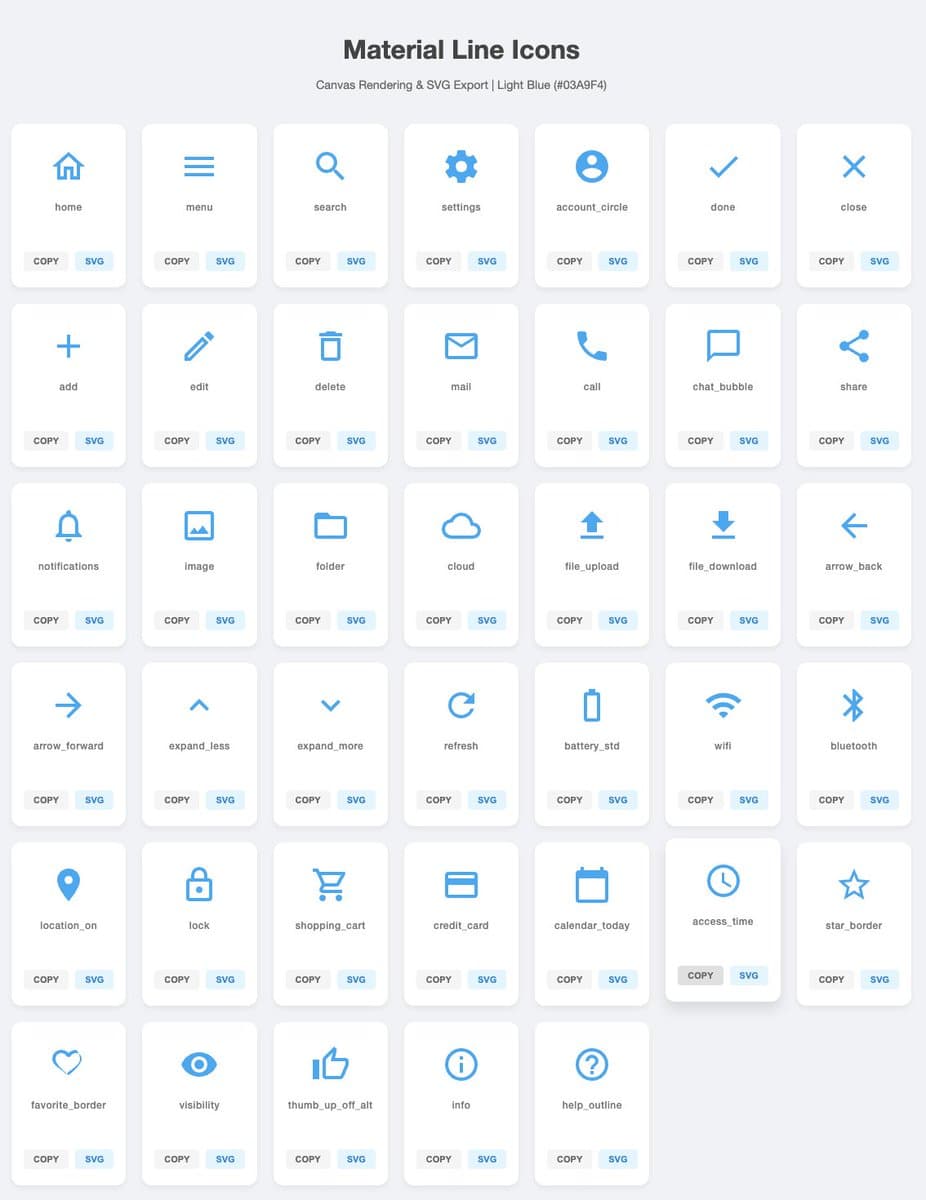
A Japanese prompt asking Gemini to generate 40 simple, versatile SVG icons in a light-blue line style, with a download button for each icon.
Prompt
Generate {argument name="icon_count" default="40"} types of simple, highly versatile icons in SVG format. Be sure to draw them on Canvas. Use {argument name="icon_color" default="ライトブルー"} for the color and {argument name="background_color"
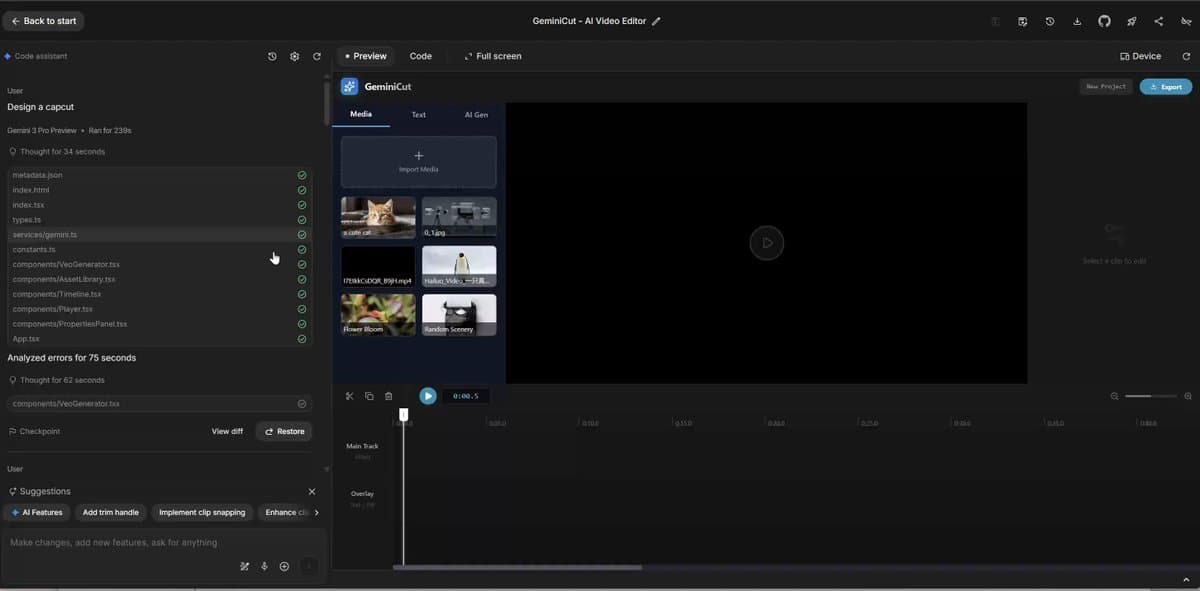
A very simple advanced prompt for using Gemini to design a CapCut-style video editing app interface.
Prompt
Design a {argument name="app_name" default="CapCut"}.
Each detail page keeps the original result, the prompt, and retest evidence in one reading path.

