

Loading…
Loading…
Creator · MotionSites
View original source ↗The reproduction prompt keeps the original and adds runtime, asset and acceptance requirements. These additions are not the author’s words.
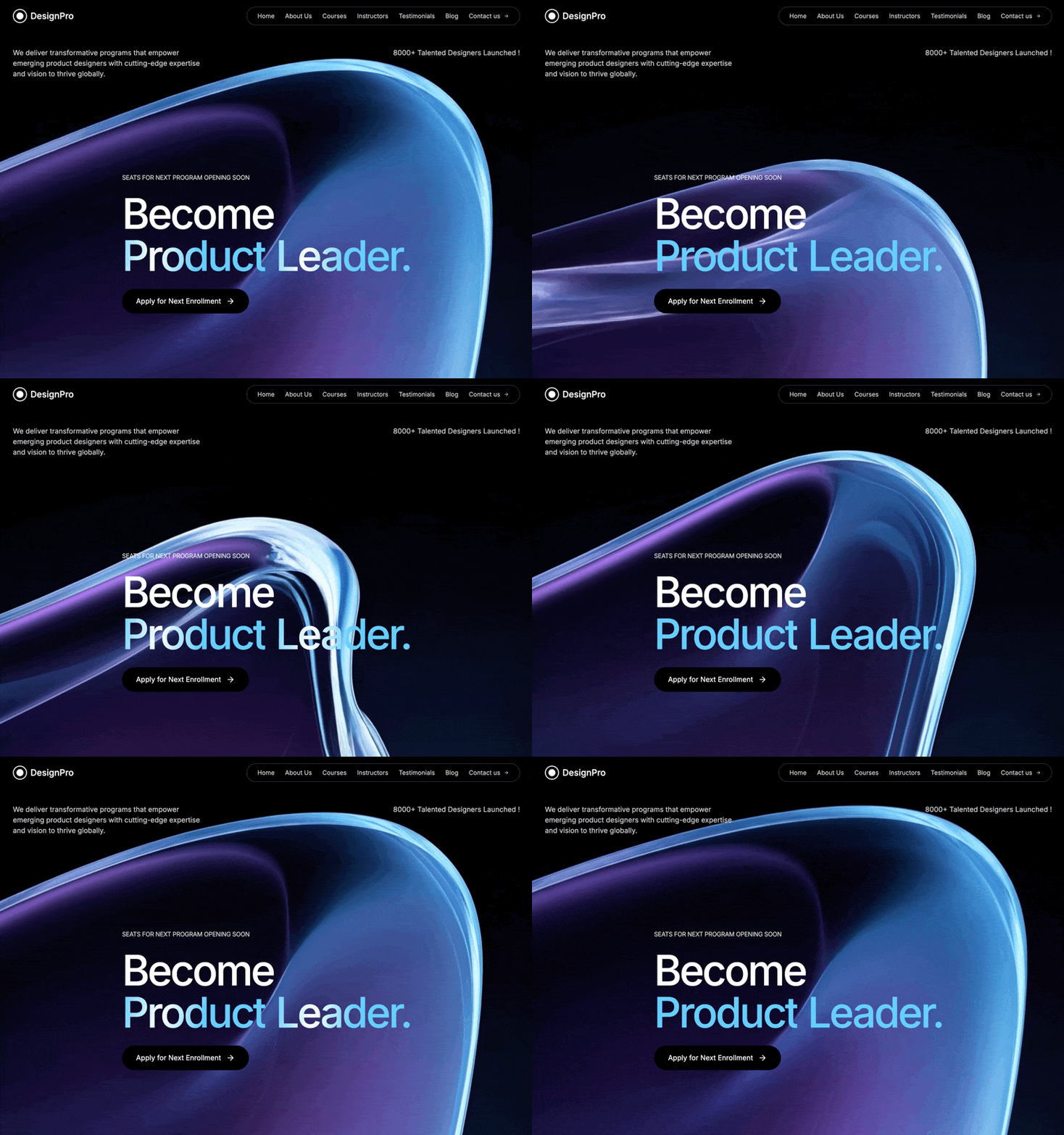
Create a full-screen hero section for a product design education platform called "DesignPro" with the following exact specifications:

Background:

Full-screen looping video background using this exact CloudFront URL: https://d8j0ntlcm91z4.cloudfront.net/user_38xzZboKViGWJOttwIXH07lWA1P/hf_20260328_105406_16f4600d-7a92-4292-b96e-b19156c7830a.mp4

Video should autoplay, loop, be muted, and play inline

Background color: black (#000000)

Navigation Bar:

Logo: Circular design with a white border (2px), containing a smaller filled white circle inside, followed by "DesignPro" text

Navigation links in a rounded pill container with gray-700 border: Home, About Us, Courses, Instructors, Testimonials, Blog, Contact us (with arrow icon)

All nav links: white/80 opacity, hover to full white

Font size: text-sm

Mobile: Show hamburger menu icon on screens smaller than lg

Max width: 7xl container with proper padding

Content Layout:

Top Section (below nav):

Two-column layout on large screens, stacked on mobile

Left column: "We deliver transformative programs that empower emerging product designers with cutting-edge expertise and vision to thrive globally."

Right column (right-aligned on lg+): "8000+ Talented Designers Launched !"

Both paragraphs: white/80 opacity, text-sm on mobile, text-base on desktop

Hero Section (center):

Small uppercase text above heading: "Seats for Next Program Opening Soon" (white/80 opacity, text-xs on mobile, text-sm on desktop, tight tracking)

Main heading with these exact specifications:

Line 1: "Become" in white, font-medium

Line 2: "Product Leader." with animated shiny gradient effect

Font sizes: text-5xl (mobile) scaling up to text-9xl (xl screens)

Line height: 0.85

Letter spacing: tracking-tighter

ShinyText Component:

Use framer-motion for animation

Base color: #64CEFB (light blue)

Shine color: #ffffff (white)

Animation speed: 3 seconds

Gradient spread: 100 degrees

Gradient should sweep across text continuously from left to right

Use CSS gradient with backgroundClip: text and transparent text fill

CTA Button:

Text: "Apply for Next Enrollment" with arrow icon (from lucide-react)

Black background, hover: gray-900

Rounded-full shape

Padding: px-6 md:px-8, py-3 md:py-4

Arrow should translate right on hover

Group hover animation on arrow icon

Typography:

Font family: Inter (sans-serif)

All text colors: white/80 opacity for body text, full white for headings and hover states

Technical Stack:

React + TypeScript

Vite

Tailwind CSS

Framer Motion for animations

Lucide React for icons

Responsive Breakpoints:

Mobile-first design

sm: 640px

md: 768px

lg: 1024px

xl: 1280px

Key CSS Details:

Container max-width: max-w-7xl with centered margins

Section height: h-screen

Video: absolute positioning, inset-0, object-cover

Content: relative z-10 positioning to appear above video

Smooth transitions on all interactive elements

Create the complete implementation including the ShinyText component with proper framer-motion animation logic.Models & stability
Recommended models
Independent reproductions
 Open reproduction ↗
GLM-5.3 单次生成;Codex 人工修复运行依赖、必要源码及移动布局,未重新生成。桌面/手机真实渲染和资源检查通过;完整功能与视觉还原尚未全部验收。源码、截图和修复记录见复现出处。
Reproduction source ↗Keep exploring

Portfolio landing page for 3D creator Jack, built with React, TypeScript and Framer Motion on a #0C0C0C dark background.
Prompt
Build a 3D Creator portfolio landing page for "Jack" using React, TypeScript, Tailwind CSS, Framer Motion, and Lucide React. The page has a dark theme (#0C0C0C background) with the font Kanit (Google Fonts, weights 300-900). The page title…

A 404 page for the hosting provider NEXOVA, with a looping video background and navigation, giving an error page the polish of a landing page.
Prompt
Build a full-page 404 error page for a hosting company called "NEXOVA". The entire page is a single viewport-height layout with a looping background video, a navigation bar, a centered hero/404 section, and a multi-column footer. Use React…

Landing site for Drift, a schedule app friendly to people with ADHD, built with React, Vite, TypeScript and Tailwind. The calm, low-stimulation visual direction is itself the selling point.
Prompt
Build a single-page landing site for "Drift" -- a calm, ADHD-friendly planner app. Use React + Vite + TypeScript + Tailwind CSS + lucide-react for icons. No other UI libraries. ### Fonts Import via Google Fonts in `index.css`: - **Inter** …
Same creator
Each detail page keeps the original result, the prompt, and retest evidence in one reading path.


