

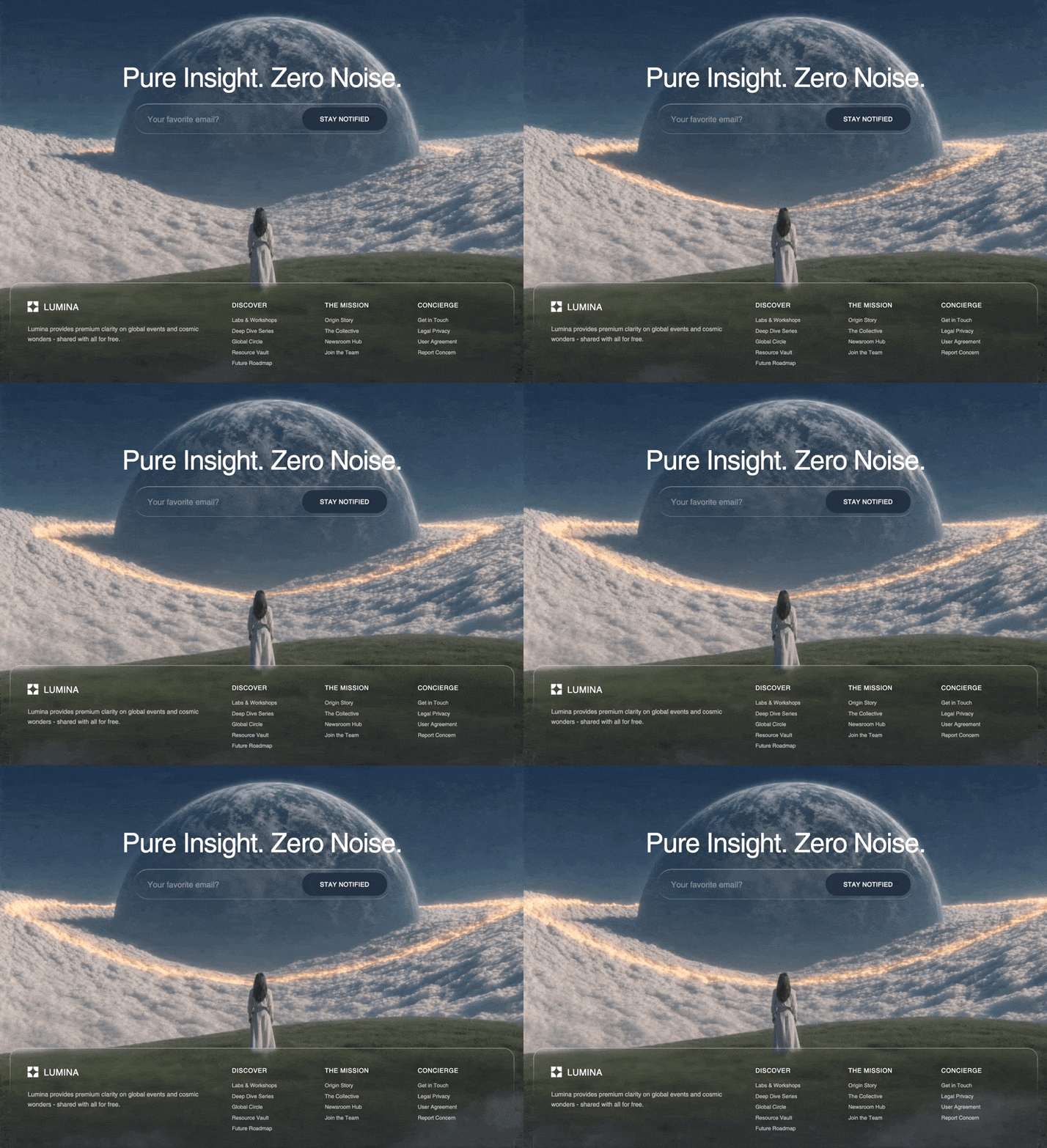
Loading…
Loading…
Creator · MotionSites
View original source ↗The reproduction prompt keeps the original and adds runtime, asset and acceptance requirements. These additions are not the author’s words.
Create a React frontend using Tailwind CSS v4, the `motion/react` library for animations, and `lucide-react` for icons. I want to build a page with an immersive video background and a highly stylized "liquid glass" footer.

Please follow these exact specifications:

1. Global CSS & Fonts (`index.css`):
Add the following exact `@font-face` to the CSS file and set it as the root Tailwind `--font-sans`:
@font-face {
    font-family: "Helvetica Regular";
    src: url("https://db.onlinewebfonts.com/t/a64ff11d2c24584c767f6257e880dc65.eot");
    src: url("https://db.onlinewebfonts.com/t/a64ff11d2c24584c767f6257e880dc65.eot?#iefix")format("embedded-opentype"),
    url("https://db.onlinewebfonts.com/t/a64ff11d2c24584c767f6257e880dc65.woff2")format("woff2"),
    url("https://db.onlinewebfonts.com/t/a64ff11d2c24584c767f6257e880dc65.woff")format("woff"),
    url("https://db.onlinewebfonts.com/t/a64ff11d2c24584c767f6257e880dc65.ttf")format("truetype"),
    url("https://db.onlinewebfonts.com/t/a64ff11d2c24584c767f6257e880dc65.svg#Helvetica Regular")format("svg");
}

2. The "Liquid Glass" CSS:
Add this exact custom CSS for the liquid glass effect bordering:
.liquid-glass {
  background: rgba(255, 255, 255, 0.01);
  background-blend-mode: luminosity;
  backdrop-filter: blur(4px);
  -webkit-backdrop-filter: blur(4px);
  border: none;
  box-shadow: inset 0 1px 1px rgba(255, 255, 255, 0.1);
  position: relative;
  overflow: hidden;
}
.liquid-glass::before {
  content: '';
  position: absolute;
  inset: 0;
  border-radius: inherit;
  padding: 1.4px;
  background: linear-gradient(180deg,
    rgba(255,255,255,0.45) 0%, rgba(255,255,255,0.15) 20%,
    rgba(255,255,255,0) 40%, rgba(255,255,255,0) 60%,
    rgba(255,255,255,0.15) 80%, rgba(255,255,255,0.45) 100%);
  -webkit-mask: linear-gradient(#fff 0 0) content-box, linear-gradient(#fff 0 0);
  -webkit-mask-composite: xor;
  mask-composite: exclude;
  pointer-events: none;
}

3. Main App Structure (`App.tsx`):
- Wrap the page in a `<main>` with `relative w-full min-h-[115vh] overflow-x-hidden flex flex-col items-center font-sans selection:bg-white/20 selection:text-white`.
- Add a `<video>` element fixed to the background (`fixed inset-0 w-full h-full object-cover z-[0]`) that auto-plays, loops, and is muted.
- The `src` for the video must be exactly this CloudFront URL: `https://d8j0ntlcm91z4.cloudfront.net/user_38xzZboKViGWJOttwIXH07lWA1P/hf_20260429_114316_1c7889ad-2885-410e-b493-98119fee0ddb.mp4`

4. Content Wrapper:
On top of the video (`z-10`), add a `max-w-7xl` container that holds an upper CTA (you can use a placeholder for the CTA) and pushes the footer to the bottom.

5. The Footer (`motion.footer`):
- Start it with these exact Framer Motion props: `initial={{ opacity: 0, y: 40 }} animate={{ opacity: 1, y: 0 }} transition={{ duration: 1, delay: 0.4, ease: "easeOut" }}`
- Give it the classes: `liquid-glass w-full rounded-3xl p-6 md:p-10 text-white/70 mt-32 md:mt-64`.

6. Footer Layout - Top Grid:
- A 12-column grid (`grid-cols-1 md:grid-cols-12 gap-10 md:gap-12 mb-10`).
- First column (md:col-span-5):
  - An SVG Logo `<svg xmlns="http://www.w3.org/2000/svg" width="24" height="24" viewBox="0 0 256 256" fill="currentColor"><path d="M 4.688 136 C 68.373 136 120 187.627 120 251.312 C 120 252.883 119.967 254.445 119.905 256 L 0 256 L 0 136.096 C 1.555 136.034 3.117 136 4.688 136 Z M 251.312 136 C 252.883 136 254.445 136.034 256 136.096 L 256 256 L 136.095 256 C 136.032 254.438 136.001 252.875 136 251.312 C 136 187.627 187.627 136 251.312 136 Z M 119.905 0 C 119.967 1.555 120 3.117 120 4.688 C 120 68.373 68.373 120 4.687 120 C 3.117 120 1.555 119.967 0 119.905 L 0 0 Z M 256 119.905 C 254.445 119.967 252.883 120 251.312 120 C 187.627 120 136 68.373 136 4.687 C 136 3.117 136.033 1.555 136.095 0 L 256 0 Z" /></svg>` along with the text "LUMINA" (text-xl font-medium).
  - A description below it: "Lumina provides premium clarity on global events and cosmic wonders - shared with all for free." (`text-sm leading-relaxed max-w-sm`).

7. Footer Layout - Links Section (md:col-span-7):
Make a 3-column grid containing these lists:
- Discover: Labs & Workshops, Deep Dive Series, Global Circle, Resource Vault, Future Roadmap
- The Mission: Origin Story, The Collective, Newsroom Hub, Join the Team
- Concierge: Get in Touch, Legal Privacy, User Agreement, Report Concern
(Headers should be `text-sm uppercase tracking-wider text-white font-medium mb-4` and links `text-xs space-y-2 hover:text-white transition-colors`).

8. Footer Layout - Bottom Bar:
- Create a bottom border (`pt-6 border-t border-white/10 flex flex-col md:flex-row items-center justify-between gap-6 md:gap-4`).
- Left side: `<p className="text-[10px] uppercase tracking-widest opacity-50">Curated by @GotInGeorgiG</p>`
- Right side: A label `<span className="text-[10px] uppercase tracking-widest opacity-50">Join the Journey:</span>` alongside a horizontal flex row of `lucide-react` icons (sizes 16): Music2, Facebook, Twitter, Youtube, and Instagram. Wrap each in an `<a>` with `opacity-70 hover:opacity-100 transition-colors hover:text-white`.Models & stability
Recommended models
Independent retest evidence
Oct 20, 2026
Aug 31, 2026
Aug 31, 2026
Independent reproductions
 Open reproduction ↗
GLM-5.3 单次生成;Codex 人工修复运行依赖、必要源码及移动布局,未重新生成。桌面/手机真实渲染和资源检查通过;完整功能与视觉还原尚未全部验收。源码、截图和修复记录见复现出处。
Reproduction source ↗Keep exploring

Portfolio landing page for 3D creator Jack, built with React, TypeScript and Framer Motion on a #0C0C0C dark background.
Prompt
Build a 3D Creator portfolio landing page for "Jack" using React, TypeScript, Tailwind CSS, Framer Motion, and Lucide React. The page has a dark theme (#0C0C0C background) with the font Kanit (Google Fonts, weights 300-900). The page title…

A 404 page for the hosting provider NEXOVA, with a looping video background and navigation, giving an error page the polish of a landing page.
Prompt
Build a full-page 404 error page for a hosting company called "NEXOVA". The entire page is a single viewport-height layout with a looping background video, a navigation bar, a centered hero/404 section, and a multi-column footer. Use React…

Landing site for Drift, a schedule app friendly to people with ADHD, built with React, Vite, TypeScript and Tailwind. The calm, low-stimulation visual direction is itself the selling point.
Prompt
Build a single-page landing site for "Drift" -- a calm, ADHD-friendly planner app. Use React + Vite + TypeScript + Tailwind CSS + lucide-react for icons. No other UI libraries. ### Fonts Import via Google Fonts in `index.css`: - **Inter** …
Same creator
Each detail page keeps the original result, the prompt, and retest evidence in one reading path.


