
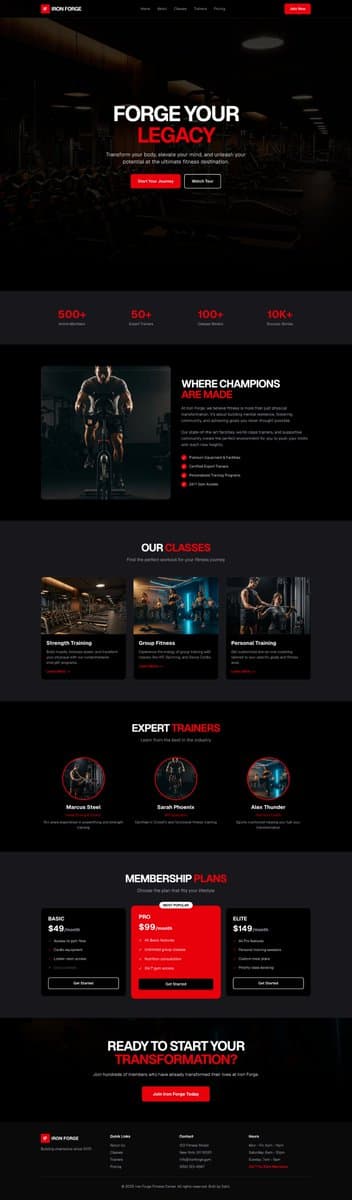
A website case by @0fficialRohit created with Claude · MCP360 ImageGen, including the public result, full prompt, and original source.
View original source ↗
Prompt · Original / Translation
Weekend experimentation turned into something fun. One single prompt — and @claudeai + @MCP360AI marketplace MCP generated an entire webpage with images. Here’s the exact prompt I used: "Create a website for a GYM with images using mcp360 imagegen in dark theme." MCP360’s next update coming soon. Stay tuned. 🚀
Reusable method
Reusable structure
Extract “target result → the product name, audience, page modules, and primary button → constraints” as a reusable template for similar work.
Retest criteria
Run single-variable comparisons around module order, value proposition, and CTA placement. Record the model, cost, and failures; turn it into a Skill only after it repeats reliably.
Recommended models
Derived Skill
Skills are derived from repeated patterns in published cases. They are not a separate submission type.

Creator
0fficialRohit focuses on production-ready AI interfaces and is active on X. “MCP360 Dark Fitness Gym Website” is the current representative case, built with Claude · MCP360 ImageGen awaiting a stability retest.
Keep exploring
A webpage case by @Oluwaphilemon1 using Claude Fable 5 · Three.js · Blender · GSAP, including the public result, full prompt, and original source.
Prompt
Claude Fable 5 and GPT-5.6 are powerful🥵🥵🥵 Here Is How I built with Claude 👇 Prompt: "Design an agency site where services are presented as supermarket product packaging in 3D" Use Three.js with WebGL to render all products in real time in the browser Use Blender to model the packaging then export as GLTF to load in Three.js Use GSAP for the smooth product rotation and hover interactions Save this if you want a portfolio that makes clients feel they are buying something premium 🛒
A webpage case by @uxsweta using AI UI Builder, including the public result, full prompt, and original source.
Prompt
Few people asked for the prompt, so here it is 👇 PS: Tweak it based on your use case. Create a modern, minimal 3D Invoice Generator Machine component with a premium SaaS-style aesthetic. Visual Design - Design a wide, horizontal invoice printing machine inspired by receipt printers, but with a futuristic and clean appearance. - Use subtle gray strokes, soft shadows, and minimal details. - The machine should feel premium, lightweight, and modern rather than realistic or industrial. - Keep the overall design clean enough to fit inside a dashboard or landing page hero section. - Add a single prominent "Print Invoice" button directly on the machine. Animation When the user clicks the "Print Invoice" button: - The machine should react with a subtle press/click animation. - A receipt should gradually emerge from the printer slot. - The receipt must animate smoothly from inside the machine to outside, giving the impression that it is being physically printed. - The animation should feel realistic, fluid, and satisfying. - The receipt should slide out line-by-line rather than appearing instantly. - Add slight motion easing and subtle paper movement for realism. Receipt Design The receipt should remain highly minimal and editable. Do NOT fill it with complex customer information. Use placeholder content such as: Customer Name Product Total Amount The receipt should look like a clean invoice preview rather than a detailed bill. Interaction - The receipt should be hidden initially. - It should only appear after clicking the Print Invoice button. - The animation should be repeatable every time the user clicks the button. - Include smooth transitions and micro-interactions throughout. Style References Apple-style minimalism Linear / Stripe design quality Premium SaaS dashboard aesthetic Soft gray strokes Clean typography Modern 3D illustration High attention to interaction details Goal: Create a delightful visual experience where users feel like an invoice is actually being generated and printed from a beautiful 3D machine, rather than simply appearing on the screen.
A webpage case by @shushant_l using AI Website Builder, including the public result, full prompt, and original source.
Prompt
Here's how to create your website in minimalist design style with AI. Use this prompt: Design a modern minimalist portfolio website for a digital creator and AI consultant. Use a clean black, white, and neutral color palette with no gradients, glassmorphism, or excessive visual effects. Focus on simplicity, whitespace, strong typography, clear hierarchy, and fast loading performance. Include a hero section with a professional introduction and call-to-action, an about section, featured projects portfolio, services section, testimonials, blog/articles preview, skills and tools showcase, client logos, contact form, and footer. Use subtle animations, smooth scrolling, elegant card layouts, responsive mobile-first design, and SEO-friendly structure. The overall aesthetic should feel premium, professional, timeless, and highly readable with a strong emphasis on content and usability. Note: Customise this prompt to your use case. I've built this with Replit, and you can also build with it, or else you can also build it with any other AI model, LLM, and AI tool too.