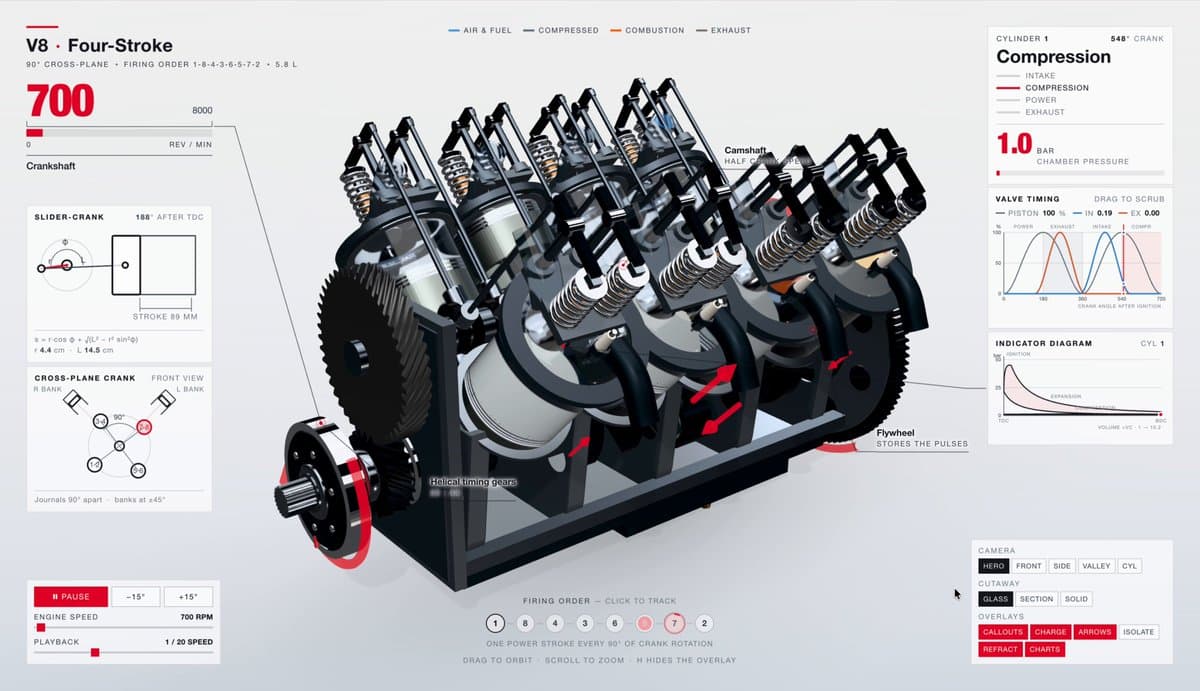
A real coding/UI case that links to the open-source 3DCellForge project, turning image input into an interactive 3D workflow.
View original source ↗Prompt · Original / Translation
https://github.com/huangserva/3DCellForge
Reusable method
Reusable structure
Extract “target result → the product name, audience, page modules, and primary button → constraints” as a reusable template for similar work.
Retest criteria
Run single-variable comparisons around module order, value proposition, and CTA placement. Record the model, cost, and failures; turn it into a Skill only after it repeats reliably.
Recommended models
Derived Skill
Skills are derived from repeated patterns in published cases. They are not a separate submission type.

Creator
servasyy_ai focuses on production-ready AI interfaces and is active on X / 𝕏. “Image to 3D” is the current representative case, built with Claude Sonnet with a 93% stability reference.
Keep exploring
A complete React implementation brief for a full-screen 3D figurine carousel, including assets, responsive behavior, animation timing, layout, and styling.
Prompt
Access ALL prompts for stunning animated websites in one click: http://motionsites.ai Build a single full-viewport hero section in React + TypeScript + Vite + Tailwind CSS, using `lucide-react` for icons. The component is a character-figurine carousel called "TOONHUB". **Fonts (load in `index.html` head):** ```html <link rel="preconnect" href="https://fonts.googleapis.com" /> <link rel="preconnect" href="https://fonts.gstatic.com" crossorigin /> <link href="https://fonts.googleapis.com/css2?family=Anton&family=Inter:wght@400;500;600;700&display=swap" rel="stylesheet" /> ``` Body font: `'Inter', sans-serif`. Display font (huge ghost text + bottom-right link): `'Anton', sans-serif`. **Image data (4 items, exact URLs and colors):** ```ts const IMAGES = [ { src: 'https://fifth-gentle-45902158.figma.site/_components/v2/4de492f6d9cf8244ad5293233e5c6f52407d42fc/1.02464a56.png', bg: '#F4845F', panel: '#F79B7F' }, { src: 'https://fifth-gentle-45902158.figma.site/_components/v2/4de492f6d9cf8244ad5293233e5c6f52407d42fc/2.b977faab.png', bg: '#6BBF7A', panel: '#85CC92' }, { src: 'https://fifth-gentle-45902158.figma.site/_components/v2/4de492f6d9cf8244ad5293233e5c6f52407d42fc/3.4df853b4.png', bg: '#E882B4', panel: '#ED9DC4' }, { src: 'https://fifth-gentle-45902158.figma.site/_components/v2/4de492f6d9cf8244ad5293233e5c6f52407d42fc/4.4457fbce.png', bg: '#6EB5FF', panel: '#8DC4FF' }, ]; ``` Preload all 4 images on mount via `new Image()`. **State & logic:** - `activeIndex` (0–3), `isAnimating` boolean lock, `isMobile` (`window.innerWidth < 640`, updated on resize). - `navigate('next' | 'prev')`: ignore if animating; set `isAnimating=true`; bump `activeIndex` `(prev+1)%4` or `(prev+3)%4`; release lock after `650ms`. - Roles derived from activeIndex: `center=activeIndex`, `left=(activeIndex+3)%4`, `right=(activeIndex+1)%4`, `back=(activeIndex+2)%4`. **Layout structure:** Outer `<div>` has `backgroundColor: IMAGES[activeIndex].bg`, transition `background-color 650ms cubic-bezier(0.4,0,0.2,1)`, `fontFamily: 'Inter, sans-serif'`, `relative w-full overflow-hidden`. Inside, a `relative w-full` div with `height: 100vh; overflow: hidden`. 1. **Grain overlay** (`absolute inset-0 pointer-events-none`, zIndex 50): SVG fractalNoise data URI, `baseFrequency=0.9`, `numOctaves=4`, opacity 0.08 inside SVG, container `opacity: 0.4`, `backgroundSize: 200px 200px`, repeat. 2. **Giant ghost text "3D SHAPE"** (`absolute inset-x-0 flex items-center justify-center pointer-events-none select-none`, zIndex 2, `top: 18%`): font Anton, `fontSize: clamp(90px, 28vw, 380px)`, weight 900, color white, opacity 1, lineHeight 1, uppercase, letterSpacing `-0.02em`, whiteSpace nowrap. 3. **Top-left brand label "TOONHUB"** (`absolute top-6 left-4 sm:left-8`, zIndex 60): `text-xs font-semibold uppercase`, white, opacity 0.9, letterSpacing `0.18em`. 4. **Carousel** (`absolute inset-0`, zIndex 3): map all 4 IMAGES; each item is `position:absolute`, `aspectRatio: '0.6 / 1'`, with role-based styles below. Inside, an `<img>` `width:100%; height:100%; objectFit:contain; objectPosition:bottom center; draggable=false`. Per-role style: - **center**: `transform: translateX(-50%) scale(${isMobile?1.25:1.68})`, no blur, opacity 1, zIndex 20, `left:50%`, `height: isMobile?'60%':'92%'`, `bottom: isMobile?'22%':0`. - **left**: `translateX(-50%) scale(1)`, blur 2px, opacity 0.85, zIndex 10, `left: isMobile?'20%':'30%'`, `height: isMobile?'16%':'28%'`, `bottom: isMobile?'32%':'12%'`. - **right**: same as left but `left: isMobile?'80%':'70%'`. - **back**: `translateX(-50%) scale(1)`, blur 4px, opacity 1, zIndex 5, `left:50%`, `height: isMobile?'13%':'22%'`, `bottom: isMobile?'32%':'12%'`. Transition on each item: `transform 650ms cubic-bezier(0.4,0,0.2,1), filter 650ms ..., opacity 650ms ..., left 650ms ...`. `willChange: transform, filter, opacity`. 5. **Bottom-left text + nav buttons** (`absolute bottom-6 left-4 sm:bottom-20 sm:left-24`, zIndex 60, `maxWidth:320px`): - `<p>` "TOONHUB FIGURINES" — bold uppercase, tracking-widest, `mb-2 sm:mb-3 text-base sm:text-[22px]`, white, opacity 0.95, letterSpacing `0.02em`. - `<p>` (hidden on mobile, `hidden sm:block`): "The artwork is stunning, shipped fully prepared. The finish is a vision, the 3D craft is flawless. Many thanks! Wishing you the win. Order now." — `text-xs sm:text-sm`, white, opacity 0.85, lineHeight 1.6, `mb-4 sm:mb-5`. - Two circular buttons (`w-12 h-12 sm:w-16 sm:h-16`, transparent bg, 2px white border, white icon): `ArrowLeft` and `ArrowRight` from lucide-react, size 26, strokeWidth 2.25. On hover: scale 1.08 + bg `rgba(255,255,255,0.12)`. Transition `transform 150ms, background-color 150ms`. Click triggers `navigate('prev')` / `navigate('next')`. 6. **Bottom-right link "DISCOVER IT"** (`absolute bottom-6 right-4 sm:bottom-20 sm:right-10`, zIndex 60): `<a>` flex items-center, font Anton, `fontSize: clamp(20px, 4vw, 56px)`, weight 400, white, opacity 0.95→1 on hover (200ms), letterSpacing `-0.02em`, lineHeight 1, uppercase, no underline. Followed by `ArrowRight` (`w-5 h-5 sm:w-8 sm:h-8`, strokeWidth 2.25). **Behavior summary:** clicking arrows rotates roles; background color, image positions, scales, blurs, and opacities all crossfade simultaneously over 650ms with `cubic-bezier(0.4,0,0.2,1)`. The character images sit at the bottom of the screen overlapping the giant "3D SHAPE" text behind them.
A webpage case by @Oluwaphilemon1 using Claude Fable 5 · Three.js · Blender · GSAP, including the public result, full prompt, and original source.
Prompt
Claude Fable 5 and GPT-5.6 are powerful🥵🥵🥵 Here Is How I built with Claude 👇 Prompt: "Design an agency site where services are presented as supermarket product packaging in 3D" Use Three.js with WebGL to render all products in real time in the browser Use Blender to model the packaging then export as GLTF to load in Three.js Use GSAP for the smooth product rotation and hover interactions Save this if you want a portfolio that makes clients feel they are buying something premium 🛒
A webpage case by @uxsweta using AI UI Builder, including the public result, full prompt, and original source.
Prompt
Few people asked for the prompt, so here it is 👇 PS: Tweak it based on your use case. Create a modern, minimal 3D Invoice Generator Machine component with a premium SaaS-style aesthetic. Visual Design - Design a wide, horizontal invoice printing machine inspired by receipt printers, but with a futuristic and clean appearance. - Use subtle gray strokes, soft shadows, and minimal details. - The machine should feel premium, lightweight, and modern rather than realistic or industrial. - Keep the overall design clean enough to fit inside a dashboard or landing page hero section. - Add a single prominent "Print Invoice" button directly on the machine. Animation When the user clicks the "Print Invoice" button: - The machine should react with a subtle press/click animation. - A receipt should gradually emerge from the printer slot. - The receipt must animate smoothly from inside the machine to outside, giving the impression that it is being physically printed. - The animation should feel realistic, fluid, and satisfying. - The receipt should slide out line-by-line rather than appearing instantly. - Add slight motion easing and subtle paper movement for realism. Receipt Design The receipt should remain highly minimal and editable. Do NOT fill it with complex customer information. Use placeholder content such as: Customer Name Product Total Amount The receipt should look like a clean invoice preview rather than a detailed bill. Interaction - The receipt should be hidden initially. - It should only appear after clicking the Print Invoice button. - The animation should be repeatable every time the user clicks the button. - Include smooth transitions and micro-interactions throughout. Style References Apple-style minimalism Linear / Stripe design quality Premium SaaS dashboard aesthetic Soft gray strokes Clean typography Modern 3D illustration High attention to interaction details Goal: Create a delightful visual experience where users feel like an invoice is actually being generated and printed from a beautiful 3D machine, rather than simply appearing on the screen.