

加载中…
创作者 · MotionSites
查看原始来源 ↗复刻提示词保留原文,另附运行环境、素材与验收要求;附加说明不是原作者原话。
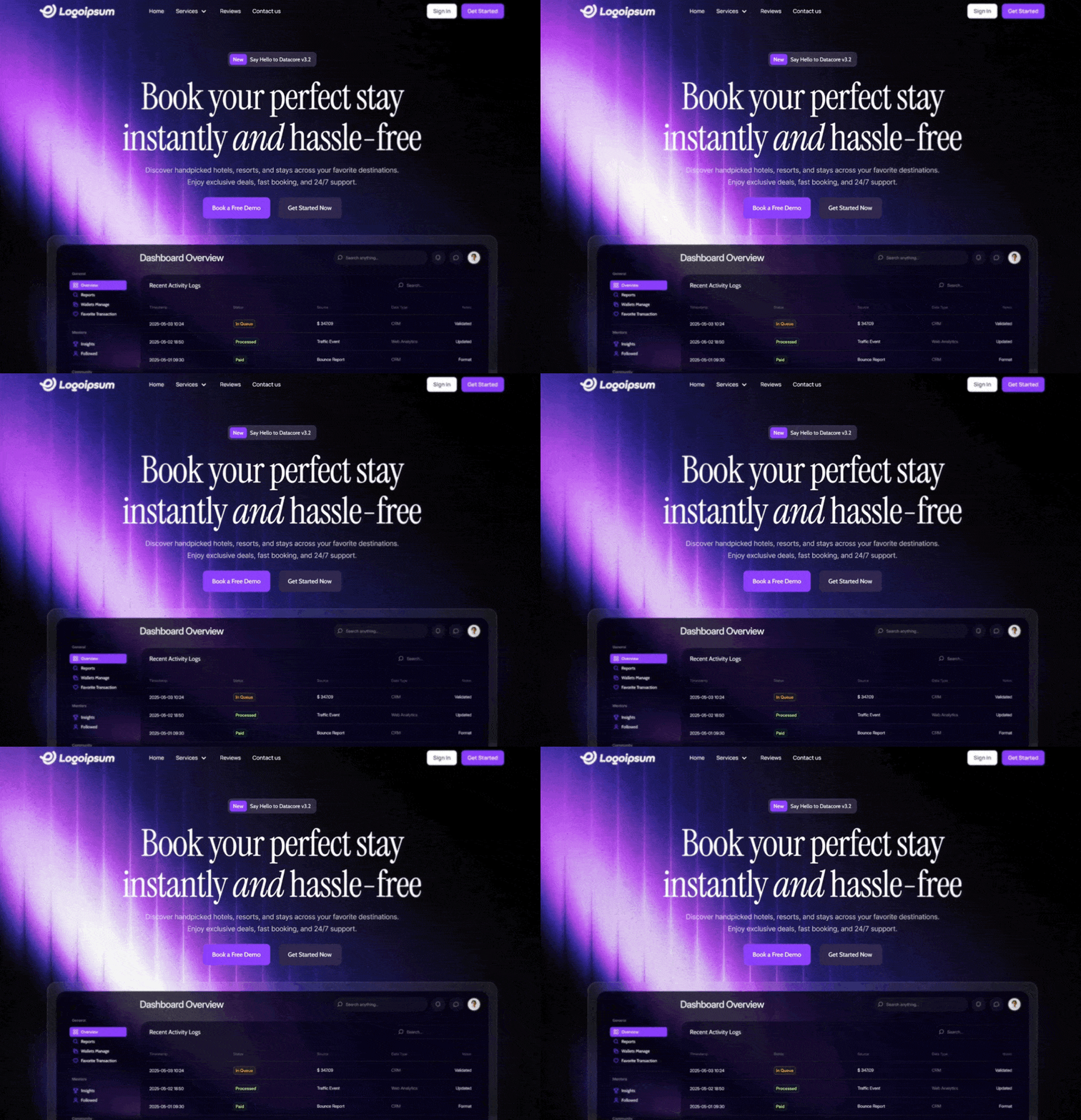
使用 React 和 Tailwind CSS 为 Web 应用创建一个响应式的全屏 hero section。

设计系统与资源:

字体:加载并使用 'Manrope'(用于 UI/Nav)、'Cabin'(用于按钮/标签)、'Instrument Serif'(用于标题)和 'Inter'(用于正文)。

主色:紫色 #7b39fc
次要色/深色:深紫色 #2b2344
背景:使用全屏、绝对定位的 HTML5 video background。视频应 autoplay、loop、mute 并 play inline。确保它覆盖整个视口(min-h-screen、object-cover),且不添加 overlay(保持不透明)。

视频 URL:https://d8j0ntlcm91z4.cloudfront.net/user_38xzZboKViGWJOttwIXH07lWA1P/hf_20260210_031346_d87182fb-b0af-4273-84d1-c6fd17d6bf0f.mp4

1. Navbar Component(顶部 Overlay)

布局:全宽、透明背景、z-20 relative positioning。
内边距:px-6(mobile)到 px-[120px](desktop),py-[16px]。

Logo(左侧):使用以下指定的 SVG path,并填充白色:
Path:M1.04356 6.35771L13.6437 0.666504...(Future logo shape)。

Navigation Links(中间偏左,仅 Desktop):
项目:"Home"、"Services"(带 ChevronDown icon)、"Reviews"、"Contact us"。
样式:Manrope 字体、Medium weight、14px size、White。
Hover effect:opacity-80。

Action Buttons(右侧,仅 Desktop):
Sign In:White background、细灰色边框(#d4d4d4)、rounded 8px、Black text(#171717)、Manrope Semibold 14px。
Get Started:Primary Purple background(#7b39fc)、rounded 8px、White text(#fafafa)、Manrope Semibold 14px、轻微阴影。

Mobile:隐藏链接/按钮,并显示一个 White Menu icon(hamburger),点击后切换显示全屏 black overlay menu。

2. Hero Content(居中)

Container:垂直和水平居中(flex-col items-center text-center),z-10 relative,顶部外边距 mt-32。

Tagline Pill:
样式:Glassmorphism effect(bg-[rgba(85,80,110,0.4)]、backdrop-blur、border rgba(164,132,215,0.5))。
形状:Rounded 10px,Height 38px。
内容:一个小型内部 badge(#7b39fc bg、rounded 6px),显示 "New",后接文字 "Say Hello to Datacore v3.2"。
字体:Cabin、Medium、14px、White。

Headline:
文本:"Book your perfect stay instantly and hassle-free"。
排版:Instrument Serif 字体、White。
字号:5xl(mobile)到 96px(desktop)。
样式:Line-height 1.1。单词 "and" 应使用 italicized,并设置特定间距。

Subtext:
文本:"Discover handpicked hotels, resorts, and stays across your favorite destinations. Enjoy exclusive deals, fast booking, and 24/7 support."
排版:Inter 字体、Normal weight、18px。
颜色:White,70% opacity(text-white/70)。
宽度:Max width 662px。

Call to Action Buttons(Row):
Button 1:"Book a Free Demo" — Primary Purple(#7b39fc)、rounded 10px、Cabin Medium 16px、White。
Button 2:"Get Started Now" — Dark Purple(#2b2344)、rounded 10px、Cabin Medium 16px、Off-white(#f6f7f9)。
Hover effects:hover 时背景略微变亮。适用模型与稳定度
建议模型
多人复现
继续探索

3D 创作者 Jack 的作品集落地页,React + TypeScript + Framer Motion,#0C0C0C 暗底。
提示语
使用 React、TypeScript、Tailwind CSS、Framer Motion 和 Lucide React,为「Jack」构建一个 3D 创作者作品集落地页。页面采用深色主题(背景为 #0C0C0C),字体使用 Kanit(Google Fonts,字重 300-900)。页面标题为「Jack -- 3D Creator」。 全局样式 html、body、#root 和主容器的背景:#0C0C0C 字体族:'Kanit', sans-serif 全局重置:b
提示语

为一家名为“NEXOVA”的托管公司构建一个全屏 404 错误页面。整个页面采用单视口高度布局,包含循环播放的背景视频、导航栏、居中的 hero/404 区域和多栏页脚。使用 React + Tailwind CSS + Lucide React icons。不要使用其他 UI 库。 --- **字体** 在 `index.html` 中通过以下样式表加载“Helvetica Now Var”: ``` <link href="https://db.onlinewebf

ADHD 友好的日程应用 Drift 落地站,React + Vite + TypeScript + Tailwind,安静低刺激的视觉方向本身就是产品卖点。
提示语
为 "Drift" 构建一个单页落地网站——这是一款平静、对 ADHD 友好的规划应用。使用 React + Vite + TypeScript + Tailwind CSS + lucide-react 提供图标。不要使用其他 UI 库。 ### 字体 通过 Google Fonts 在 `index.css` 中导入: - **Inter**(字重 400、500、600)——用作基础正文字体 - **Instrument Serif**(仅斜体)——用于首屏标题中的
Case 详情页把原帖效果、Prompt 与复测证据放在同一条阅读路径里。


