加载中…
创作者 · MotionSites
查看原始来源 ↗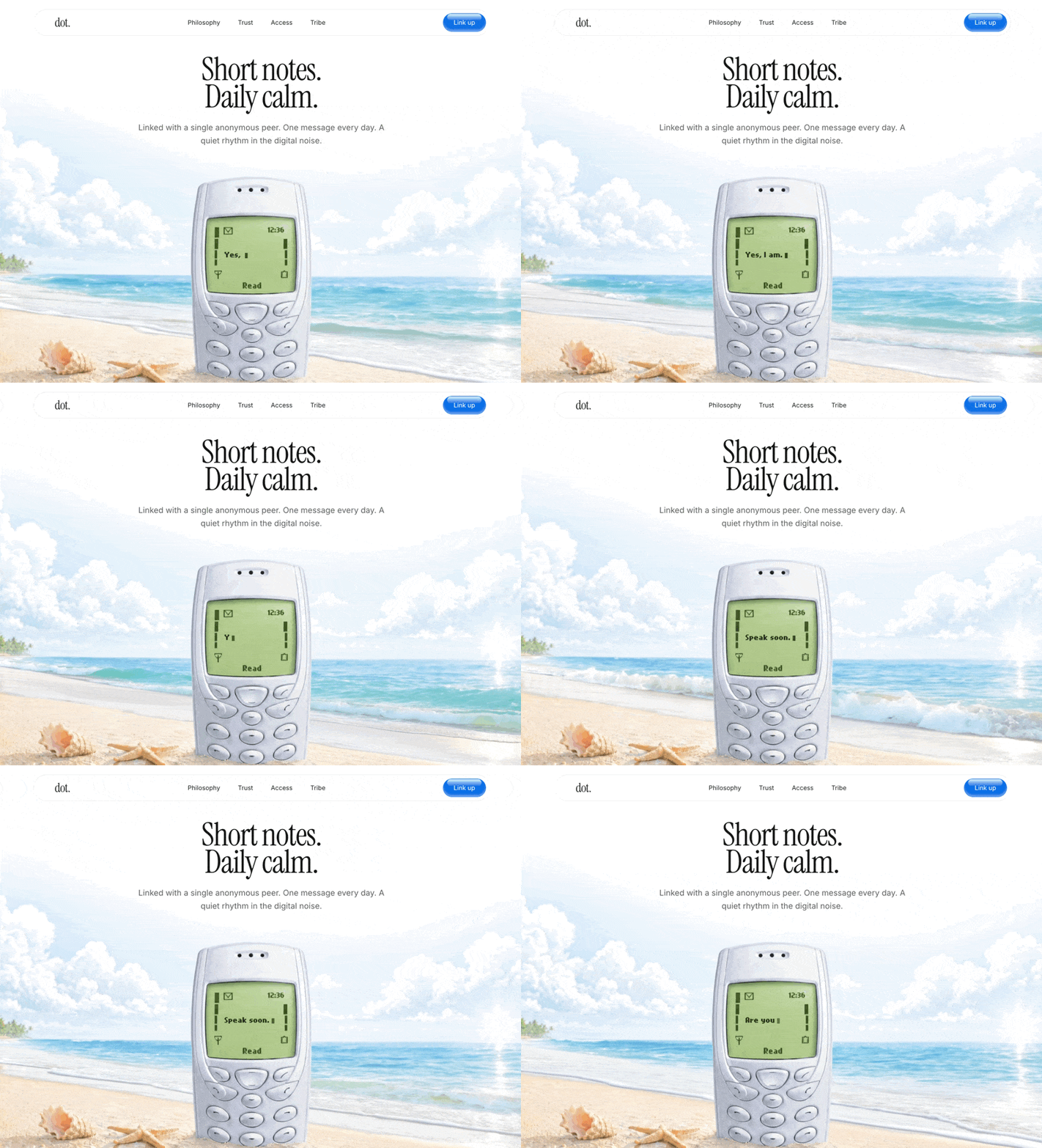
Prompt
严格按照以下说明构建一个 React 落地页。使用 React 19、Tailwind CSS v4 和 motion/react 实现动画。
1. 字体与全局 CSS 设置:
在 index.html 中导入以下 Google Fonts:
Instrument Serif(字重 400、斜体 400)
Inter(字重 100 至 900)
在 src/index.css 中为 Nokia 文本导入以下自定义字体:
@import url('https://db.onlinewebfonts.com/c/440b53b1a1c65037f944ff19259d8014?family=Nokia+Cellphone+FC+Small');
在 index.css 中配置 Tailwind 主题变量:
--font-instrument: "Instrument Serif", serif;
--font-serif: "Instrument Serif", serif;
--font-sans: "Inter", sans-serif;
--font-nokia: "Nokia Cellphone FC Small", monospace;
创建一个 @utility font-instrument { font-family: "Instrument Serif", serif; }
将根元素的 font-family 设置为 var(--font-sans),并应用抗锯齿。
2. 组件结构:
创建一个主 App.tsx 文件,其中包含 4 个组件:TypingMessages、Navbar、Hero 和 App。
3. Navbar 组件:
容器:固定在顶部 top-6,水平居中 left-1/2 -translate-x-1/2,宽度为 95% w-[95%] max-w-5xl。z-50、pointer-events-none。
Nav 标签:pointer-events-auto、背景模糊、完整圆角胶囊形状、带 border border-black/10 的透明背景。项目两端对齐的 Flex 布局。
Logo:使用 font-instrument text-[28px] tracking-tight text-[#1a1a1a] 显示文本 "dot."。
链接:"Philosophy"、"Trust"、"Access"、"Tribe"。移动端隐藏,桌面端以 flex 显示(gap-10)。font-sans text-[14px] text-[#1a1a1a],悬停时透明度渐变。
CTA 按钮("Link up"):
背景色 #0871E7,完整圆角,白色文本,font-sans text-[14px]。
阴影:shadow-[inset_0_-4px_4px_rgba(255,255,255,0.39)] outline-1 outline-[#0871E7] -outline-offset-1。
在按钮内部使用一个绝对定位的矩形添加细微的顶部闪光效果:w-[80%] h-4 left-[10%] top-[1px] bg-gradient-to-b from-[#DEF0FC] to-transparent rounded-[12px]。group 悬停时让它横向放大(group-hover:scale-x-105)。
4. Hero 组件:
容器:min-h-screen bg-[#F3F4ED] pt-24 md:pt-32,纵向 flex 居中。
视频背景:绝对定位 inset-0 z-0。使用 HTML5 <video>,设置为 autoplay、loop、muted、playsInline,并通过 object-cover 缩放。
视频源:必须完全使用 https://d8j0ntlcm91z4.cloudfront.net/user_38xzZboKViGWJOttwIXH07lWA1P/hf_20260427_054418_a6d194f0-ac86-4df9-abe5-ded73e596d7c.mp4。叠加一个使用 bg-white/5 的空 div,形成轻微色调覆盖。
Hero 文本容器:Relative z-20、pointer-events-none、文本居中布局。
主标题:"Short notes. <br /> Daily calm."
使用 motion.div 制作动画(在 1.5s 内从 opacity: 0、scale: 0.95 变为 opacity: 1、scale: 1,ease 为 [0.16, 1, 0.3, 1])。
样式:font-instrument text-[38px] md:text-[56px] lg:text-[72px] leading-[0.85] tracking-tight text-[#1a1a1a] mb-6。
副标题:"Linked with a single anonymous peer. One message every day. A quiet rhythm in the digital noise."
使用 motion.div 制作动画(在 1.2s 内从 opacity: 0、y: 20 变为 opacity: 1、y: 0,delay: 0.3,ease 为 [0.16, 1, 0.3, 1])。
样式:font-sans text-[16px] md:text-[18px] text-[#1a1a1a]/70 leading-relaxed font-normal max-w-xl mx-auto。
在 Hero 中包含 TypingMessages 组件,使其叠加在视频里的手机屏幕上。
5. TypingMessages 组件:
逻辑:循环显示消息数组:["Are you here?", "Yes, I am.", "Speak soon."]。
输入速度:100ms。删除速度:50ms。删除前暂停:2000ms。
定位:使用绝对定位,使其完美贴合视频中的手机屏幕:
absolute left-[48.5%] md:left-[47.5%] lg:left-[48.5%] -translate-x-1/2 bottom-[32%] z-30 w-[110px] sm:w-[130px] flex justify-start text-left。
文本样式:font-nokia text-[#2A3616] text-[10px] sm:text-[14px] leading-tight break-words min-h-[1.5em]。
光标:添加一个闪烁的 Framer Motion 光标 motion.span(w-1.5 h-3 bg-[#2A3616] ml-1 align-middle),让 opacity 在 0.8s 内从 0 变为 1 再变为 0,以线性方式无限重复。适用模型与稳定度
建议模型
继续探索

@Oluwaphilemon1 使用 Claude Fable 5 · Three.js · Blender · GSAP完成的网页案例,包含公开结果、完整 Prompt 与原始来源。
提示语
Claude Fable 5 和 GPT-5.6 很强🥵🥵🥵 下面是我如何使用 Claude 构建的 👇 提示词:「设计一个机构网站,把服务以 3D 超市商品包装的形式呈现」 使用 Three.js 和 WebGL 在浏览器中实时渲染所有产品 使用 Blender 制作包装模型,然后导出为 GLTF 以加载到 Three.js 中 使用 GSAP 实现流畅的产品旋转和悬停交互 如果你想做一个让客户感觉像是在购买高级商品的作品集,请保存这条 🛒
复制这段 TSX 组件源码,交给 Cursor、v0、Claude 等 AI 编程工具,说明这是「3D Animated Pin」的 Aceternity UI 组件实现,即可让它接入你的 React 项目,再按需替换文案、配色与触发参数复用。
提示语
// components/ui/3d-pin.tsx "use client"; import React, { useState } from "react"; import { motion } from "motion/react"; import { cn } from "@/lib/utils"; export const PinContainer = ({ children, title, href, className, containerClassName…

提示语
首先搜索 "/unlazy" skill,完整阅读它,并在整个任务中持续使用。 将此视为一项至少持续 {argument name="minimum duration" default="5 小时"} 的大型视觉构建。如果环境允许,最好进行 {argument name="optimal duration" default="8–24 小时"} 有实质意义的实现和迭代。不要在制作出一个还不错的场景后就停下。 在浏览器中创建一个细节极其丰富的实时 {argument nam

