

加载中…
创作者 · MotionSites
查看原始来源 ↗复刻提示词保留原文,另附运行环境、素材与验收要求;附加说明不是原作者原话。
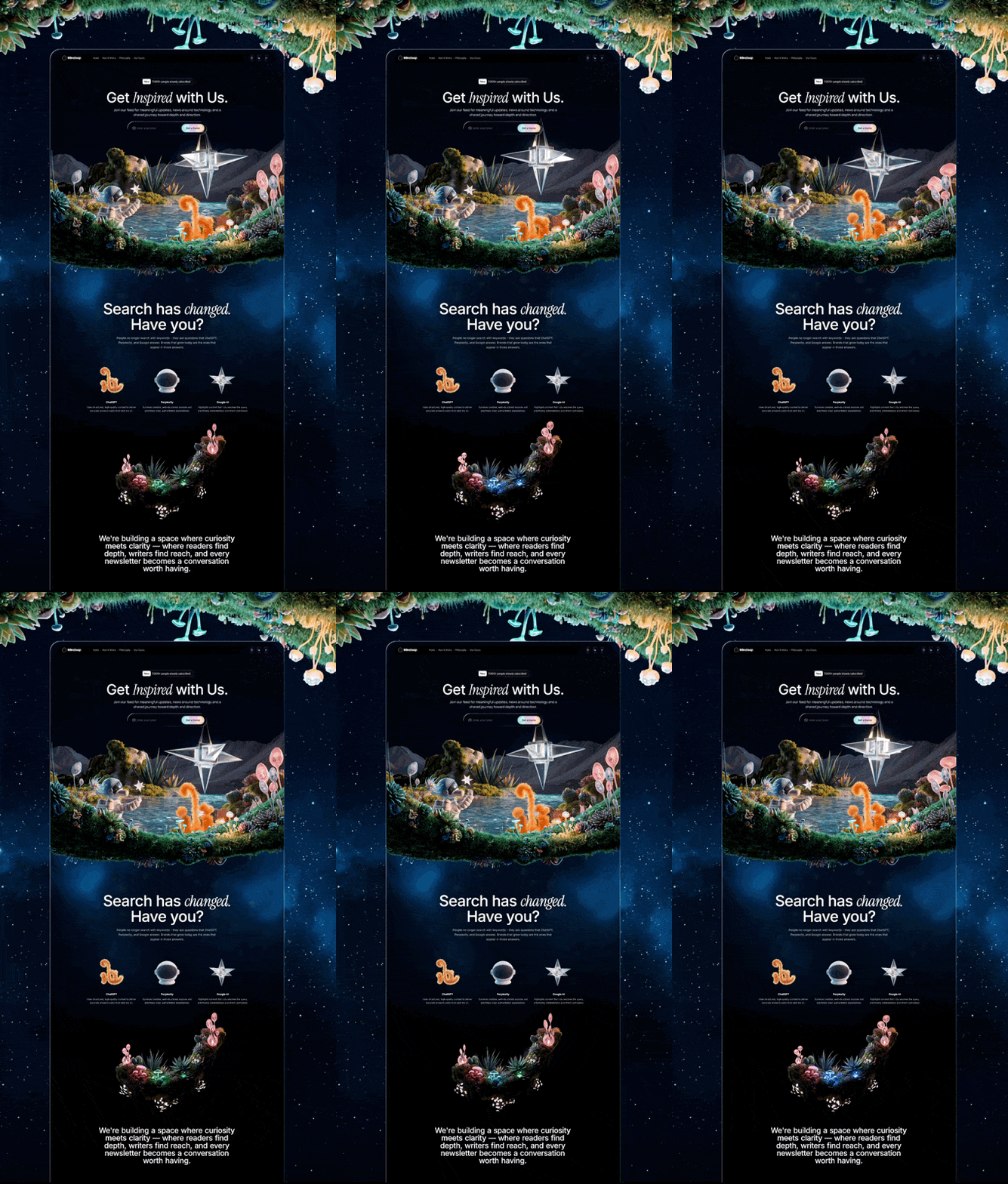
构建一个名为 Mindloop 的深色单色 landing page——一个 newsletter/content platform。使用 React + Vite + TypeScript + Tailwind CSS + shadcn/ui + Framer Motion。字体:Inter(sans)和 Instrument Serif(serif,用于斜体强调词)。整个主题采用纯黑色(#000)background 和白色 foreground——除单色外不使用任何颜色或 gradients。安装 hls.js 和 framer-motion。

设计系统(index.css)
所有 CSS variables 均使用 HSL(变量中不含 hsl() wrapper,仅保留数值):

--background: 0 0% 0%
--foreground: 0 0% 100%
--card: 0 0% 5%
--card-foreground: 0 0% 100%
--primary: 0 0% 100%
--primary-foreground: 0 0% 0%
--secondary: 0 0% 12%
--secondary-foreground: 0 0% 85%
--muted: 0 0% 15%
--muted-foreground: 0 0% 65%
--accent: 170 15% 45%
--accent-foreground: 0 0% 100%
--border: 0 0% 20%
--input: 0 0% 18%
--ring: 0 0% 40%
--hero-subtitle: 210 17% 95%
液态玻璃效果(全局 CSS class .liquid-glass)

.liquid-glass {
  background: rgba(255, 255, 255, 0.01);
  background-blend-mode: luminosity;
  backdrop-filter: blur(4px);
  -webkit-backdrop-filter: blur(4px);
  border: none;
  box-shadow: inset 0 1px 1px rgba(255, 255, 255, 0.1);
  position: relative;
  overflow: hidden;
}
.liquid-glass::before {
  content: '';
  position: absolute;
  inset: 0;
  border-radius: inherit;
  padding: 1.4px;
  background: linear-gradient(180deg,
    rgba(255,255,255,0.45) 0%, rgba(255,255,255,0.15) 20%,
    rgba(255,255,255,0) 40%, rgba(255,255,255,0) 60%,
    rgba(255,255,255,0.15) 80%, rgba(255,255,255,0.45) 100%);
  -webkit-mask: linear-gradient(#fff 0 0) content-box, linear-gradient(#fff 0 0);
  -webkit-mask-composite: xor;
  mask-composite: exclude;
  pointer-events: none;
}
动画模式
所有 sections 使用一个可复用的 fadeUp helper,并设置交错 delays:

const fadeUp = (delay: number) => ({
  initial: { opacity: 0, y: 20 },
  whileInView: { opacity: 1, y: 0 },
  viewport: { once: true, margin: "-100px" },
  transition: { duration: 0.6, delay, ease: "easeOut" },
});

页面结构(从上到下)
1. Navbar(fixed、transparent)
左侧:Logo(同心圆 icon——外层 w-7 h-7,带 border-2 border-foreground/60;内层 w-3 h-3,带 border border-foreground/60)+ "Mindloop" 粗体文字。
中间偏左:Nav links ["首页", "运作方式", "理念", "使用场景"],以 • dots 分隔。Links 为 text-muted-foreground hover:text-foreground。
右侧:3 个 social icons(来自 lucide-react 的 Instagram、Linkedin、Twitter),置于 liquid-glass circular buttons(w-10 h-10 rounded-full)中。
无 background——完全 transparent,fixed top-0 z-50,padding px-8 md:px-28 py-4。

2. Hero Section(full viewport height)
Background:覆盖整个 section 的 autoplaying looping muted MP4 video。
Video URL:https://d8j0ntlcm91z4.cloudfront.net/user_38xzZboKViGWJOttwIXH07lWA1P/hf_20260325_120549_0cd82c36-56b3-4dd9-b190-069cfc3a623f.mp4
底部 gradient:h-64 bg-gradient-to-t from-background to-transparent,使画面平滑淡入黑色。
内容(centered、z-10、pt-28 md:pt-32):
头像行:3 个重叠的圆形头像(-space-x-2、w-8 h-8 rounded-full border-2 border-background)+ "已有 7,000+ 人订阅",样式为 text-muted-foreground text-sm。
Heading:text-5xl md:text-7xl lg:text-8xl font-medium tracking-[-2px]——"与我们一起获取灵感",其中 "灵感" 使用 font-serif italic font-normal。
Subtitle:使用 hsl(var(--hero-subtitle)) color 的 text-lg——"加入我们的信息流,获取有意义的更新、科技资讯,并共同踏上追寻深度与方向的旅程。"
Email form:liquid-glass rounded-full p-2 max-w-lg container,包含 email input 和一个 white bg-foreground text-background rounded-full px-8 py-3 的 "订阅" button,设置 whileHover scale 1.03 和 whileTap scale 0.98。

3. "搜索已经改变" Section
顶部 padding pt-52 md:pt-64,底部 padding pb-6 md:pb-9。
Heading:text-5xl md:text-7xl lg:text-8xl——"搜索已经改变。你呢?",其中 "改变。" 使用 serif italic。
Subtitle:text-muted-foreground text-lg max-w-2xl mx-auto mb-24。
3 个平台 cards(grid md:grid-cols-3 gap-12 md:gap-8 mb-20):每个 card 均包含一个居中的 200x200 icon image、平台名称(font-semibold text-base)和说明(text-muted-foreground text-sm)。
ChatGPT icon:本地资源 icon-chatgpt.png
Perplexity icon:本地资源 icon-perplexity.png
Google AI icon:本地资源 icon-google.png
底部标语:"如果你不回答这些问题,别人就会回答。",样式为 text-muted-foreground text-sm text-center。

4. Mission Section
Padding pt-0 pb-32 md:pb-44。
Video:居中的大型 800x800 looping autoplaying muted video。
Video URL:https://d8j0ntlcm91z4.cloudfront.net/user_38xzZboKViGWJOttwIXH07lWA1P/hf_20260325_132944_a0d124bb-eaa1-4082-aa30-2310efb42b4b.mp4
使用 framer-motion 的 useScroll 和 useTransform 实现由滚动驱动的逐词显示:
Paragraph 1(text-2xl md:text-4xl lg:text-5xl font-medium tracking-[-1px]):"我们正在构建一个好奇与清晰相遇的空间——读者在这里获得深度,作者在这里扩大触达,每一封 newsletter 都成为一场值得展开的对话。" 单词 "好奇"、"相遇"、"清晰" 使用 --foreground 高亮,其余使用 --hero-subtitle。
Paragraph 2(text-xl md:text-2xl lg:text-3xl font-medium mt-10):"一个让内容、社区与洞察协同流动的平台——减少噪声、减少摩擦,为每一位参与者带来更多意义。"
每个单词的 opacity 根据 scroll progress 从 0.15 过渡至 1。

5. Solution Section
Padding py-32 md:py-44,border-t border-border/30。
Label:"解决方案",使用 text-xs tracking-[3px] uppercase text-muted-foreground。
Heading:text-4xl md:text-6xl——"承载有意义内容的平台"("有意义" 使用 serif italic)。
Video:Rounded rounded-2xl、aspect-[3/1] object-cover。
Video URL:https://d8j0ntlcm91z4.cloudfront.net/user_38xzZboKViGWJOttwIXH07lWA1P/hf_20260325_125119_8e5ae31c-0021-4396-bc08-f7aebeb877a2.mp4
4-column feature grid(md:grid-cols-4 gap-8):精选信息流、作者工具、社区、分发——每项都包含标题(font-semibold text-base)和说明(text-muted-foreground text-sm)。

6. CTA Section
Padding py-32 md:py-44,border-t border-border/30,overflow-hidden。
Background video(通过 hls.js 使用 HLS):absolute inset-0 object-cover z-0。
HLS URL:https://stream.mux.com/8wrHPCX2dC3msyYU9ObwqNdm00u3ViXvOSHUMRYSEe5Q.m3u8
使用 Hls.isSupported() check,并为 Safari fallback 到 native HLS。
Overlay:absolute inset-0 bg-background/45 z-[1]。
内容(z-10、centered):
同心圆 logo icon(w-10 h-10 外层,w-5 h-5 内层)。
Heading:"开启你的旅程"(serif italic)。
Subtitle 使用 text-muted-foreground。
两个 buttons:"立即订阅"(bg-foreground text-background rounded-lg px-8 py-3.5)和 "开始创作"(liquid-glass rounded-lg)。

7. Footer
简洁的 py-12 px-8 md:px-28 footer。
左侧:"© 2026 Mindloop。保留所有权利。",样式为 text-muted-foreground text-sm。
右侧:隐私、条款、联系 links,样式为 text-muted-foreground text-sm hover:text-foreground。

关键依赖项
framer-motion:用于所有动画
hls.js:用于 CTA background video streaming
@fontsource/inter(400、500、600、700)
@fontsource/instrument-serif(400、400-italic)
lucide-react:用于 icons
tailwindcss-animate plugin

所需资源
3 张头像图片(avatar-1.png、avatar-2.png、avatar-3.png)
3 个平台图标(icon-chatgpt.png、icon-perplexity.png、icon-google.png)适用模型与稳定度
建议模型
多人复现
继续探索
提示语
使用 **React 18 + TypeScript + Vite + Tailwind CSS + motion/react (framer motion) + lucide-react** 构建一个名为 "Aura" 的高端 AI 原生电子邮件客户端落地页。整体采用深色美学(背景 `#0c0c0c`),呈现电影感与玻璃质感,包含循环播放的全屏背景视频、闪亮的渐变标题、macOS 风格菜单栏、逼真的收件箱模型,以及自定义 "liquid-glass" 卡片效果。 ## 技

无代码产品的等候名单页,React + Tailwind v4 + Motion + hls.js,暗色单屏加视频流背景。
提示语
使用 React + Vite + Tailwind CSS v4 + Motion (framer-motion) + Lucide React icons + hls.js 构建一个全屏深色 hero section 落地页。页面应为单屏(100vh,无滚动),采用黑色背景、全屏背景视频、glassmorphism navbar,以及包含电子邮件收集 CTA 的居中 hero。 > > **依赖项:** `react`、`react-dom`、`motion`、`hls.

3D 创作者 Jack 的作品集落地页,React + TypeScript + Framer Motion,#0C0C0C 暗底。
提示语
使用 React、TypeScript、Tailwind CSS、Framer Motion 和 Lucide React,为「Jack」构建一个 3D 创作者作品集落地页。页面采用深色主题(背景为 #0C0C0C),字体使用 Kanit(Google Fonts,字重 300-900)。页面标题为「Jack -- 3D Creator」。 全局样式 html、body、#root 和主容器的背景:#0C0C0C 字体族:'Kanit', sans-serif 全局重置:b
Case 详情页把原帖效果、Prompt 与复测证据放在同一条阅读路径里。


