

加载中…
创作者 · MotionSites
查看原始来源 ↗复刻提示词保留原文,另附运行环境、素材与验收要求;附加说明不是原作者原话。
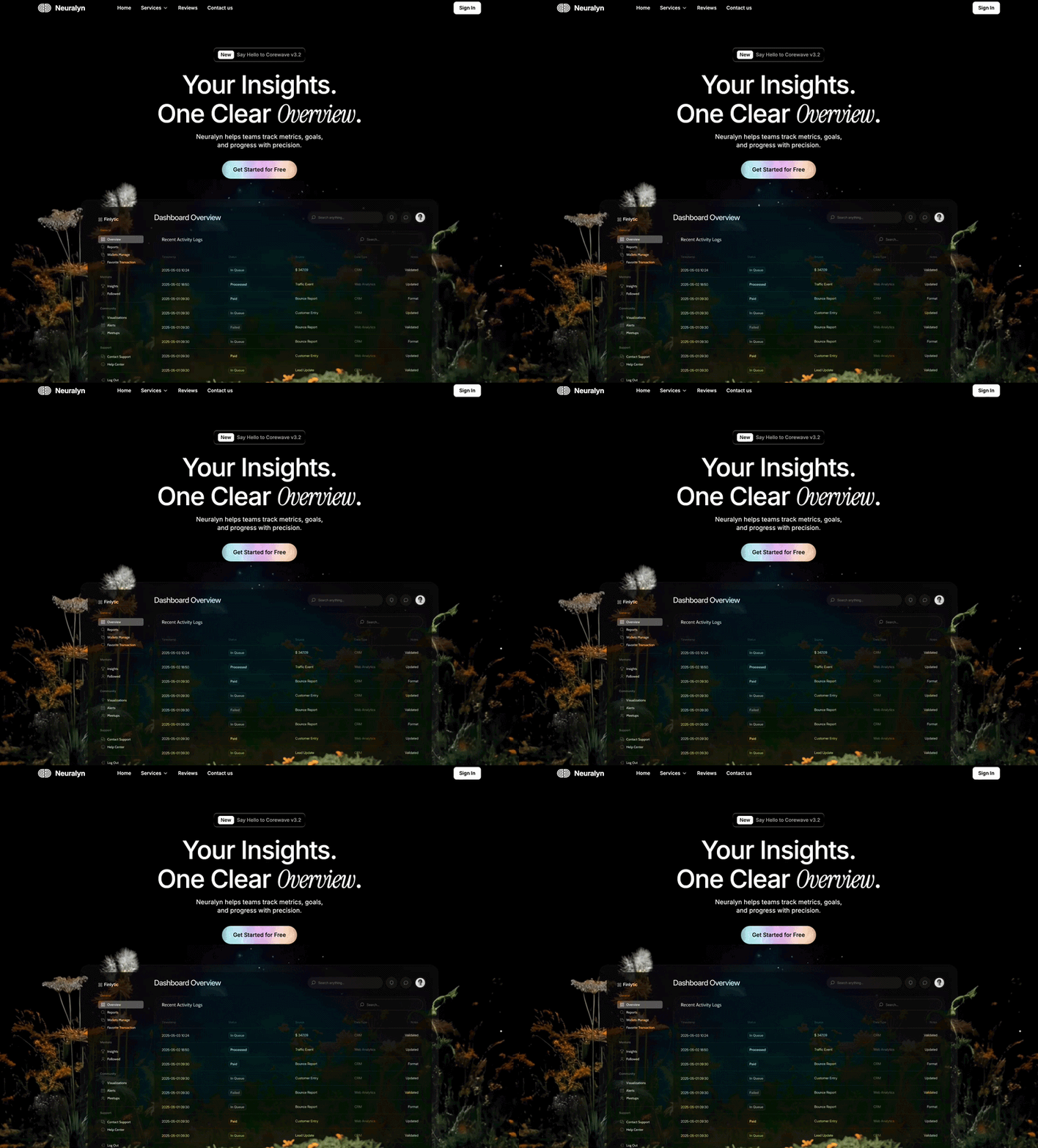
为“Neuralyn”——一款分析仪表板 SaaS——创建一个深色落地页。使用 React + Vite + Tailwind CSS + TypeScript + Framer Motion + shadcn/ui。

字体
正文/UI 使用通过 @fontsource/inter 引入的 Inter(400、500、600、700)
斜体强调词使用通过 @fontsource/instrument-serif 引入的 Instrument Serif(400、400-italic)

颜色主题(全部使用 HSL,默认在 :root 中启用深色模式)
背景:0 0% 0%(纯黑)
前景:0 0% 100%(纯白)
弱化前景:0 0% 65%
卡片:0 0% 5%
边框:0 0% 20%
首屏副标题:210 17% 95%

页面结构
Section 1:首屏(占满视口高度,overflow-hidden)

导航栏——横向布局,内边距 px-8 md:px-28 py-4:

左侧:Logo 图片 + “Neuralyn”文字(text-xl font-bold tracking-tight)+ 导航链接(Home、带 ChevronDown 图标的 Services、Reviews、Contact us)——移动端隐藏链接,链接之间 gap-1,Logo 与链接之间 gap-12 md:gap-20
右侧:“Sign In”按钮——纯白背景(bg-foreground)、黑色文字(text-background)、rounded-lg text-sm font-semibold,悬停时进行 opacity transition

首屏内容——居中纵向排列,mt-16 md:mt-20 px-4:

标签胶囊:一个“liquid glass”风格的胶囊(liquid-glass class),内部包含“New”徽章(白色背景、黑色文字、rounded-md text-sm font-medium px-2 py-0.5)+ 使用 text-sm font-medium text-muted-foreground 的“Say Hello to Corewave v3.2”。胶囊设置 px-3 py-2 rounded-lg mb-6。
标题:text-5xl md:text-7xl、tracking-[-2px]、font-medium、leading-tight md:leading-[1.15] mb-3。文字:“Your Insights.” / “One Clear Overview.”——其中“Overview”使用 Instrument Serif italic(font-serif italic font-normal)
副标题:text-lg font-normal leading-6 opacity-90 mb-8,颜色使用 CSS 变量 --hero-subtitle。文字:“Neuralyn helps teams track metrics, goals, and progress with precision.”,在“goals,”后添加一个 <br/>
CTA 按钮:“Get Started for Free”——纯白色(bg-foreground text-background),rounded-full px-8 py-3.5 text-base font-medium,whileHover: scale 1.03,whileTap: scale 0.98

仪表板 + 视频区域——使用 w-screen 和 marginLeft: calc(-50vw + 50%) 技巧占满整个视口宽度,aspect-ratio: 16/9,positioned relative:

背景视频:<video>,绝对定位,inset-0 w-full h-full object-cover。URL:https://d8j0ntlcm91z4.cloudfront.net/user_38xzZboKViGWJOttwIXH07lWA1P/hf_20260307_083826_e938b29f-a43a-41ec-a153-3d4730578ab8.mp4
仪表板图片:绝对定位,居中,max-w-5xl w-[90%] rounded-2xl,mixBlendMode: "luminosity"。具有视差滚动效果(y: 0→-250)。
底部渐变淡出:绝对定位在 section 底部,h-40,从背景色到透明色的渐变,z-30,pointer-events-none。

视差滚动效果(Framer Motion useScroll({ target: sectionRef, offset: ["start start", "end start"] }) + useTransform):

首屏文字内容组:y: [0, -200] 和 opacity: [1, 0](在滚动的前 50% 逐渐淡出)
仪表板图片:y: [0, -250]

入场动画:交错的 initial={{ opacity: 0, y }} / animate={{ opacity: 1, y: 0 }}:

标签胶囊:y: 10,duration 0.5s,delay 0
标题:y: 20,duration 0.6s,delay 0.1
副标题:y: 20,duration 0.6s,delay 0.2
CTA:y: 20,duration 0.6s,delay 0.3
仪表板区域:y: 40,duration 0.8s,delay 0.4

Liquid Glass CSS

.liquid-glass {
  background: rgba(255, 255, 255, 0.01);
  background-blend-mode: luminosity;
  backdrop-filter: blur(4px);
  -webkit-backdrop-filter: blur(4px);
  border: none;
  box-shadow: inset 0 1px 1px rgba(255, 255, 255, 0.1);
  position: relative;
  overflow: hidden;
}
.liquid-glass::before {
  content: '';
  position: absolute;
  inset: 0;
  border-radius: inherit;
  padding: 1.4px;
  background: linear-gradient(180deg,
    rgba(255,255,255,0.45) 0%, rgba(255,255,255,0.15) 20%,
    rgba(255,255,255,0) 40%, rgba(255,255,255,0) 60%,
    rgba(255,255,255,0.15) 80%, rgba(255,255,255,0.45) 100%);
  -webkit-mask: linear-gradient(#fff 0 0) content-box, linear-gradient(#fff 0 0);
  -webkit-mask-composite: xor;
  mask-composite: exclude;
  pointer-events: none;
}

Section 2:客户评价(min-h-screen,居中,py-24 md:py-32 px-8 md:px-28)

引号符号图片(w-14 h-10 object-contain)
客户评价文字(text-4xl md:text-5xl font-medium leading-[1.2],包裹在 flex flex-wrap 中):“Neuralyn revolutionized how we handle financial insights using smart analytics. We are now driving better outcomes quicker than we ever imagined! Neuralyn revolutionized how we handle financial insights using smart analytics.”
滚动驱动的逐词显现:每个单词都是一个带有 mr-[0.3em] 的 <motion.span>。使用 useScroll({ target: containerRef, offset: ["start end", "end center"] })。每个单词映射到连续区间 [i/total, (i+1)/total] → opacity: [0.2, 1] 和 color: ["hsl(0 0% 35%)", "hsl(0 0% 100%)"]。
末尾的 ” 引号使用 text-muted-foreground ml-2
作者行(flex items-center gap-4):头像图片(w-14 h-14 rounded-full border-[3px] border-foreground object-cover)+ 姓名“Brooklyn Simmons”(text-base font-semibold leading-7 text-foreground)+ 职位“Product Manager”(text-sm font-normal leading-5 text-muted-foreground)
布局:max-w-3xl mx-auto,内容左对齐(items-start),元素之间 gap-10

所需资源:
logo.png——小型 Logo 图标
hero-dashboard.png——仪表板截图
quote-symbol.png——装饰性引号标记
testimonial-avatar.png——圆形头像适用模型与稳定度
建议模型
多人复现
继续探索

3D 创作者 Jack 的作品集落地页,React + TypeScript + Framer Motion,#0C0C0C 暗底。
提示语
使用 React、TypeScript、Tailwind CSS、Framer Motion 和 Lucide React,为「Jack」构建一个 3D 创作者作品集落地页。页面采用深色主题(背景为 #0C0C0C),字体使用 Kanit(Google Fonts,字重 300-900)。页面标题为「Jack -- 3D Creator」。 全局样式 html、body、#root 和主容器的背景:#0C0C0C 字体族:'Kanit', sans-serif 全局重置:b
提示语

为一家名为“NEXOVA”的托管公司构建一个全屏 404 错误页面。整个页面采用单视口高度布局,包含循环播放的背景视频、导航栏、居中的 hero/404 区域和多栏页脚。使用 React + Tailwind CSS + Lucide React icons。不要使用其他 UI 库。 --- **字体** 在 `index.html` 中通过以下样式表加载“Helvetica Now Var”: ``` <link href="https://db.onlinewebf

ADHD 友好的日程应用 Drift 落地站,React + Vite + TypeScript + Tailwind,安静低刺激的视觉方向本身就是产品卖点。
提示语
为 "Drift" 构建一个单页落地网站——这是一款平静、对 ADHD 友好的规划应用。使用 React + Vite + TypeScript + Tailwind CSS + lucide-react 提供图标。不要使用其他 UI 库。 ### 字体 通过 Google Fonts 在 `index.css` 中导入: - **Inter**(字重 400、500、600)——用作基础正文字体 - **Instrument Serif**(仅斜体)——用于首屏标题中的
Case 详情页把原帖效果、Prompt 与复测证据放在同一条阅读路径里。


