

加载中…
创作者 · MotionSites
查看原始来源 ↗复刻提示词保留原文,另附运行环境、素材与验收要求;附加说明不是原作者原话。
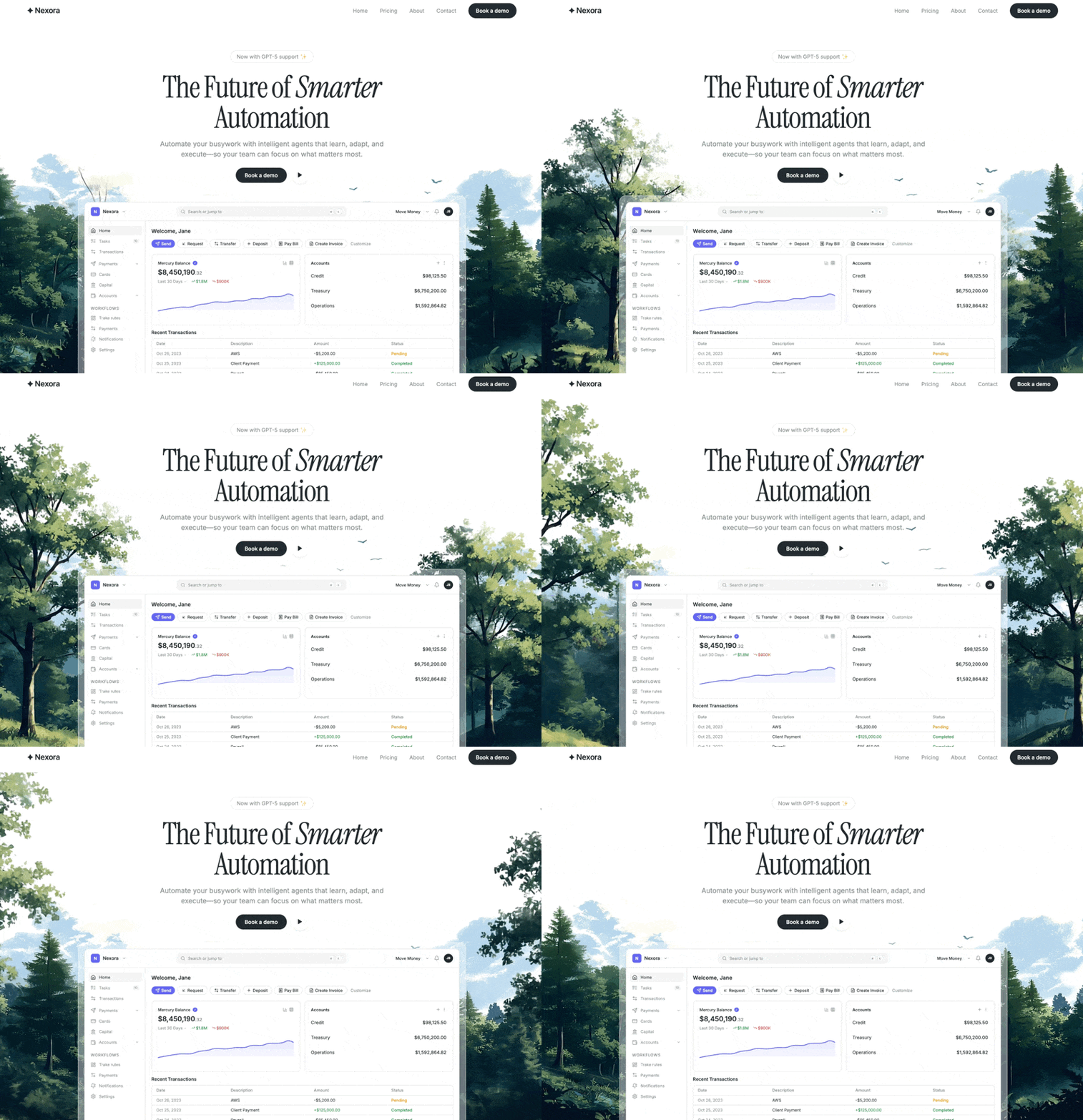
创建一个 SaaS 落地页的 hero section,严格遵循以下规格:

页面布局

整个页面采用 h-screen flex flex-col bg-background overflow-hidden——Navbar + Hero 恰好填满 100vh,不可滚动。
页面使用两种通过 CSS 导入的 Google Fonts:Instrument Serif(用于展示文字/标题,包括斜体)和 Inter(用于正文)。
字体与设计 Token(index.css)

导入字体:

@import url('https://fonts.googleapis.com/css2?family=Instrument+Serif:ital@0;1&family=Inter:wght@400;500;600&display=swap');
CSS 变量(:root):

--background: 0 0% 100%(白色)
--foreground: 210 14% 17%(深炭灰色)
--primary: 210 14% 17% / --primary-foreground: 0 0% 100%
--secondary: 0 0% 96% / --secondary-foreground: 0 0% 9%
--muted: 0 0% 96% / --muted-foreground: 184 5% 55%
--accent: 239 84% 67%(靛蓝色/蓝色)/ --accent-foreground: 0 0% 100%
--border: 0 0% 90%
--ring: 239 84% 67%
--radius: 0.5rem
--font-display: 'Instrument Serif', serif
--font-body: 'Inter', sans-serif
--shadow-dashboard: 0 25px 80px -12px rgba(0, 0, 0, 0.08), 0 0 0 1px rgba(0, 0, 0, 0.06)
Tailwind 配置扩展 fontFamily,将 display 和 body 映射到 CSS 变量。所有颜色均使用 hsl(var(--token)) 模式。

Navbar

flex items-center justify-between px-6 md:px-12 lg:px-20 py-5 font-body
左侧:Logo 文字 ✦ Nexora——text-xl font-semibold tracking-tight text-foreground
右侧(在移动端隐藏):导航链接“首页”“定价”“关于”“联系”——text-sm text-muted-foreground hover:text-foreground,gap-8
CTA 按钮:rounded-full px-5 text-sm font-medium,使用 primary 样式
Hero Section


背景视频:全屏静音自动播放循环视频,absolute inset-0 w-full h-full object-cover z-0
视频 URL:https://d8j0ntlcm91z4.cloudfront.net/user_38xzZboKViGWJOttwIXH07lWA1P/hf_20260319_015952_e1deeb12-8fb7-4071-a42a-60779fc64ab6.mp4
所有内容包裹在 relative z-10 flex flex-col items-center w-full 中
1. 徽章(顶部)

Framer Motion:从 y:10 向上淡入,duration 0.5s
inline-flex items-center gap-1.5 rounded-full border border-border bg-background px-4 py-1.5 text-sm text-muted-foreground font-body
文字:“现已支持 GPT-5 ✨”
mb-6
2. 标题

Framer Motion:从 y:16 向上淡入,duration 0.6s,delay 0.1s
text-center font-display text-5xl md:text-6xl lg:text-[5rem] leading-[0.95] tracking-tight text-foreground max-w-xl
内容:更智能自动化的未来——“更智能”一词使用 Instrument Serif italic 渲染
3. 副标题

Framer Motion:从 y:16 向上淡入,duration 0.6s,delay 0.2s
mt-4 text-center text-base md:text-lg text-muted-foreground max-w-[650px] leading-relaxed font-body
文字:“利用能够学习、适应并执行任务的智能代理,将繁忙工作自动化——让你的团队专注于最重要的事情。”
4. CTA 按钮

Framer Motion:从 y:16 向上淡入,duration 0.6s,delay 0.3s
mt-5 flex items-center gap-3
主按钮:rounded-full px-6 py-5 text-sm font-medium font-body——文字“预约演示”
播放按钮:ghost variant,h-11 w-11 rounded-full border-0 bg-background shadow-[0_2px_12px_rgba(0,0,0,0.08)] hover:bg-background/80,包含一个 Play icon(lucide),h-4 w-4 fill-foreground
5. Dashboard 预览(自定义编码,NOT an image)

Framer Motion:从 y:30 向上淡入,duration 0.8s,delay 0.5s
容器:mt-8 w-full max-w-5xl
磨砂玻璃 wrapper:rounded-2xl overflow-hidden p-3 md:p-4,使用 inline styles:
background: rgba(255, 255, 255, 0.4)
border: 1px solid rgba(255, 255, 255, 0.5)
boxShadow: var(--shadow-dashboard)
Dashboard 内部元素(全部使用 React 编码,text-[11px]、select-none pointer-events-none):

Top bar:圆角方框中的 Logo“N”+“Nexora”+ chevron | 带 ⌘K shortcut 的搜索栏 | “转账”+ bell + avatar“JB”
Sidebar(w-40):项目——首页(active)、任务(badge“10”)、交易、付款(chevron)、卡片、资金、账户(chevron)。分区“工作流”:跟踪路线、付款、通知、设置
Main content(bg-secondary/30):
问候语:“欢迎,Jane”——text-sm font-semibold
操作按钮行:发送(primary/accent)、请求、转账、存款、支付账单、创建发票——rounded-full pill buttons text-[10px],+“自定义”文字
两个等宽卡片(flex-1 basis-0)并排显示:
余额卡片:“Mercury 余额”,带 checkmark,金额 $8,450,190.32(美分部分使用 text-xs text-muted-foreground),统计数据(过去 30 天、+$1.8M 绿色、-$900K 红色),SVG area chart(h-20),带平滑的 cubic Bézier curve,linear gradient fill 从 15% opacity 的 accent 渐变至透明,stroke 使用 accent color,strokeWidth="1.5"
账户卡片:Header“账户”,带 + 和 ⋮ icons。三行(py-3、无 dividers、text-xs、justify-between):信贷 $98,125.50、财资 $6,750,200.00、运营 $1,592,864.82
交易表格:“近期交易”heading,表格 columns 为日期/说明/金额/状态。4 行:AWS -$5,200 待处理(amber)、客户付款 +$125,000 已完成(green)、工资 -$85,450 已完成、办公用品 -$1,200 已完成
依赖项

framer-motion 用于所有动画
lucide-react 用于所有 icons
shadcn/ui Button component
Tailwind CSS,配合 tailwindcss-animate plugin
关键设计决策

Dashboard 向 viewport 底部溢出,并由 parent 上的 overflow-hidden 裁剪
无 dark mode——仅 light
所有颜色均使用语义化 Tailwind tokens,components 中绝不使用 raw color values
SVG chart 使用手工制作的 cubic Bézier path,而非 charting library适用模型与稳定度
建议模型
多人复现
继续探索

3D 创作者 Jack 的作品集落地页,React + TypeScript + Framer Motion,#0C0C0C 暗底。
提示语
使用 React、TypeScript、Tailwind CSS、Framer Motion 和 Lucide React,为「Jack」构建一个 3D 创作者作品集落地页。页面采用深色主题(背景为 #0C0C0C),字体使用 Kanit(Google Fonts,字重 300-900)。页面标题为「Jack -- 3D Creator」。 全局样式 html、body、#root 和主容器的背景:#0C0C0C 字体族:'Kanit', sans-serif 全局重置:b
提示语

为一家名为“NEXOVA”的托管公司构建一个全屏 404 错误页面。整个页面采用单视口高度布局,包含循环播放的背景视频、导航栏、居中的 hero/404 区域和多栏页脚。使用 React + Tailwind CSS + Lucide React icons。不要使用其他 UI 库。 --- **字体** 在 `index.html` 中通过以下样式表加载“Helvetica Now Var”: ``` <link href="https://db.onlinewebf

ADHD 友好的日程应用 Drift 落地站,React + Vite + TypeScript + Tailwind,安静低刺激的视觉方向本身就是产品卖点。
提示语
为 "Drift" 构建一个单页落地网站——这是一款平静、对 ADHD 友好的规划应用。使用 React + Vite + TypeScript + Tailwind CSS + lucide-react 提供图标。不要使用其他 UI 库。 ### 字体 通过 Google Fonts 在 `index.css` 中导入: - **Inter**(字重 400、500、600)——用作基础正文字体 - **Instrument Serif**(仅斜体)——用于首屏标题中的
Case 详情页把原帖效果、Prompt 与复测证据放在同一条阅读路径里。


