

加载中…
创作者 · MotionSites
查看原始来源 ↗复刻提示词保留原文,另附运行环境、素材与验收要求;附加说明不是原作者原话。
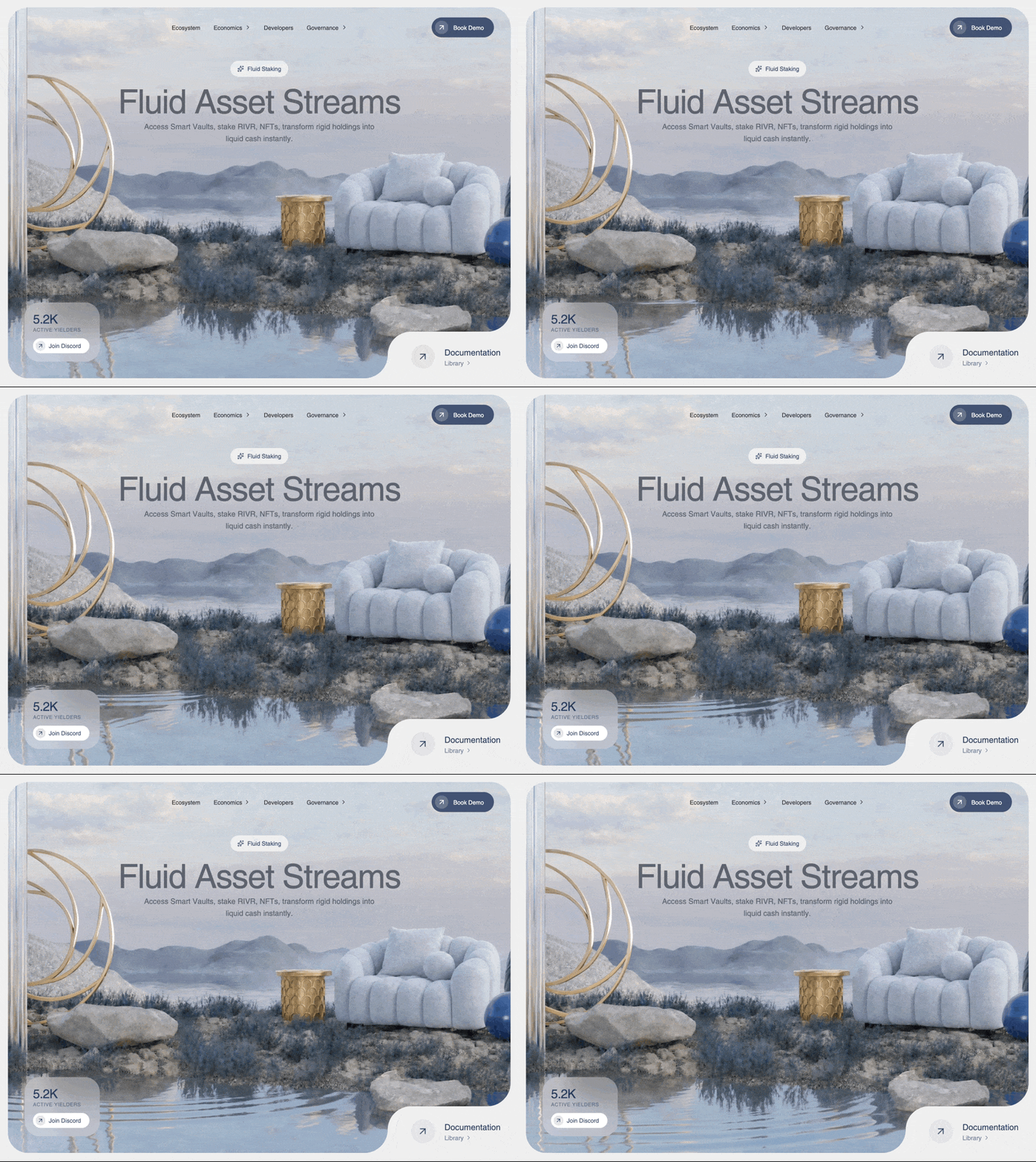
为名为 RIVR 的 DeFi 仪表盘构建一个 Hero 区域,呈现简洁精致的 glassmorphism 美学。请严格仿照以下规格,确保 UI 具有高级质感。

依赖项:
- 使用 `lucide-react` 提供图标。
- 使用 `motion`(从 `'motion/react'` 导入)实现动画。

1. 全局样式(`src/index.css`)
导入自定义 'Helvetica Regular' 字体,正确设置 Tailwind 主题,并重置 body。需包含以下原样 CSS:
@import "tailwindcss";

@font-face {
    font-family: "Helvetica Regular";
    src: url("https://db.onlinewebfonts.com/t/a64ff11d2c24584c767f6257e880dc65.eot");
    src: url("https://db.onlinewebfonts.com/t/a64ff11d2c24584c767f6257e880dc65.eot?#iefix")format("embedded-opentype"),
    url("https://db.onlinewebfonts.com/t/a64ff11d2c24584c767f6257e880dc65.woff2")format("woff2"),
    url("https://db.onlinewebfonts.com/t/a64ff11d2c24584c767f6257e880dc65.woff")format("woff"),
    url("https://db.onlinewebfonts.com/t/a64ff11d2c24584c767f6257e880dc65.ttf")format("truetype"),
    url("https://db.onlinewebfonts.com/t/a64ff11d2c24584c767f6257e880dc65.svg#Helvetica Regular")format("svg");
}

@theme {
  --font-helvetica: "Helvetica Regular", ui-sans-serif, system-ui, sans-serif;
}

:root {
  font-family: var(--font-helvetica);
}

body {
  margin: 0;
  overflow-x: hidden;
  background-color: #f0f0f0;
}

2. App 结构(`src/App.tsx`)
创建单个 `<main className="min-h-screen bg-[#f0f0f0]">` 实例,并让它返回 `<Hero />` 组件。

3. Hero 组件(`src/components/Hero.tsx`)
外层包装器:`<div className="w-full h-screen flex items-center justify-center p-3 md:p-5 bg-[#f0f0f0]">`。
内层容器:`<section className="relative w-full max-w-[1536px] h-full rounded-[1.5rem] md:rounded-[3rem] overflow-hidden shadow-none flex flex-col items-center bg-white/10 group">`
在 `<section>` 内:
- 视频背景:
  一个带有 `autoPlay muted loop playsInline` 的 `<video>` 元素。
  Classes:`absolute inset-0 w-full h-full object-cover object-[65%] lg:object-center z-0`。
  来源 URL:`https://d8j0ntlcm91z4.cloudfront.net/user_38xzZboKViGWJOttwIXH07lWA1P/hf_20260428_193507_4286c423-2fd9-4efd-92bd-91a939453fc1.mp4`(必须完全使用此 URL)。
- 内容层:
  一个 `<div className="relative z-10 w-full h-full flex flex-col items-center">`。
  在其中依次放置:`<Navbar />`、文本容器、`<BottomLeftCard />` 和 `<BottomRightCorner />`。
- 文本容器:
  `<div className="w-full flex flex-col items-center pt-8 px-6 text-center max-w-4xl">`。在其中放置:
  - `<HeroBadge />`
  - 一个 `<motion.h1>`,class:`text-4xl sm:text-5xl md:text-6xl lg:text-[80px] font-normal text-[#5E6470] mb-2 tracking-tight leading-[1.05]`。文本:“流动资产流”。动画:initial={{ opacity: 0, scale: 0.98 }}, animate={{ opacity: 1, scale: 1 }}, transition={{ duration: 0.8, delay: 0.2 }}。
  - 一个 `<motion.p>`,class:`text-sm sm:text-base md:text-lg text-[#5E6470] opacity-80 leading-relaxed max-w-xl font-normal`。文本:“访问 Smart Vaults,质押 RIVR、NFTs,即刻将僵化资产转化为流动现金。”。动画:initial={{ opacity: 0 }}, animate={{ opacity: 1 }}, transition={{ duration: 0.8, delay: 0.4 }}。

4. Navbar 组件(`src/components/Navbar.tsx`)
包装器:`<nav className="flex items-center justify-between py-6 px-6 md:px-10 w-full relative z-10">`。
- 左侧(用于居中的隐藏占位元素):`<div className="flex-1 hidden md:block" />`
- 中央菜单:`<ul className="hidden md:flex items-center gap-8 text-[rgb(45,45,45)] font-normal text-sm">`。包含这些项目:生态系统、经济模型(hasDropdown)、开发者、治理(hasDropdown)。列表项需要使用:`cursor-pointer hover:opacity-70 transition-opacity flex items-center gap-1 group`。如果 hasDropdown 为 true,则在后面添加一个 `ChevronRight` 图标(classes:`w-4 h-4 transition-transform group-hover:translate-x-0.5`)。
- 移动端 Logo:`<div className="md:hidden"><span className="font-regular tracking-tighter text-xl text-[rgba(30,50,90,0.9)]">RIVR</span></div>`
- 右侧按钮:使用 `<div className="flex-1 flex justify-end">` 包裹一个 `<motion.button>`(whileHover={{ scale: 1.02 }} whileTap={{ scale: 0.98 }})。
  按钮 classes:`flex items-center bg-[rgba(30,50,90,0.8)] text-white rounded-full pl-2 pr-4 md:pr-6 py-1.5 md:py-2 gap-2 md:gap-3 hover:bg-[rgba(30,50,90,1)] transition-colors group`。按钮内部:添加图标包装器 `<div className="bg-white/20 p-1 md:p-1.5 rounded-full flex items-center justify-center">`,其中包含 `ArrowUpRight`(w-4 h-4 md:w-5 md:h-5 text-white),以及文本节点“预约演示”(`text-xs md:text-sm font-normal`)。

5. HeroBadge 组件(`src/components/HeroBadge.tsx`)
返回一个 `<motion.div>`(initial opacity 0, y 20;animate opacity 1, y 0;transition duration 0.6, ease "easeOut")。
Classes:`flex items-center gap-2 px-4 py-2 rounded-full bg-white/60 backdrop-blur-md border border-white/20 mx-auto mb-3 w-fit`。
内容:`<Sparkles className="w-4 h-4 text-[rgba(30,50,90,0.8)]" />` 和文本 `<span className="text-[14px] font-normal text-[rgba(30,50,90,0.9)]">流动质押</span>`。

6. BottomLeftCard 组件(`src/components/BottomLeftCard.tsx`)
返回一个 `<motion.div>`(initial x: -20, opacity: 0;animate x: 0, opacity: 1;transition: duration 0.8, delay 0.2)。
位置/样式:`absolute bottom-28 right-4 left-auto md:left-6 md:right-auto md:bottom-6 lg:bottom-10 lg:left-10 p-3 md:p-4 lg:p-5 rounded-[1.2rem] md:rounded-[1.5rem] lg:rounded-[2.2rem] bg-white/30 backdrop-blur-xl flex flex-col gap-2 lg:gap-3 min-w-[140px] md:min-w-[150px] lg:min-w-[180px] w-fit`。
- 顶部文本块:纵向排列“5.2K”(classes:`text-2xl md:text-3xl font-normal text-[rgba(30,50,90,0.9)] tracking-tight`)和“活跃收益者”(classes:`text-[10px] md:text-[12px] font-normal text-[rgba(30,50,90,0.6)] uppercase tracking-wider`)。
- 加入 Discord 的 `<motion.button>`(hover/tap scale 1.02/0.98)。Classes:`flex items-center bg-white rounded-full pl-1.5 pr-5 py-1.5 gap-2 hover:bg-white/90 transition-colors self-start group`。内部:将 `ArrowUpRight` 包裹在 `<div className="bg-[rgba(30,50,90,0.1)] p-1 rounded-full ...">` 中(图标使用 `text-[rgba(30,50,90,0.9)]`),并追加“加入 Discord”文本(`text-[14px] font-normal text-[rgba(30,50,90,0.9)]`)。

7. BottomRightCorner 组件(`src/components/BottomRightCorner.tsx`)
这里需要一个复杂的仿镂空布局。使用一个 `<motion.div>`(initial y: 20, opacity: 0;animate y: 0, opacity: 1;duration: 0.8, delay: 0.4)。
Classes:`absolute bottom-0 right-0 p-3 pt-5 pl-8 sm:p-4 sm:pt-6 sm:pl-10 md:p-6 md:pt-8 md:pl-14 bg-[#f0f0f0] rounded-tl-[1.5rem] sm:rounded-tl-[2rem] md:rounded-tl-[3.5rem] flex items-center gap-3 sm:gap-4 md:gap-6`。
必须在此容器内加入以下转角遮罩:
- 顶部交接遮罩:`<div className="absolute -top-[1.5rem] sm:-top-[2rem] md:-top-[3.5rem] right-0 w-[1.5rem] sm:w-[2rem] md:w-[3.5rem] h-[1.5rem] sm:h-[2rem] md:h-[3.5rem] pointer-events-none"><svg width="100%" height="100%" viewBox="0 0 56 56" fill="none" xmlns="http://www.w3.org/2000/svg"><path d="M56 56V0C56 30.9279 30.9279 56 0 56H56Z" fill="#f0f0f0"/></svg></div>`
- 左侧交接遮罩:`<div className="absolute bottom-0 -left-[1.5rem] sm:-left-[2rem] md:-left-[3.5rem] w-[1.5rem] sm:w-[2rem] md:w-[3.5rem] h-[1.5rem] sm:h-[2rem] md:h-[3.5rem] pointer-events-none"><svg width="100%" height="100%" viewBox="0 0 56 56" fill="none" xmlns="http://www.w3.org/2000/svg"><path d="M56 56H0C30.9279 56 56 30.9279 56 0V56Z" fill="#f0f0f0"/></svg></div>`
内容:
- 圆形图标:一个使用 `bg-[rgba(30,50,90,0.05)] w-10 h-10 md:w-14 md:h-14 rounded-full flex items-center justify-center border border-[rgba(30,50,90,0.1)]` 的 div,内含 `ArrowUpRight`(`text-[rgba(30,50,90,0.8)]`)。
- 信息列,包含标题“文档”(`text-[16px] md:text-[20px] font-normal text-[rgba(30,50,90,0.95)]`)。下方是一行“资料库”文本和一个 `ChevronRight` 图标,两者包裹在 `<div className="flex items-center gap-1 text-[rgba(30,50,90,0.6)] cursor-pointer hover:text-[rgba(30,50,90,0.8)] transition-colors"><span className="text-[12px] md:text-[15px] font-normal">...` 中适用模型与稳定度
建议模型
独立复测证据
2026年10月22日
2026年8月31日
2026年8月31日
多人复现
继续探索

3D 创作者 Jack 的作品集落地页,React + TypeScript + Framer Motion,#0C0C0C 暗底。
提示语
使用 React、TypeScript、Tailwind CSS、Framer Motion 和 Lucide React,为「Jack」构建一个 3D 创作者作品集落地页。页面采用深色主题(背景为 #0C0C0C),字体使用 Kanit(Google Fonts,字重 300-900)。页面标题为「Jack -- 3D Creator」。 全局样式 html、body、#root 和主容器的背景:#0C0C0C 字体族:'Kanit', sans-serif 全局重置:b
提示语

为一家名为“NEXOVA”的托管公司构建一个全屏 404 错误页面。整个页面采用单视口高度布局,包含循环播放的背景视频、导航栏、居中的 hero/404 区域和多栏页脚。使用 React + Tailwind CSS + Lucide React icons。不要使用其他 UI 库。 --- **字体** 在 `index.html` 中通过以下样式表加载“Helvetica Now Var”: ``` <link href="https://db.onlinewebf

ADHD 友好的日程应用 Drift 落地站,React + Vite + TypeScript + Tailwind,安静低刺激的视觉方向本身就是产品卖点。
提示语
为 "Drift" 构建一个单页落地网站——这是一款平静、对 ADHD 友好的规划应用。使用 React + Vite + TypeScript + Tailwind CSS + lucide-react 提供图标。不要使用其他 UI 库。 ### 字体 通过 Google Fonts 在 `index.css` 中导入: - **Inter**(字重 400、500、600)——用作基础正文字体 - **Instrument Serif**(仅斜体)——用于首屏标题中的
Case 详情页把原帖效果、Prompt 与复测证据放在同一条阅读路径里。


