

加载中…
创作者 · MotionSites
复刻提示词保留原文,另附运行环境、素材与验收要求;附加说明不是原作者原话。
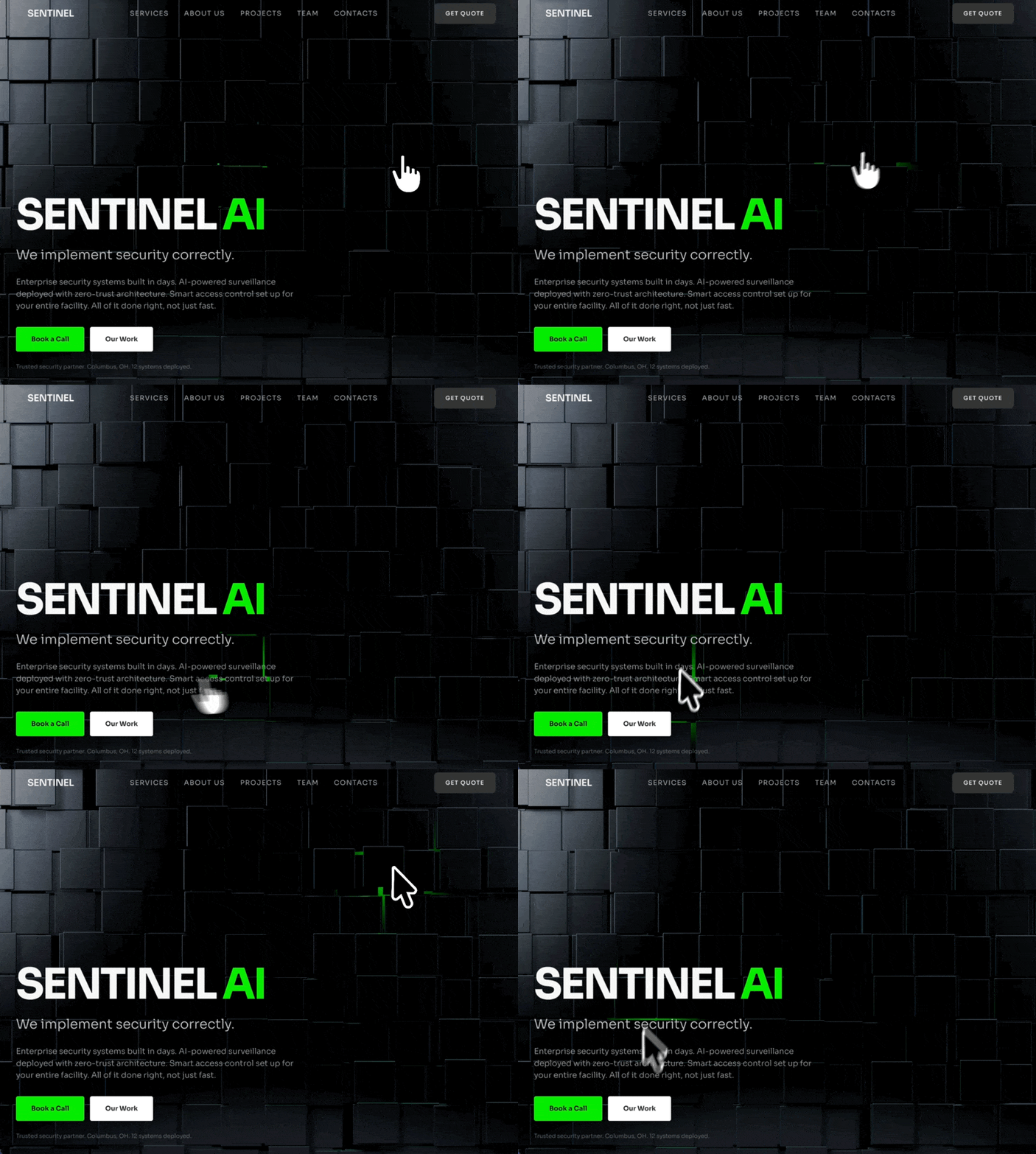
使用 React、Vite、TypeScript、Tailwind CSS、shadcn/ui,以及作为背景嵌入的 Spline 3D scene,为一家名为“SENTINEL AI”的安防公司创建一个全屏深色 hero landing page。技术栈使用 @splinetool/react-spline 和 @splinetool/runtime 嵌入 3D 内容。以下是全部细节:
字体:
Google Fonts“Sora”,字重为 300、400、500、600、700。在 index.html 中加载:
<link rel="preconnect" href="https://fonts.googleapis.com">
<link rel="preconnect" href="https://fonts.gstatic.com" crossorigin>
<link href="https://fonts.googleapis.com/css2?family=Sora:wght@300;400;500;600;700&display=swap" rel="stylesheet">
通过 Tailwind config 将 font-sora 设置为 body 字体:fontFamily: { sora: ["Sora", "sans-serif"] },并在 body 上应用 font-sora antialiased。
配色主题(全部使用 HSL CSS custom properties,仅深色模式,无浅色模式):
--background: 0 0% 10%(深炭灰色)
--foreground: 0 0% 96%(近白色)
--primary: 119 99% 46%(鲜绿色)
--primary-foreground: 0 0% 4%(近黑色)
--secondary: 0 0% 18%
--secondary-foreground: 0 0% 96%
--muted: 0 0% 16%
--muted-foreground: 0 0% 60%
--accent: 119 99% 46%(与 primary 相同的鲜绿色)
--accent-foreground: 0 0% 4%
--destructive: 0 84% 60%
--border: 0 0% 20%
--input: 0 0% 20%
--ring: 119 99% 46%
--radius: 0.5rem
--nav-button: 0 0% 18%
--hero-bg: 0 0% 8%(最深的背景色,接近黑色)
在 Tailwind config 中使用 hsl(var(--variable)) 模式映射这些属性。添加自定义颜色 token:nav-button 和 hero-bg。
自定义动画(Tailwind config keyframes + animation):
fade-up keyframe:
0%: opacity: 0, transform: translateY(20px), filter: blur(4px)
100%: opacity: 1, transform: translateY(0), filter: blur(0)
动画:fade-up 0.7s cubic-bezier(0.16, 1, 0.3, 1) forwards
fade-in keyframe:
0%: opacity: 0
100%: opacity: 1
动画:fade-in 0.5s ease-out forwards
导航栏(固定、透明、悬浮在 Spline scene 上方):
fixed top-0 left-0 right-0 z-50,水平 flex,justify-between,padding px-8 lg:px-16 py-5
左侧:Logo 文本“SENTINEL”——text-foreground text-xl font-semibold tracking-tight
中间:导航链接数组:["Services", "About Us", "Projects", "Team", "Contacts"]——每项使用 text-sm text-muted-foreground hover:text-foreground transition-colors uppercase tracking-widest。链接使用 href={#section-name}。在移动端隐藏(hidden md:flex),gap-8。
右侧:“Get Quote”按钮,使用带有自定义 navCta variant 的 shadcn Button:text-foreground bg-nav-button hover:bg-nav-button/80 active:scale-[0.97] transition-all。Size lg,class 为 hidden md:inline-flex rounded-lg uppercase text-xs tracking-widest px-6。
HERO SECTION(全屏,内容位于左下角):
结构:
外层 <section>:relative min-h-screen flex items-end bg-hero-bg overflow-hidden
Spline 3D Background(absolute,全尺寸):通过 React.lazy(() => import("@splinetool/react-spline")) 延迟加载,并包裹在 <Suspense> 中,fallback 为 <div className="absolute inset-0 bg-hero-bg" />。Spline component 使用 scene="https://prod.spline.design/Slk6b8kz3LRlKiyk/scene.splinecode" 和 className="w-full h-full"。放置在 <div className="absolute inset-0"> 内。
深色 overlay:<div className="absolute inset-0 bg-black/30 z-[1] pointer-events-none" />
内容容器:relative z-10 pointer-events-none w-full max-w-[90%] sm:max-w-md lg:max-w-2xl px-6 md:px-10 pb-10 md:pb-10 pt-32
内容元素(全部使用错开的 animate-fade-up,初始为 opacity-0):
Heading(延迟 0.2s):<h1>,文本由白色的“SENTINEL”和 primary 绿色的“ AI”组成。Classes:text-[clamp(3rem,8vw,6rem)] font-bold leading-[1.05] tracking-[-0.05em] text-foreground mb-2 md:mb-4 uppercase。“AI”部分包裹在 <span className="text-primary"> 中。
Subheading(延迟 0.4s):<p>——“我们正确地实施安防系统。”——text-foreground/80 text-[clamp(1.125rem,2.5vw,1.875rem)] font-light mb-3 md:mb-6
Description(延迟 0.55s):<p>——“数日内建成企业级安防系统。采用 zero-trust architecture 部署 AI 驱动的监控系统。为您的整个设施配置智能门禁。一切不仅做得快,更要做得正确。”——text-muted-foreground text-[clamp(0.875rem,1.5vw,1.25rem)] font-light mb-4 md:mb-8
两个 CTA 按钮(延迟 0.7s):包裹在 flex flex-wrap gap-3 font-bold 中。两者均为普通 <button> 元素(不是 shadcn Button),并带有 pointer-events-auto(由于父元素为 pointer-events-none,以此重新启用点击):
“预约通话”:bg-primary text-primary-foreground px-6 py-3 md:px-8 md:py-4 text-sm rounded-sm cursor-pointer hover:brightness-110 transition-all active:scale-[0.97]
“我们的项目”:bg-white text-background px-6 py-3 md:px-8 md:py-4 text-sm rounded-sm cursor-pointer hover:brightness-90 transition-all active:scale-[0.97]
信任信息行(延迟 0.85s):<p>——“值得信赖的安防合作伙伴。Columbus, OH。已部署 12 套系统。”——text-muted-foreground/60 text-xs font-light mt-4 md:mt-6
所有动画元素都使用 style={{ animationDelay: "Xs" }} 设置错开时间,并结合 opacity-0 animate-fade-up classes。
页面包装器(Index.tsx):
简单包装器:<div className="bg-hero-bg min-h-screen">,其中包含 <Navbar /> 和 <HeroSection />。
关键依赖项:
用于嵌入 3D Spline 内容的 @splinetool/react-spline 和 @splinetool/runtime
tailwindcss-animate plugin
带有自定义 variants(navCta、hero、heroOutline)的 shadcn/ui Button component
用于按钮 variants 的 class-variance-authority
重要说明:
Spline scene URL 为 https://prod.spline.design/Slk6b8kz3LRlKiyk/scene.splinecode——这是所使用的确切 3D scene
整个内容区域设置了 pointer-events-none,使点击可以穿透至 Spline scene,但按钮通过 pointer-events-auto 重新启用点击
Heading、Subheading 和 Description 使用 clamp() 实现响应式流体排版
内容锚定在 viewport 左下角(section 上使用 flex items-end,内容上设置 padding-bottom)
移动端没有 hamburger menu——导航链接和 CTA 直接隐藏(hidden md:flex / hidden md:inline-flex)适用模型与稳定度
建议模型
多人复现
继续探索

3D 创作者 Jack 的作品集落地页,React + TypeScript + Framer Motion,#0C0C0C 暗底。
提示语
使用 React、TypeScript、Tailwind CSS、Framer Motion 和 Lucide React,为「Jack」构建一个 3D 创作者作品集落地页。页面采用深色主题(背景为 #0C0C0C),字体使用 Kanit(Google Fonts,字重 300-900)。页面标题为「Jack -- 3D Creator」。 全局样式 html、body、#root 和主容器的背景:#0C0C0C 字体族:'Kanit', sans-serif 全局重置:b

单文件 HTML 复刻 Vesper.ai 单屏落地页,内联 CSS 加一小段 IIFE 处理菜单和动画降级,零框架零依赖,适合学怎么把整页规格压进一个文件。
提示语
精准复刻这个 **Vesper.ai** 单视口落地页。文档标题:`Vesper.ai — Operational AI Infrastructure`。`lang="en"`。使用一个包含内联 CSS 的 HTML 文件,并加入一个用于菜单和动画回退的小型 IIFE。纯黑色 `#000000`。除三项统计数据外,不要添加任何额外版块、卡片、表单、定价表或页脚。不要添加视频、WebGL、Three.js 或 Lottie。不要虚构 CloudFront URL。 立即强制显
AI 工作流产品 hero,React 18 + Tailwind 3.4,明确不用动画库,图标清单点名到具体组件。
提示语

### 技术栈 - **Vite** + **React 18** + **TypeScript** - **Tailwind CSS 3.4** - 使用 **lucide-react** 提供图标(`LogIn`、`UserPlus`、`Play`、`Sparkles`、`Menu`、`X`) - 不使用 Framer Motion——所有动画均使用 CSS `transition-*` 类 --- ### 字体(在 `index.html` 中加载) ```ht
Case 详情页把原帖效果、Prompt 与复测证据放在同一条阅读路径里。


