

加载中…
创作者 · MotionSites
查看原始来源 ↗复刻提示词保留原文,另附运行环境、素材与验收要求;附加说明不是原作者原话。
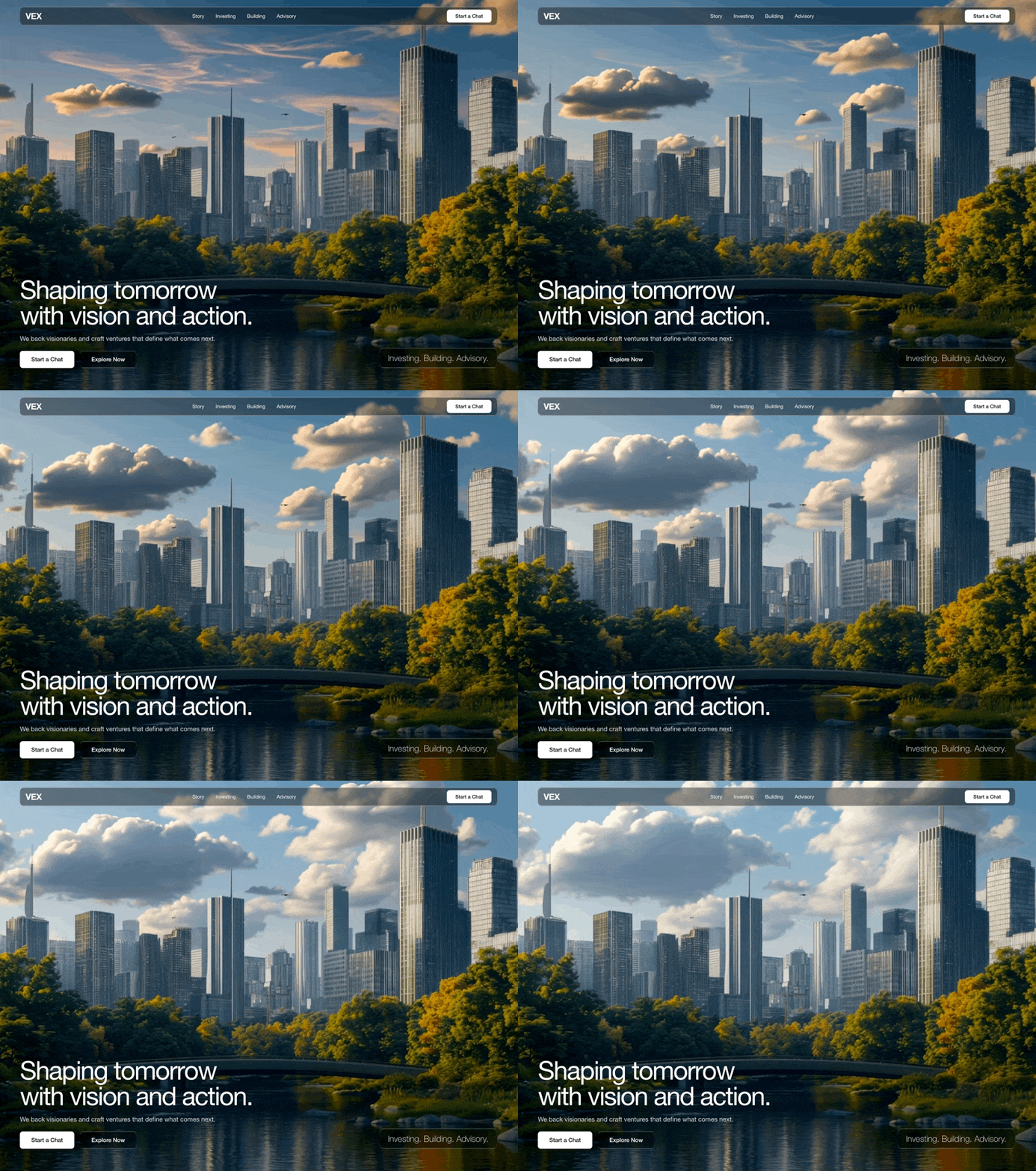
精确复刻这个 hero section。完整规格如下:

视频背景:

全屏背景视频,使用绝对定位,覆盖整个 viewport(object-cover)
视频 URL:https://d8j0ntlcm91z4.cloudfront.net/user_38xzZboKViGWJOttwIXH07lWA1P/hf_20260403_050628_c4e32401-fab4-4a27-b7a8-6e9291cd5959.mp4
Autoplay、loop、muted、playsInline
不要 dark overlay,不要 gradient overlay,不要在视频上方添加 semi-transparent layer。直接播放原始视频,不得进行任何压暗处理。
排版(关键——必须全局应用):

通过 index.html 中的 <link> 标签导入 Google Font Inter:

<link rel="preconnect" href="https://fonts.googleapis.com">
<link rel="preconnect" href="https://fonts.gstatic.com" crossorigin>
<link href="https://fonts.googleapis.com/css2?family=Inter:wght@300;400;500;600&display=swap" rel="stylesheet">
在 CSS 中将 body font-family 设置为:'Inter', sans-serif
在 body 上应用 -webkit-font-smoothing: antialiased 和 -moz-osx-font-smoothing: grayscale
同时扩展 Tailwind config,设置 fontFamily: { sans: ['Inter', 'sans-serif'] },使 Tailwind 中所有 font-sans 用法自动采用 Inter
导航栏:

包裹在页面水平内边距中:px-6 md:px-12 lg:px-16,并使用 pt-6 顶部内边距
导航栏本身使用 .liquid-glass 类,并带有 rounded-xl、px-4 py-2,以及 items-center justify-between 的 flex 布局
左侧:Logo 文字 "VEX"——text-2xl font-semibold tracking-tight
中间(移动端隐藏,md+ 显示):链接 "Story"、"Investing"、"Building"、"Advisory"——text-sm、gap-8,hover 时过渡至 gray-300
右侧:"Start a Chat" 按钮——bg-white text-black px-6 py-2 rounded-lg text-sm font-medium,hover 时变为 gray-100
Hero 内容(viewport 底部):

容器:使用与导航栏相同的水平内边距,采用 flex column 填满剩余高度,通过 flex-1 flex flex-col justify-end 将内容推至底部,底部内边距为 pb-12 lg:pb-16
在大屏幕上:双栏 grid(lg:grid lg:grid-cols-2 lg:items-end)
左栏——主要内容:

标题:"Shaping tomorrow\nwith vision and action."("tomorrow" 与 "with" 之间使用 literal line break)

响应式字号:text-4xl md:text-5xl lg:text-6xl xl:text-7xl
font-normal、mb-4
内联样式:letterSpacing: '-0.04em'
逐字符入场动画:每个字符初始为 opacity: 0 和 translateX(-18px),随后过渡至 opacity: 1 和 translateX(0)。每个字符使用按以下公式计算的 staggered delay:(lineIndex * lineLength * charDelay) + (charIndex * charDelay),其中 charDelay = 30ms。整个动画在 200ms initial delay 后开始。每个字符的 transition 为 500ms。
空格渲染为 \u00A0(non-breaking space)
副标题:"We back visionaries and craft ventures that define what comes next."

text-base md:text-lg text-gray-300 mb-5
Fade-in 动画:在 800ms delay 后开始,持续 1000ms
按钮行:flex-wrap,gap-4

"Start a Chat"——bg-white text-black px-8 py-3 rounded-lg font-medium
"Explore Now"——liquid-glass border border-white/20 text-white px-8 py-3 rounded-lg font-medium,hover 时过渡为白色背景 + 黑色文字
Fade-in 动画:在 1200ms delay 后开始,持续 1000ms
右栏——标签:

在大屏幕上与右下方对齐(flex items-end justify-start lg:justify-end)
Glass card:liquid-glass border border-white/20 px-6 py-3 rounded-xl
文字:"Investing. Building. Advisory."——text-lg md:text-xl lg:text-2xl font-light
Fade-in 动画:在 1400ms delay 后开始,持续 1000ms
Liquid Glass CSS(放入全局 CSS):


.liquid-glass {
  background: rgba(0, 0, 0, 0.4);
  background-blend-mode: luminosity;
  backdrop-filter: blur(4px);
  -webkit-backdrop-filter: blur(4px);
  border: none;
  box-shadow: inset 0 1px 1px rgba(255, 255, 255, 0.1);
  position: relative;
  overflow: hidden;
}
.liquid-glass::before {
  content: '';
  position: absolute;
  inset: 0;
  border-radius: inherit;
  padding: 1.4px;
  background: linear-gradient(180deg,
    rgba(255,255,255,0.3) 0%, rgba(255,255,255,0.1) 20%,
    rgba(255,255,255,0) 40%, rgba(255,255,255,0) 60%,
    rgba(255,255,255,0.1) 80%, rgba(255,255,255,0.3) 100%);
  -webkit-mask: linear-gradient(#fff 0 0) content-box, linear-gradient(#fff 0 0);
  -webkit-mask-composite: xor;
  mask-composite: exclude;
  pointer-events: none;
}
FadeIn component:一个初始 opacity: 0 的 wrapper,在 configurable delay(ms)后通过 setTimeout + React state 过渡至 opacity: 1。Transition duration 同样可配置。使用内联 transitionDuration 样式和 Tailwind 的 transition-opacity 类。

AnimatedHeading component:按 \n 将文本拆分为多行,再将每一行拆分为单独字符。每个字符都是一个 inline-block <span>,带有作用于 opacity 和 transform(translateX)的 CSS transitions。动画在 initial delay 后通过 React state 触发。

配色方案:黑色背景、白色文字、次要文字使用 gray-300、边框使用 white/20。不要紫色,不要靛蓝色。

技术栈:React + TypeScript、Tailwind CSS、Vite。不需要额外的 UI libraries。如有需要,图标使用 lucide-react(当前 hero 中未使用图标)。适用模型与稳定度
建议模型
独立复测证据
2026年8月31日
2026年8月31日
多人复现
继续探索

3D 创作者 Jack 的作品集落地页,React + TypeScript + Framer Motion,#0C0C0C 暗底。
提示语
使用 React、TypeScript、Tailwind CSS、Framer Motion 和 Lucide React,为「Jack」构建一个 3D 创作者作品集落地页。页面采用深色主题(背景为 #0C0C0C),字体使用 Kanit(Google Fonts,字重 300-900)。页面标题为「Jack -- 3D Creator」。 全局样式 html、body、#root 和主容器的背景:#0C0C0C 字体族:'Kanit', sans-serif 全局重置:b
提示语

为一家名为“NEXOVA”的托管公司构建一个全屏 404 错误页面。整个页面采用单视口高度布局,包含循环播放的背景视频、导航栏、居中的 hero/404 区域和多栏页脚。使用 React + Tailwind CSS + Lucide React icons。不要使用其他 UI 库。 --- **字体** 在 `index.html` 中通过以下样式表加载“Helvetica Now Var”: ``` <link href="https://db.onlinewebf

ADHD 友好的日程应用 Drift 落地站,React + Vite + TypeScript + Tailwind,安静低刺激的视觉方向本身就是产品卖点。
提示语
为 "Drift" 构建一个单页落地网站——这是一款平静、对 ADHD 友好的规划应用。使用 React + Vite + TypeScript + Tailwind CSS + lucide-react 提供图标。不要使用其他 UI 库。 ### 字体 通过 Google Fonts 在 `index.css` 中导入: - **Inter**(字重 400、500、600)——用作基础正文字体 - **Instrument Serif**(仅斜体)——用于首屏标题中的
Case 详情页把原帖效果、Prompt 与复测证据放在同一条阅读路径里。


