


Loading…
Creator · 设计师学Ai
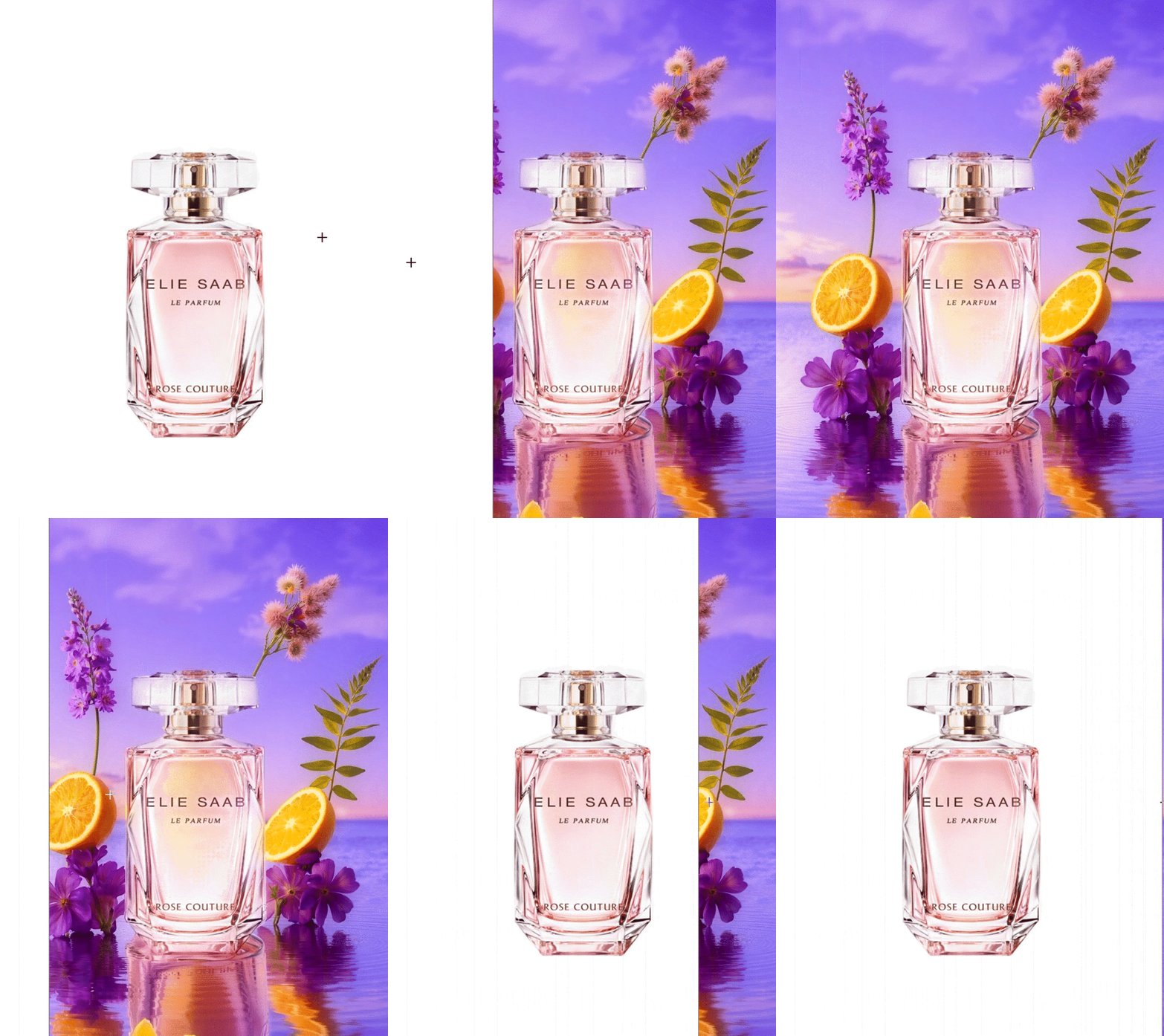
This workflow can be used with one click on liblibai, with plugins and models already installed.

Recommended large model:
majicMIX realistic, or other realistic-style SD1.5 large models

Recommended LoRA:
Lin He - Wuhua Tianbao - e-commerce commercial product modeling and rendering premium-assist LoRA. If you do not have a membership, you can use other SD1.5 e-commerce-style LoRAs.

The workflow tutorial is being updated.

Workflow steps:
1. In the first Load Image module, upload the product image
2. In the second Load Image module, upload the product style reference image
3. Load the correct models required in the workflow. If you are not sure how to adjust them, you can watch the video tutorial (video tutorial pending update)
4. Click Generate

Workflow compiled and published by [Designer Learns Ai]

If you like this workflow, remember to follow me. My homepage has more workflows published.Models & stability
Recommended models
Independent retest evidence
Sep 2, 2026

The requested model is recorded, but the generation receipt did not expose a verifiable underlying model ID.
Aug 9, 2026

The requested model is recorded, but the generation receipt did not expose a verifiable underlying model ID.
Keep exploring

Upload a reference image and a transparent-background product image at the same time to generate an image in one click, with no prompt required. The product position and size in the reference image should not differ too much from the transparent product image. The aspect ratio of the transparent-background product image will be the final generated image ratio; there are no size requirements for the reference image. All product label details are fully preserved. Dedicated LoRA ****s://****liblib.art/modelinfo/cce9d298ce144cc7b916e1a703f07dfa?from=personal_page&versionUuid=7cef291b17e04747b92d31df5863c452 Feel free to add me if you have questions~ Workflow page; for commercial use, you must also check the base model, LoRA, nodes, and input materials. License: not clearly stated on the original page; manual review pending
Prompt
Upload a reference image and a transparent-background product image at the same time to generate an image in one click, with no prompt required. The product position and size in the reference image should not differ too much from the transp

############### AI Master Workflow ################## This workflow can help you achieve: First, simply upload a product image, and you can use the latest sam2 model to cut out the product losslessly. Second, the extracted product can generate any background based on the prompt you write, and it can blend well with the background without looking out of place. Third, intelligent lighting adjustment. The current version temporarily uses the 1.5 lighting control model, and later versions can also be upgraded to the FLUX version to further enhance the product’s texture. Fourth, it can also ensure that the final generated main image perfectly preserves the original text on the product, so you can finally say goodbye to AI-processed gibberish. Fifth, if you also want AI to generate Chinese or English text on the final image, it supports calling any font installed on your computer, with free control over the text size, position, color, and more. Specific usage: e-commerce image generation + text generation two-in-one workflow ############### AI Master Workflow ################## Workflow page; for commercial use, also verify the base model, LoRA, nodes, and input materials. License: not clearly stated on the original page, pending manual review
Prompt
############### AI Master Workflow ################## This workflow can help you achieve: First, simply upload a product image, and you can use the latest sam2 model to cut out the product losslessly. Second, the extracted product can ge

Write the keywords carefully!!! The content must feature the item in the uploaded image as the main subject. The workflow was quite impressive when I built and tested it myself. The product image workflow automatically generates a suitable angle based on the specific need and blends perfectly into the environmental lighting and shadows. Product images can be uploaded with a transparent background, a white background, or any scene image that is not too complex!! A LoRA dedicated to retouching and rendering has been included. Address: ****s://****liblib.art/modelinfo/e5604e02cca44f0cb8ceeca0359447d3?from=personal_page&versionUuid=b54eed5cdd71420bb70beb3337b4d59c Mask expansion may require several tests to find the value range suitable for your own product. The default value is one I found to have relatively high compatibility after testing different products. You can generate multiple images at once and draw for the best result~ Everyone is welcome to share results, and you can also follow my profile for more e-commerce workflows. Note: this workflow does not mind the angle, lighting, or shadows of the uploaded product. Some small details in the output may have errors; in general, it can achieve 80~95% fidelity. If you need to preserve details perfectly, there are several workflow options available on my profile~ Workflow page; for commercial use, you must also verify the base model, LoRA, nodes, and input materials. License: the original page does not specify this; pending manual review.
Prompt
Write the keywords carefully!!! The content must feature the item in the uploaded image as the main subject. The workflow was quite impressive when I built and tested it myself. The product image workflow automatically generates a suitable
Each detail page keeps the original result, the prompt, and retest evidence in one reading path.