
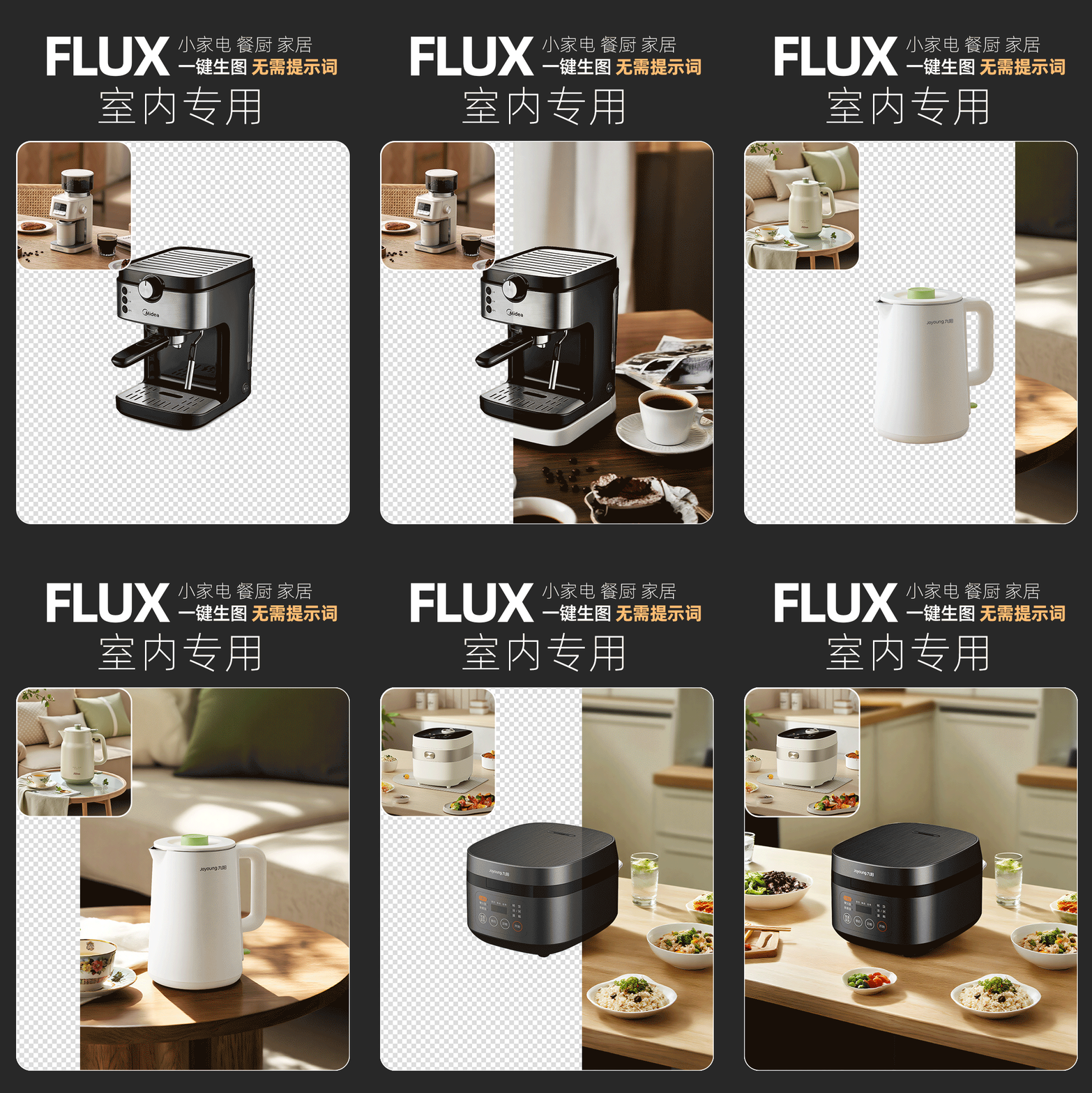
Upload a reference image and a transparent-background product image at the same time to generate an image in one click, with no prompt required. The product position and size in the reference image should not differ too much from the transparent product image. The aspect ratio of the transparent-background product image will be the final generated image ratio; there are no size requirements for the reference image. All product label details are fully preserved. Dedicated LoRA ****s://****liblib.art/modelinfo/cce9d298ce144cc7b916e1a703f07dfa?from=personal_page&versionUuid=7cef291b17e04747b92d31df5863c452 Feel free to add me if you have questions~ Workflow page; for commercial use, you must also check the base model, LoRA, nodes, and input materials. License: not clearly stated on the original page; manual review pending
View original source ↗
Prompt · Original / Translation
Upload a reference image and a transparent-background product image at the same time to generate an image in one click, with no prompt required. The product position and size in the reference image should not differ too much from the transparent product image. The aspect ratio of the transparent-background product image will be the final generated image ratio; there are no size requirements for the reference image. All product label details are fully preserved. Dedicated LoRA ****s://****liblib.art/modelinfo/cce9d298ce144cc7b916e1a703f07dfa?from=personal_page&versionUuid=7cef291b17e04747b92d31df5863c452 Feel free to add me if you have questions~
Reusable method
Reusable structure
Extract “target result → the subject, scene, material, and color palette → constraints” as a reusable template for similar work.
Retest criteria
Run single-variable comparisons around subject description, style intensity, lighting, and material constraints. Record the model, cost, and failures; turn it into a Skill only after it repeats reliably.
Recommended models
Derived Skill
Skills are derived from repeated patterns in published cases. They are not a separate submission type.
Creator
北洛 focuses on AI image making and is active on LiblibAI. “One Image for Everything: FLUX Workflow for Real E-commerce Product Photography” is the current representative case, built with ComfyUI 工作流 awaiting a stability retest.
Keep exploring

This workflow can be used with one click on liblibai, with plugins and models already installed. Recommended large model: majicMIX realistic, or other realistic-style SD1.5 large models. Recommended LoRA: Lin He - Wuhua Tianbao - e-commerce commercial product modeling and rendering premium-assist LoRA. If you do not have a membership, you can use other SD1.5 e-commerce-style LoRAs. The workflow tutorial is being updated. Workflow steps: 1. In the first Load Image module, upload the product image. 2. In the second Load Image module, upload the product style reference image. 3. Load the correct models required in the workflow. If you are not sure how to adjust them, you can watch the video tutorial (video tutorial pending update). 4. Click Generate. Workflow compiled and published by [Designer Learns Ai]. If you like this workflow, remember to follow me. My homepage has more workflows published. Workflow page; for commercial use, you must also verify the base model, LoRA, nodes, and input materials. License: not specified on the original page, pending manual review.
Prompt
This workflow can be used with one click on liblibai, with plugins and models already installed. Recommended large model: majicMIX realistic, or other realistic-style SD1.5 large models Recommended LoRA: Lin He - Wuhua Tianbao - e-commerce commercial product modeling and rendering premium-assist LoRA. If you do not have a membership, you can use other SD1.5 e-commerce-style LoRAs. The workflow tutorial is being updated. Workflow steps: 1. In the first Load Image module, upload the product image 2. In the second Load Image module, upload the product style reference image 3. Load the correct models required in the workflow. If you are not sure how to adjust them, you can watch the video tutorial (video tutorial pending update) 4. Click Generate Workflow compiled and published by [Designer Learns Ai] If you like this workflow, remember to follow me. My homepage has more workflows published.

Sticker collage / creative image compositing / wallet / passport holder. Application introduction: This workflow can seamlessly blend patterns onto specified products. It is designed specifically for visual design tasks such as e-commerce product image generation, pattern mapping, and scene integration. It can intelligently fit user-provided pattern images onto the surface of product images, generating highly realistic composite images that meet commercial photography standards, suitable for product displays, advertising design, content creation, and many other scenarios. 1. Intelligent blending, natural and realistic Uses advanced visual models such as Gemini 3 Pro Image to achieve natural integration of lighting, material, and perspective between the pattern and the product surface, avoiding a “mapped-on” look. Supports multilayer image input (two-image/three-image modes), allowing multiple patterns and base colors to be integrated at the same time. 2. Multiple modes, flexible adaptation Two-image mode: pattern + product image Three-image mode: pattern 1 + pattern 2 + product image Single-image mode: product image only + scene description generation Unlimited image variation: generate diverse lifestyle scene images based on a single image 3. Batch generation, efficient output Built-in Repeater node supports one-click batch generation of multiple result images (default 4), improving image output efficiency. Output quantity, quality (1K/2K/4K), and aspect ratio (1:1, etc.) can be freely adjusted. 4. Prompt guidance, precise control Provides structured prompt templates. Users only need to make slight adjustments to control: pattern integration method (printed layer/sticker feel/embossed feel), scene description (airport, cafe, office setting, etc.), shooting style (commercial photography/lifestyle snapshot/high realism) 5. Plug and play, easy to use Preset node connections and parameters are already configured. Users only need to: upload images, fill in or select a prompt, and click generate. Built-in with many example images and prompt cases, so beginners can get started quickly. How to use: Step 1: Upload the product image and pattern image. Step 2: Fill in the prompt (default is available Step 3: Click generate. Many high-quality workflows on the homepage: ****s://****liblib.art/userpage/46987de339ac47e0965172f7ccd1b939/publish/workflow Workflow customization, model customization, optimization, teaching, error troubleshooting, one-on-one guidance WeChat: [omitted] If this workflow is not what you need, contact the creator to customize an exclusive workflow. Workflow page; for commercial use, also verify the base model, LoRA, nodes, and input materials. License: Not clearly stated on the original page, pending manual review
Prompt
Sticker collage / creative image compositing / wallet / passport holder Application introduction: This workflow can seamlessly blend patterns onto specified products. It is designed specifically for visual design tasks such as e-commerce product image generation, pattern mapping, and scene integration. It can intelligently fit user-provided pattern images onto the surface of product images, generating highly realistic composite images that meet commercial photography standards, suitable for product displays, advertising design, content creation, and many other scenarios. 1. Intelligent blending, natural and realistic Uses advanced visual models such as Gemini 3 Pro Image to achieve natural integration of lighting, material, and perspective between the pattern and the product surface, avoiding a “mapped-on” look. Supports multilayer image input (two-image/three-image modes), allowing multiple patterns and base colors to be integrated at the same time. 2. Multiple modes, flexible adaptation Two-image mode: pattern + product image Three-image mode: pattern 1 + pattern 2 + product image Single-image mode: product image only + scene description generation Unlimited image variation: generate diverse lifestyle scene images based on a single image 3. Batch generation, efficient output Built-in Repeater node supports one-click batch generation of multiple result images (default 4), improving image output efficiency. Output quantity, quality (1K/2K/4K), and aspect ratio (1:1, etc.) can be freely adjusted. 4. Prompt guidance, precise control Provides structured prompt templates. Users only need to make slight adjustments to control: pattern integration method (printed layer/sticker feel/embossed feel), scene description (airport, cafe, office setting, etc.), shooting style (commercial photography/lifestyle snapshot/high realism) 5. Plug and play, easy to use Preset node connections and parameters are already configured. Users only need to: upload images, fill in or select a prompt, and click generate. Built-in with many example images and prompt cases, so beginners can get started quickly. How to use: Step 1: Upload the product image and pattern image. Step 2: Fill in the prompt (default is available Step 3: Click generate. Many high-quality workflows on the homepage: ****s://****liblib.art/userpage/46987de339ac47e0965172f7ccd1b939/publish/workflow Workflow customization, model customization, optimization, teaching, error troubleshooting, one-on-one guidance WeChat: [omitted] If this workflow is not what you need, contact the creator to customize an exclusive workflow.

############### AI Master Workflow ################## This workflow can help you achieve: First, simply upload a product image, and you can use the latest sam2 model to cut out the product losslessly. Second, the extracted product can generate any background based on the prompt you write, and it can blend well with the background without looking out of place. Third, intelligent lighting adjustment. The current version temporarily uses the 1.5 lighting control model, and later versions can also be upgraded to the FLUX version to further enhance the product’s texture. Fourth, it can also ensure that the final generated main image perfectly preserves the original text on the product, so you can finally say goodbye to AI-processed gibberish. Fifth, if you also want AI to generate Chinese or English text on the final image, it supports calling any font installed on your computer, with free control over the text size, position, color, and more. Specific usage: e-commerce image generation + text generation two-in-one workflow ############### AI Master Workflow ################## Workflow page; for commercial use, also verify the base model, LoRA, nodes, and input materials. License: not clearly stated on the original page, pending manual review
Prompt
############### AI Master Workflow ################## This workflow can help you achieve: First, simply upload a product image, and you can use the latest sam2 model to cut out the product losslessly. Second, the extracted product can generate any background based on the prompt you write, and it can blend well with the background without looking out of place. Third, intelligent lighting adjustment. The current version temporarily uses the 1.5 lighting control model, and later versions can also be upgraded to the FLUX version to further enhance the product’s texture. Fourth, it can also ensure that the final generated main image perfectly preserves the original text on the product, so you can finally say goodbye to AI-processed gibberish. Fifth, if you also want AI to generate Chinese or English text on the final image, it supports calling any font installed on your computer, with free control over the text size, position, color, and more. Specific usage: e-commerce image generation + text generation two-in-one workflow ############### AI Master Workflow ##################