

Loading…
Loading…
Creator · KanaWorks_AI
The reproduction prompt keeps the original and adds runtime, asset and acceptance requirements. These additions are not the author’s words.
Use Blender MCP to build a small, stylized Japanese flower shop scene. Focus on faithfully recreating the key visual elements: the green awnings, the rooftop sign displaying the Japanese text “花屋”, flower pots and plants arranged in front of the shop, the vending machine, bicycles, traffic light, utility poles, surrounding trees, and other recognizable street details. Render the scene in a warm, charming cartoon style, with soft lighting, appealing materials, and a cozy atmosphere.

Create a high-impact, dynamic exploded-view animation of the entire flower shop scene. The explosion should be bold and exaggerated rather than subtle. Smoothly and systematically separate the individual components outward to dramatically reveal the construction and interior of the flower shop.

During the explosion, have the exterior walls, surrounding trees, utility poles, signs, awnings, bicycles, flower pots, plants, street props, and other environmental elements fly outward or backward, creating enough open space for the viewer to clearly see inside the flower shop. Break the building into meaningful structural layers so that the interior architecture, furniture, decorations, flowers, plants, shelves, and smaller details become clearly visible.

The vending machine should also explode into its individual components. Its exterior panels should separate, and the individual soda bottles and cans inside should dynamically fly outward, spreading into an organized formation so they remain clearly readable. Small components and details can travel farther to make the sequence more visually exciting.

Use staggered timing, different movement speeds, rotation, depth, and layered trajectories to give the explosion a strong sense of energy and impact while keeping every component visually organized and easy to follow. Avoid having everything move outward at exactly the same time or speed.

Once the entire scene is fully exploded, hold the composition briefly so the viewer can clearly observe the internal structure and all the separated components.

Then reverse the sequence: the soda bottles, vending machine parts, plants, props, interior objects, walls, trees, utility poles, signs, bicycles, and all other components should fly smoothly back into place and reassemble into the complete flower shop scene.

The entire animation should feel energetic, cinematic, satisfying, and visually impactful, with strong motion and clear transformation between the complete scene, the fully exploded state, and the final reassembled scene. Keep the motion layered, readable, and carefully choreographed throughout.

Use a neutral studio background during the exploded-view sequence so that the separated objects and internal structures remain clearly visible.

Final deliverables:
A fully rendered animation and an editable Blender 3D project file. All objects, components, collections, materials, and major scene elements must be clearly, consistently, and professionally named and organized.Models & stability
Recommended models
Keep exploring

I made an interactive dumpling feast🥟
Prompt
Build a complete, polished interactive 3D website called “The Dumpling Club” using Three.js and the provided dumpling GLB model. Art direction: Create a cozy miniature food scene
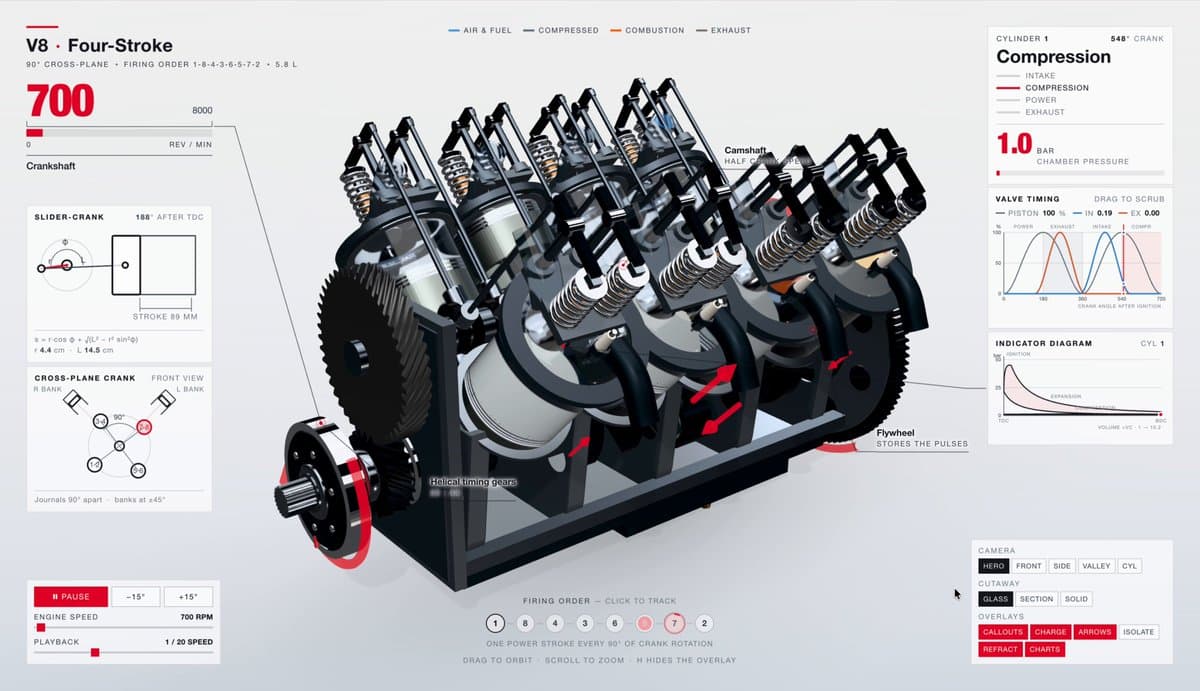
A prompt that uses GPT-6 Astra to generate a highly detailed, interactive 3D visualization of a V8 engine.
Prompt
create a highly detailed, interactive visualization of a V8 engine

A website case by @viktoroddy created with Lovable · Nano Banana · Veo 3, including the public result, full prompt, and original source.
Prompt
Access ALL prompts for stunning animated websites in one click: Create a single-page hero section with a fullscreen looping background video, glassmorphic navigation, and cinematic typography. Use React + Vite + Tailwi
Each detail page keeps the original result, the prompt, and retest evidence in one reading path.