


加载中…
创作者 · viktoroddy
复刻提示词保留原文,另附运行环境、素材与验收要求;附加说明不是原作者原话。
一键获取所有令人惊艳的动效网站提示词:

提示词:

用 React + TypeScript + Vite + Tailwind CSS + framer-motion + lucide-react 构建一个单页落地页。整个页面背景为 bg-black。通过 Google Fonts 加载的字体是 Instrument Serif(斜体和常规体)。在 index.css 中引入它:

@import url('');
液态玻璃 CSS(写在 index.css 的 @layer components 中)
创建一个可复用的 .liquid-glass 类,用在每个玻璃元素上:

.liquid-glass {
 background: rgba(255, 255, 255, 0.01);
 background-blend-mode: luminosity;
 backdrop-filter: blur(4px);
 -webkit-backdrop-filter: blur(4px);
 border: none;
 box-shadow: inset 0 1px 1px rgba(255, 255, 255, 0.1);
 position: relative;
 overflow: hidden;
}

.liquid-glass::before {
 content: '';
 position: absolute;
 inset: 0;
 border-radius: inherit;
 padding: 1.4px;
 background: linear-gradient(
 180deg,
 rgba(255, 255, 255, 0.45) 0%,
 rgba(255, 255, 255, 0.15) 20%,
 rgba(255, 255, 255, 0) 40%,
 rgba(255, 255, 255, 0) 60%,
 rgba(255, 255, 255, 0.15) 80%,
 rgba(255, 255, 255, 0.45) 100%
 );
 -webkit-mask: linear-gradient(#fff 0 0) content-box, linear-gradient(#fff 0 0);
 -webkit-mask-composite: xor;
 mask-composite: exclude;
 pointer-events: none;
}
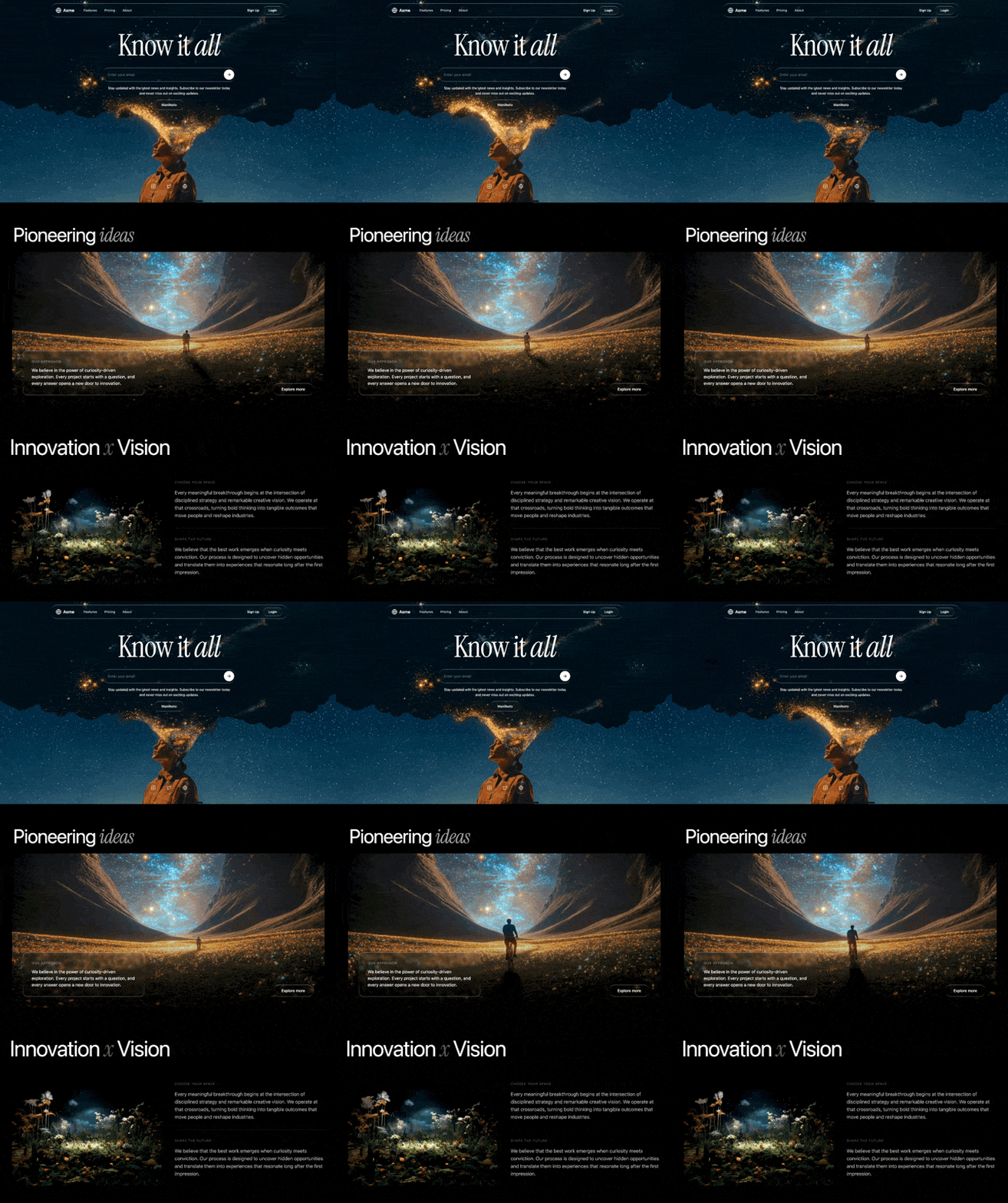
版块 1 —— HERO(全视口,写在 Index.tsx 中)
全屏(min-h-screen)容器,overflow-hidden relative flex flex-col。

背景视频:绝对定位,铺满整个视口(absolute inset-0 w-full h-full object-cover object-bottom)。URL:

属性:muted、autoPlay、playsInline、preload="auto"。初始 opacity: 0。

视频淡入淡出逻辑(通过 ref 用原生 JS 实现,不使用 CSS transition):

canplay 时:播放视频,然后用 requestAnimationFrame 在 500ms 内把 opacity 从 0 动画到 1。
timeupdate 时:当剩余时间 <= 0.55 秒,在 500ms 内把 opacity 从当前值动画到 0。
ended 时:把 opacity 设为 0,等待 100ms,把 currentTime 重置为 0,再次播放,在 500ms 内淡回 1。
这样就能在两次播放之间做出无缝循环,并带平滑的黑场交叉淡入淡出。
导航栏(relative z-20,px-6 py-6):

一个液态玻璃圆角药丸,max-w-5xl mx-auto,px-6 py-3,左右两端对齐布局。
左侧:地球图标(24px,白色)加「Asme」文字(白色,font-semibold,text-lg)。移动端隐藏:导航链接「Features」「Pricing」「About」(text-white/80 hover:text-white text-sm font-medium,gap-8 ml-8)。
右侧:「Sign Up」文字按钮(白色,text-sm,font-medium)加「Login」按钮(液态玻璃 rounded-full px-6 py-2,白色 text-sm font-medium)。
Hero 内容(relative z-10,flex-1 flex flex-col items-center justify-center,px-6 py-12 text-center,-translate-y-[20%]):

标题:text-7xl md:text-8xl lg:text-9xl,白色,tracking-tight whitespace-nowrap,字体 'Instrument Serif', serif。文字:Know it then <em>all</em>.
邮箱输入框:max-w-xl w-full。一个液态玻璃圆角药壳,pl-6 pr-2 py-2 flex items-center gap-3。内部:透明的 <input>,占位符「Enter your email」(text-white placeholder:text-white/40)。一个白色圆形提交按钮(bg-white rounded-full p-3 text-black),内含 ArrowRight 图标(20px)。
副标题:text-white text-sm leading-relaxed px-4。文字:「Stay updated with the latest news and insights. Subscribe to our newsletter today and never miss out on exciting updates.」
Manifesto 按钮:液态玻璃 rounded-full px-8 py-3 text-white text-sm font-medium hover:bg-white/5 transition-colors。
社交图标页脚(relative z-10,flex justify-center gap-4 pb-12):

三个液态玻璃圆角 p-4 按钮,分别对应 Instagram、Twitter、Globe 图标(20px)。text-white/80 hover:text-white hover:bg-white/5 transition-all。
版块 2 —— ABOUT 版块(独立组件 AboutSection.tsx)
使用 framer-motion 的 useInView(ref, { once: true, margin: "-100px" })。
bg-black pt-32 md:pt-44 pb-10 md:pb-14 px-6 overflow-hidden。
细微的放射状渐变叠加层:bg-[radial-gradient(ellipse_at_top,_rgba(255,255,255,0.03)_0%,_transparent_70%)]。
标签:「About Us」—— text-white/40 text-sm tracking-widest uppercase。动画:opacity: 0, y: 20 -> opacity: 1, y: 0,时长 0.6。
标题:text-4xl md:text-6xl lg:text-7xl text-white leading-[1.1] tracking-tight。动画:opacity: 0, y: 40 -> opacity: 1, y: 0,时长 0.8,延迟 0.1。文字结构:
Pioneering then ideas(Instrument Serif 斜体,text-white/60)for
换行(移动端隐藏)
minds that then create, build, and inspire.(全部为 Instrument Serif 斜体,text-white/60)
版块 3 —— 精选视频(独立组件 FeaturedVideoSection.tsx)
bg-black pt-6 md:pt-10 pb-20 md:pb-32 px-6 overflow-hidden。最大宽度 6xl。
一个 rounded-3xl overflow-hidden aspect-video 容器,动画为 opacity: 0, y: 60 -> opacity: 1, y: 0,时长 0.9。
视频:w-full h-full object-cover,muted、autoPlay、loop、playsInline、preload="auto"。URL:

视频上的渐变叠加层:bg-gradient-to-t from-black/60 via-transparent to-transparent。
底部叠加内容(absolute bottom-0 left-0 right-0 p-6 md:p-10):
桌面端为横向排列,移动端为纵向排列。
左侧:一个液态玻璃 rounded-2xl p-6 md:p-8 max-w-md 卡片。标签「Our Approach」(text-white/50 text-xs tracking-widest uppercase mb-3)。正文(text-white text-sm md:text-base leading-relaxed):「We believe in the power of curiosity-driven exploration. Every project starts with a question, and every answer opens a new door to innovation.」
右侧:「Explore more」按钮(液态玻璃 rounded-full px-8 py-3,白色 text-sm font-medium),配 whileHover={{ scale: 1.05 }} 和 whileTap={{ scale: 0.95 }}。适用模型与稳定度
建议模型
独立复测证据
2026年8月9日
多人复现
同款 Prompt 自动聚类归并(相似度 0.67,原独立 Case innovation)
复现出处 ↗继续探索

@viktoroddy 使用 AntiGravity · Gemini 3.1 Pro完成的网页案例,包含公开结果、完整 Prompt 与原始来源。
提示语
提示词: 构建一个 Hero 区域,具体规格如下: 整体布局: 全宽版块,背景色 #000000(纯黑) overflow hidden 所有内容背后播放背景视频(详情见下) 背景视频: 来源: 自动播放、循环、静音、playsInline 缩放到容器的 120%(宽度和高度均为 120%) 水平居中,焦点锚定在底部 位于所有内容之下(最低层级) 模糊背景元素: 绝对定位,水平居中,顶部偏移约 215px 尺寸:宽 801px × 高 384px,完全圆角(药丸

提示语
提示词: 构建一个高级电动车落地页,具有深色电影感美学。整个网站使用黑色背景(hsl(0,0%,0%)),配浅色文字(主色 hsl(0,0%,95%))和橙色强调色(hsl(25,100%,50%))。不使用默认字体——保持极简和编辑感。使用 shadcn/ui 设计令牌。以下是按顺序排列的各版块: 设计系统(index.css) --background: 0 0% 0% --foreground: 0 0% 12%(用于 CTA 按钮内圆等深色元素) --primar

@viktoroddy 使用 Nano Banana · Flow · AntiGravity完成的网页案例,包含公开结果、完整 Prompt 与原始来源。
提示语
提示词: 为一家名为「Logoisum」的视频剪辑机构构建一个高级、高端的 Hero 区域,具体规格如下: 背景:实现一个全屏循环播放的视频背景,使用这个 URL:。视频必须静音、自动播放,并设置为 object-cover 以铺满整个版块,不加任何颜色叠加层。 导航栏:一个悬浮的白色导航栏,圆角 rounded-[16px],带细微阴影。 左侧:机构 Logo。 中间:一个菜单,包含「About」「Works」「Services」和「Testimonial」链接,字
 Nano Banana + Kling + Claude 电影感 HeroAI 编程(UI) · Nano Banana · Kling · Claude · 2026-07-28
 Gemini vs Claude:Velorah 电动房车落地页AI 编程(UI) · Gemini · Claude · 2026-07-28
 Nano Banana + Veo 3 + Lovable 动效站AI 编程(UI) · Lovable · Nano Banana · Veo 3 · 2026-07-28
 Google Stitch 对比 Claude 网页生成AI 编程(UI) · Google Stitch · Claude · 2026-07-28
 GPT Image 2 + Veo 3 + Lovable 营销站AI 编程(UI) · GPT Image 2 · Veo 3 · Lovable · 2026-07-28
Case 详情页把原帖效果、Prompt 与复测证据放在同一条阅读路径里。


