

加载中…
创作者 · MotionSites
查看原始来源 ↗复刻提示词保留原文,另附运行环境、素材与验收要求;附加说明不是原作者原话。
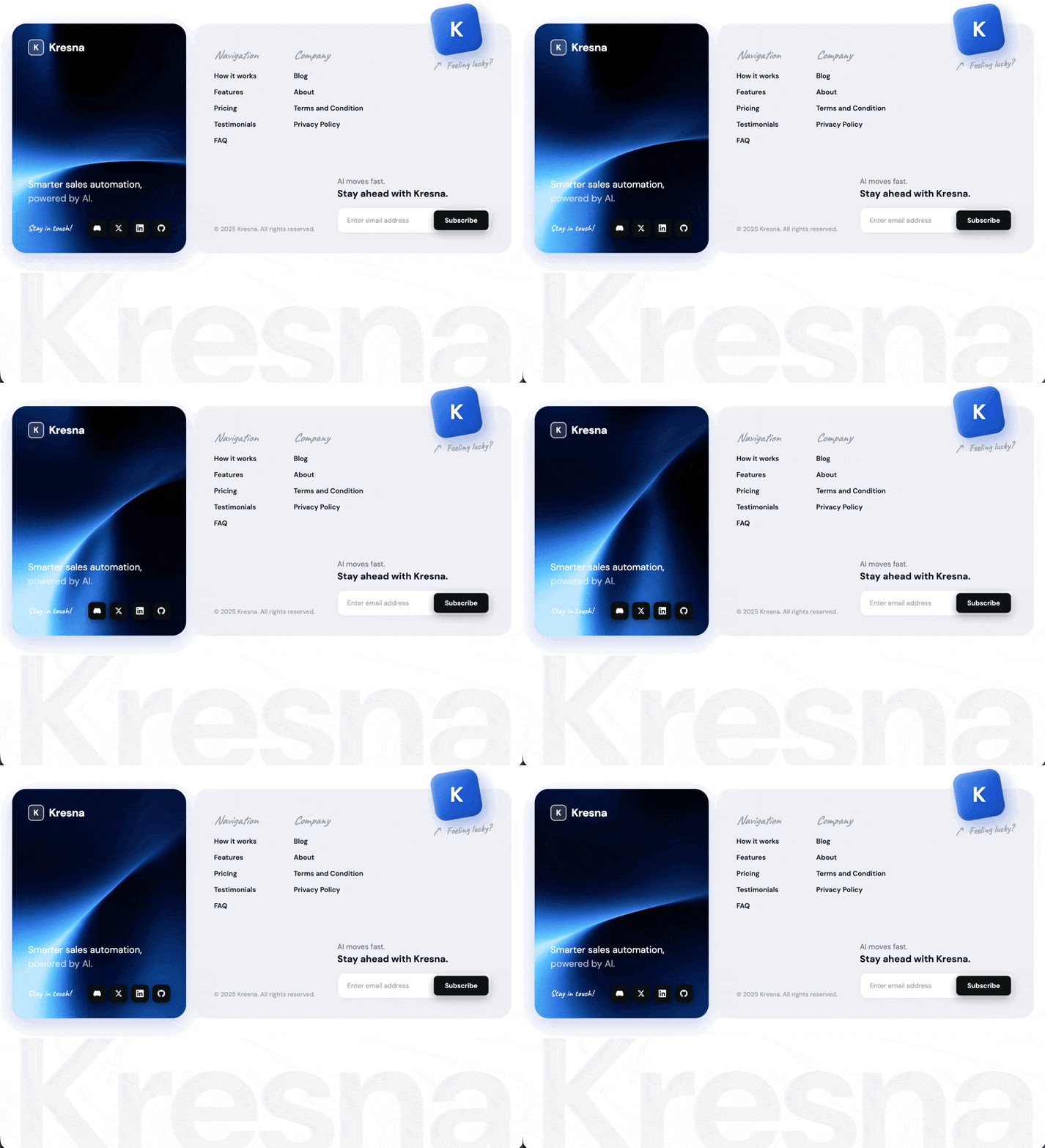
构建一个名为 Kresna 的单文件 HTML 页脚组件——这是一个销售自动化 SaaS 品牌。交付物是一个自包含的 .html 文件,包含内联 <style> 和内联 <script>。将其渲染在白色页面上的 <section class="footer-section"> 内(body { background: #ffffff; padding: 48px 24px; })。
字体
在 <head> 中从 Google Fonts 加载:

DM Sans — 字重 400、500、600、700(正文、导航链接、按钮、标题、水印)
Caveat — 字重 500、600、700(手写风格装饰文字:"保持联系!"、"感觉幸运吗?"、分栏标题 "导航"/"公司")

默认正文字体:'DM Sans', sans-serif。正文颜色 #2d3148。
使用 *, *::before, *::after { box-sizing: border-box; margin: 0; padding: 0; }。
布局结构
一个 .footer-wrapper,max-width: 1150px,居中,CSS grid grid-template-columns: 350px 1fr,gap: 16px,align-items: stretch。两张卡片并排放置:
左侧卡片 — .footer-left(视频背景)

Position relative,min-height: 340px,border-radius: 28px,padding: 32px,overflow: hidden
Box shadow: 0 12px 40px rgba(21, 76, 189, 0.25)
后备背景:#1e4fc0
Flex column,justify-content: space-between
按顺序包含:

一个 <video class="footer-left-video" autoplay muted loop playsinline preload="auto">,其中包含 <source src="https://d8j0ntlcm91z4.cloudfront.net/user_38xzZboKViGWJOttwIXH07lWA1P/hf_20260503_104800_bc43ae09-f494-43e3-97d7-2f8c1692cfd7.mp4" type="video/mp4" />。样式:position: absolute; inset: 0; width: 100%; height: 100%; object-fit: cover; z-index: 0; pointer-events: none;。不要叠加层、不要色调、不要噪点纹理。
.footer-logo — flex row,gap: 10px,position: relative; z-index: 1。包含:

.footer-logo-mark — 一个 32×32 的圆角方块(border-radius: 8px),background: rgba(255,255,255,0.15),border: 1.5px solid rgba(255,255,255,0.85),内部居中放置粗体字母 "K"(DM Sans、16px、字重 700、白色、letter-spacing: -0.02em)
<span class="footer-logo-name">Kresna</span> — DM Sans、22px、字重 700、白色、letter-spacing: -0.02em


.footer-tagline-container — margin-top: auto; margin-bottom: 28px,z-index: 1。包含 .footer-tagline(19px、字重 400、白色、line-height: 1.45),文本为:


     更智能的销售自动化,<br>
     <span>由 AI 驱动。</span>
内部 `<span>` 使用 `color: rgba(255, 255, 255, 0.65)`。
4. .footer-social-row — flex row,justify-content: space-between,align-items: center,gap: 12px,z-index: 1。包含:
- .footer-social-label — Caveat、17px、字重 600、颜色 rgba(255,255,255,0.9)、letter-spacing: 0.3px,文本:"保持联系!"
- .footer-social-icons — flex row,gap: 7px。四个 .social-icon div,每个均为 36×36、border-radius: 9px、background: #0e1014,内部居中放置 15×15 白色 SVG,box shadow 0 6px 18px rgba(0,0,0,0.35), 0 2px 6px rgba(0,0,0,0.2)。Hover:background: #000,transform: translateY(-2px),更深的阴影,transition: background 0.2s, transform 0.15s, box-shadow 0.2s。图标顺序:Discord、X (Twitter)、LinkedIn、GitHub——在 <svg viewBox="0 0 24 24"> 中为每个图标使用官方品牌 path d= 字符串。
右侧卡片 — .footer-right(浅灰色)

background: #f0f1f5,border-radius: 28px,padding: 40px,overflow: visible,box-shadow: 0 4px 20px rgba(0,0,0,0.04)
Flex column,justify-content: space-between,position relative
包含:

浮动的 "感觉幸运吗?" 徽章 — .footer-lucky-graphic
Absolutely positioned,top: -36px; right: 40px,z-index: 10,flex column,align-items: flex-start,gap: 6px。向上溢出卡片顶部边缘。

.lucky-cube — 96×96,border-radius: 22px,transform: rotate(-10deg),渐变 linear-gradient(135deg, #5b9ffb 0%, #1e5dd7 55%, #1448be 100%),多层阴影:

  inset 3px 3px 8px rgba(255,255,255,0.35),
  inset -3px -3px 12px rgba(0,0,0,0.18),
  8px 14px 28px rgba(20,72,200,0.35)
内部放置一个 <span class="lucky-cube-mark">K</span>:DM Sans、42px、字重 700、白色、letter-spacing: -0.04em、transform: rotate(10deg)(与立方体反向旋转)、text-shadow: 0 3px 6px rgba(0,0,0,0.25)、line-height: 1。

.lucky-text-row — flex row,gap: 6px,align-items: center,transform: rotate(-4deg),margin-top: 4px。包含:

.lucky-arrow — 22×22 内联 SVG,color: #9ca3af。SVG 内容:一支手绘风格的弯曲箭头:


html    <svg viewBox="0 0 24 24" xmlns="http://www.w3.org/2000/svg">
      <path d="M3 20 C 6 14, 10 9, 18 5" />
      <path d="M18 5 L 12 5" />
      <path d="M18 5 L 18 11" />
    </svg>
SVG paths:`stroke: currentColor; fill: none; stroke-width: 2; stroke-linecap: round; stroke-linejoin: round`。

.lucky-text — Caveat、20px、字重 600、color #9ca3af、white-space: nowrap,文本:"感觉幸运吗?"

顶部 — .footer-right-top,包含 .footer-nav-cols
Flex row,gap: 72px,padding-top: 8px。两个 .footer-col 分栏:

分栏标题(.footer-col-title):Caveat、24px、字重 600、italic、color #9ca3af、margin-bottom: 18px
链接(.footer-col a):block、DM Sans、14px、字重 600、color #111827、margin-bottom: 14px、无下划线,hover color #1f65d6,transition: color 0.2s

第 1 栏 — 标题 "导航",链接:工作原理、功能、定价、客户评价、常见问题
第 2 栏 — 标题 "公司",链接:博客、关于、条款与条件、隐私政策
底部 — .footer-bottom
Flex row,align-items: flex-end,justify-content: space-between,margin-top: 48px。包含:

.footer-copyright — DM Sans、12.5px、字重 500、color #9ca3af,文本:"© 2025 Kresna。保留所有权利。"
.footer-cta-mini — flex column,gap: 14px,包含:

<h4> — 15px、字重 400、color #6b7280、line-height: 1.45,文本为:


    AI 发展迅速。<br><strong>使用 Kresna,保持领先。</strong>
`<strong>` 为 block-level、19px、字重 700、颜色 `#111827`。

.footer-subscribe-row — flex row,width: 310px,background: #fff,border: 1px solid #e5e7eb,border-radius: 12px,padding: 5px,box-shadow: 0 2px 10px rgba(0,0,0,0.04)。包含:

<input type="email" placeholder="输入电子邮箱地址"> — flex 1,padding: 11px 14px,透明、无边框、DM Sans 13.5px、color #111827、placeholder #9ca3af
<button type="button">订阅</button> — padding: 11px 22px,background: #111214,白色文本,DM Sans 13.5px 字重 600,border-radius: 8px,shadow 0 6px 20px rgba(0,0,0,0.28), 0 2px 8px rgba(0,0,0,0.15)。Hover:background: #000,更深的阴影,transform: translateY(-1px),transition: background 0.2s, box-shadow 0.2s, transform 0.15s。


水印 — .footer-watermark(位于 .footer-wrapper 外部,但在 section 内部)
一个巨大的淡化 "Kresna" 字标,能够流式缩放至页脚容器的完整宽度,使可见字形边缘与容器边缘齐平。
CSS:
css.footer-watermark {
  max-width: 1150px;
  margin: -60px auto 0;
  pointer-events: none;
  user-select: none;
  position: relative;
  z-index: 0;
  line-height: 0;
}
.footer-watermark svg {
  display: block;
  width: 100%;
  height: auto;
  overflow: visible;
}
.footer-watermark text {
  font-family: 'DM Sans', sans-serif;
  font-weight: 700;
  letter-spacing: -0.03em;
  fill: rgba(0, 0, 0, 0.04);
}
HTML:
html<div class="footer-watermark" aria-hidden="true">
  <svg id="watermarkSvg" viewBox="62 95 876 175" preserveAspectRatio="xMidYMid meet" xmlns="http://www.w3.org/2000/svg">
    <text id="watermarkText" x="500" y="240" text-anchor="middle" font-size="320">Kresna</text>
  </svg>
</div>
在 section 末尾放置内联 JS,通过 getBBox() 测量渲染后文本的边界框并更新 SVG viewBox,使可见字形边缘与容器齐平——在 document.fonts.ready 后以及调整大小时运行:
html<script>
  function fitWatermark() {
    const svg = document.getElementById('watermarkSvg');
    const text = document.getElementById('watermarkText');
    if (!svg || !text) return;
    try {
      const bbox = text.getBBox();
      svg.setAttribute('viewBox',
        `${bbox.x} ${bbox.y} ${bbox.width} ${bbox.height}`);
    } catch (e) {}
  }
  if (document.fonts && document.fonts.ready) {
    document.fonts.ready.then(fitWatermark);
  } else {
    window.addEventListener('load', fitWatermark);
  }
  window.addEventListener('resize', fitWatermark);
</script>
响应式断点
@media (max-width: 860px):

.footer-wrapper 变为 grid-template-columns: 1fr
.footer-left min-height: auto,gap: 40px

@media (max-width: 560px):

.footer-right padding: 24px
.footer-nav-cols gap: 40px
.footer-bottom flex-direction: column,align-items: flex-start,gap: 24px
.footer-subscribe-row width: 100%
.footer-lucky-graphic right: 12px,top: -28px
.lucky-cube width: 72px,height: 72px
如有需要,按比例缩放 .lucky-cube-mark

动画/过渡
不要使用 keyframe 动画。所有动效均由 hover 通过 CSS transition 驱动:

社交图标:hover 时改变 background、transform、box-shadow
订阅按钮:hover 时改变 background、box-shadow 并向上抬升
导航链接:hover 时改变颜色

左侧卡片的视频自动播放、循环、静音并以内联方式播放(无控件)。
<section class="footer-section"> 内的最终标记顺序
<section class="footer-section">
  <div class="footer-wrapper">
    <div class="footer-left"> [视频、logo、标语、社交媒体行] </div>
    <div class="footer-right"> [浮动幸运徽章、导航分栏、底部行] </div>
  </div>
  <div class="footer-watermark"> [SVG] </div>
  <script> [fitWatermark] </script>
</section>适用模型与稳定度
建议模型
独立复测证据
2026年10月19日
2026年8月31日
2026年8月31日
多人复现
继续探索

3D 创作者 Jack 的作品集落地页,React + TypeScript + Framer Motion,#0C0C0C 暗底。
提示语
使用 React、TypeScript、Tailwind CSS、Framer Motion 和 Lucide React,为「Jack」构建一个 3D 创作者作品集落地页。页面采用深色主题(背景为 #0C0C0C),字体使用 Kanit(Google Fonts,字重 300-900)。页面标题为「Jack -- 3D Creator」。 全局样式 html、body、#root 和主容器的背景:#0C0C0C 字体族:'Kanit', sans-serif 全局重置:b
提示语

为一家名为“NEXOVA”的托管公司构建一个全屏 404 错误页面。整个页面采用单视口高度布局,包含循环播放的背景视频、导航栏、居中的 hero/404 区域和多栏页脚。使用 React + Tailwind CSS + Lucide React icons。不要使用其他 UI 库。 --- **字体** 在 `index.html` 中通过以下样式表加载“Helvetica Now Var”: ``` <link href="https://db.onlinewebf

ADHD 友好的日程应用 Drift 落地站,React + Vite + TypeScript + Tailwind,安静低刺激的视觉方向本身就是产品卖点。
提示语
为 "Drift" 构建一个单页落地网站——这是一款平静、对 ADHD 友好的规划应用。使用 React + Vite + TypeScript + Tailwind CSS + lucide-react 提供图标。不要使用其他 UI 库。 ### 字体 通过 Google Fonts 在 `index.css` 中导入: - **Inter**(字重 400、500、600)——用作基础正文字体 - **Instrument Serif**(仅斜体)——用于首屏标题中的
Case 详情页把原帖效果、Prompt 与复测证据放在同一条阅读路径里。


