Loading…
Creator · Aceternity UI
View original source ↗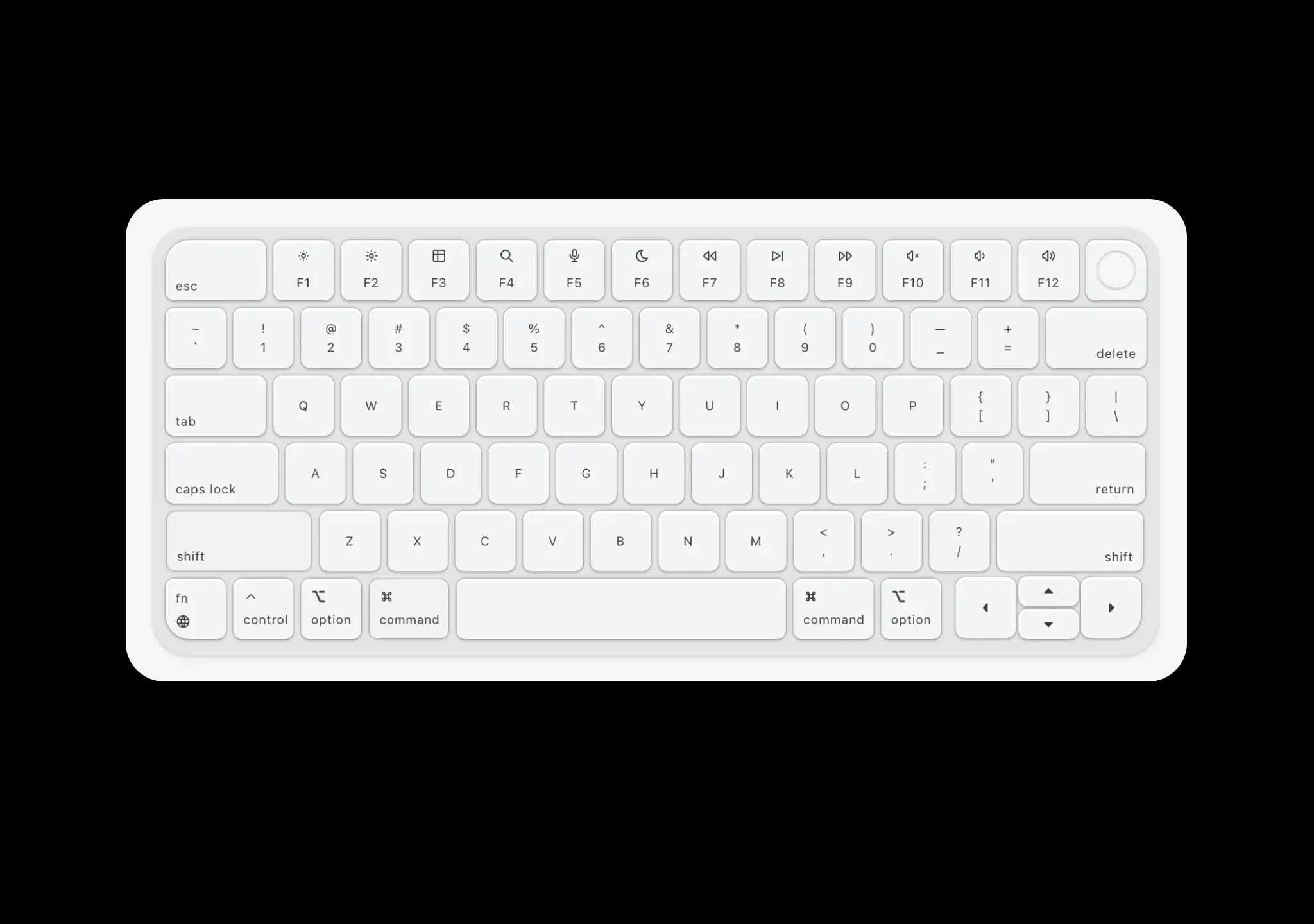
Prompt
// components/ui/keyboard.tsx
"use client";
import React, {
  createContext,
  useContext,
  useEffect,
  useRef,
  useState,
  useCallback,
} from "react";
import { motion, AnimatePresence } from "motion/react";
import { cn } from "@/lib/utils";
import {
  IconBrightnessDown,
  IconBrightnessUp,
  IconCaretRightFilled,
  IconCaretUpFilled,
  IconChevronUp,
  IconMicrophone,
  IconMoon,
  IconPlayerSkipForward,
  IconPlayerTrackNext,
  IconPlayerTrackPrev,
  IconTable,
  IconVolume,
  IconVolume2,
  IconVolume3,
  IconSearch,
  IconWorld,
  IconCommand,
  IconCaretLeftFilled,
  IconCaretDownFilled,
} from "@tabler/icons-react";

// Sound sprite definitions from config.json [startMs, durationMs]
// Key down sounds - half duration for a snappy press sound
const SOUND_DEFINES_DOWN: Record<string, [number, number]> = {
  Escape: [2894, 113],
  F1: [3610, 98],
  F2: [4210, 90],
  F3: [4758, 90],
  F4: [5250, 100],
  F5: [5831, 105],
  F6: [6396, 105],
  F7: [6900, 105],
  F8: [7443, 111],
  F9: [7955, 91],
  F10: [8504, 105],
  F11: [9046, 94],
  F12: [9582, 96],
  Backquote: [12476, 100],
  Digit1: [12946, 96],
  Digit2: [13470, 95],
  Digit3: [13963, 100],
  Digit4: [14481, 102],
  Digit5: [14994, 94],
  Digit6: [15505, 109],
  Digit7: [15990, 97],
  Digit8: [16529, 92],
  Digit9: [17012, 103],
  Digit0: [17550, 87],
  Minus: [18052, 93],
  Equal: [18553, 89],
  Backspace: [19065, 110],
  Tab: [21734, 119],
  KeyQ: [22245, 95],
  KeyW: [22790, 89],
  KeyE: [23317, 83],
  KeyR: [23817, 92],
  KeyT: [24297, 92],
  KeyY: [24811, 93],
  KeyU: [25313, 95],
  KeyI: [25795, 91],
  KeyO: [26309, 84],
  KeyP: [26804, 83],
  BracketLeft: [27330, 85],
  BracketRight: [27883, 99],
  Backslash: [28393, 100],
  CapsLock: [31011, 126],
  KeyA: [31542, 85],
  KeyS: [32031, 88],
  KeyD: [32492, 85],
  KeyF: [32973, 87],
  KeyG: [33453, 94],
  KeyH: [33986, 93],
  KeyJ: [34425, 88],
  KeyK: [34932, 90],
  KeyL: [35410, 95],
  Semicolon: [35914, 95],
  Quote: [36428, 87],
  Enter: [36902, 117],
  ShiftLeft: [38136, 133],
  KeyZ: [38694, 80],
  KeyX: [39148, 76],
  KeyC: [39632, 95],
  KeyV: [40136, 94],
  KeyB: [40621, 107],
  KeyN: [41103, 90],
  KeyM: [41610, 93],
  Comma: [42110, 92],
  Period: [42594, 90],
  Slash: [43105, 95],
  ShiftRight: [43565, 137],
  Fn: [44251, 110],
  ControlLeft: [45327, 83],
  AltLeft: [45750, 82],
  MetaLeft: [46199, 100],
  Space: [51541, 144],
  MetaRight: [47929, 75],
  AltRight: [49329, 82],
  ArrowUp: [44251, 110],
  ArrowLeft: [49837, 88],
  ArrowDown: [50333, 90],
  ArrowRight: [50783, 111],
};

// Key up sounds - shorter duration, offset for the release "thock"
// Uses the tail end of each sound sample for a lighter release effect
const SOUND_DEFINES_UP: Record<string, [number, number]> = {
  Escape: [2894 + 120, 100],
  F1: [3610 + 100, 90],
  F2: [4210 + 95, 80],
  F3: [4758 + 95, 80],
  F4: [5250 + 105, 90],
  F5: [5831 + 110, 95],
  F6: [6396 + 110, 95],
  F7: [6900 + 110, 95],
  F8: [7443 + 115, 100],
  F9: [7955 + 95, 80],
  F10: [8504 + 110, 95],
  F11: [9046 + 100, 85],
  F12: [9582 + 100, 85],
  Backquote: [12476 + 105, 90],
  Digit1: [12946 + 100, 85],
  Digit2: [13470 + 100, 85],
  Digit3: [13963 + 105, 90],
  Digit4: [14481 + 110, 90],
  Digit5: [14994 + 100, 85],
  Digit6: [15505 + 115, 100],
  Digit7: [15990 + 100, 90],
  Digit8: [16529 + 95, 85],
  Digit9: [17012 + 110, 90],
  Digit0: [17550 + 90, 80],
  Minus: [18052 + 100, 85],
  Equal: [18553 + 90, 85],
  Backspace: [19065 + 115, 100],
  Tab: [21734 + 125, 110],
  KeyQ: [22245 + 100, 85],
  KeyW: [22790 + 90, 85],
  KeyE: [23317 + 85, 80],
  KeyR: [23817 + 95, 85],
  KeyT: [24297 + 95, 85],
  KeyY: [24811 + 100, 85],
  KeyU: [25313 + 100, 85],
  KeyI: [25795 + 95, 85],
  KeyO: [26309 + 85, 80],
  KeyP: [26804 + 85, 80],
  BracketLeft: [27330 + 85, 80],
  BracketRight: [27883 + 105, 90],
  Backslash: [28393 + 105, 90],
  CapsLock: [31011 + 135, 110],
  KeyA: [31542 + 90, 80],
  KeyS: [32031 + 90, 80],
  KeyD: [32492 + 85, 80],
  KeyF: [32973 + 90, 80],
  KeyG: [33453 + 100, 85],
  KeyH: [33986 + 95, 85],
  KeyJ: [34425 + 90, 85],
  KeyK: [34932 + 95, 85],
  KeyL: [35410 + 100, 85],
  Semicolon: [35914 + 100, 85],
  Quote: [36428 + 90, 80],
  Enter: [36902 + 125, 105],
  ShiftLeft: [38136 + 140, 120],
  KeyZ: [38694 + 85, 75],
  KeyX: [39148 + 80, 70],
  KeyC: [39632 + 100, 85],
  KeyV: [40136 + 100, 85],
  KeyB: [40621 + 115, 95],
  KeyN: [41103 + 95, 85],
  KeyM: [41610 + 100, 85],
  Comma: [42110 + 95, 85],
  Period: [42594 + 95, 85],
  Slash: [43105 + 100, 85],
  ShiftRight: [43565 + 145, 125],
  Fn: [44251 + 115, 100],
  ControlLeft: [45327 + 85, 80],
  AltLeft: [45750 + 85, 80],
  MetaLeft: [46199 + 105, 90],
  Space: [51541 + 150, 130],
  MetaRight: [47929 + 75, 70],
  AltRight: [49329 + 85, 80],
  ArrowUp: [44251 + 115, 100],
  ArrowLeft: [49837 + 90, 85],
  ArrowDown: [50333 + 95, 80],
  ArrowRight: [50783 + 115, 100],
};

// Map key codes to display labels
const KEY_DISPLAY_LABELS: Record<string, string> = {
  Escape: "esc",
  Backspace: "delete",
  Tab: "tab",
  Enter: "return",
  ShiftLeft: "shift",
  ShiftRight: "shift",
  ControlLeft: "control",
  ControlRight: "control",
  AltLeft: "option",
  AltRight: "option",
  MetaLeft: "command",
  MetaRight: "command",
  Space: "space",
  CapsLock: "caps",
  ArrowUp: "↑",
  ArrowDown: "↓",
  ArrowLeft: "←",
  ArrowRight: "→",
  Backquote: "`",
  Minus: "-",
  Equal: "=",
  BracketLeft: "[",
  BracketRight: "]",
  Backslash: "\\",
  Semicolon: ";",
  Quote: "'",
  Comma: ",",
  Period: ".",
  Slash: "/",
};

const getKeyDisplayLabel = (keyCode: string): string => {
  if (KEY_DISPLAY_LABELS[keyCode]) return KEY_DISPLAY_LABELS[keyCode];
  if (keyCode.startsWith("Key")) return keyCode.slice(3);
  if (keyCode.startsWith("Digit")) return keyCode.slice(5);
  if (keyCode.startsWith("F") && keyCode.length <= 3) return keyCode;
  return keyCode;
};

interface KeyboardContextType {
  playSoundDown: (keyCode: string) => void;
  playSoundUp: (keyCode: string) => void;
  pressedKeys: Set<string>;
  setPressed: (keyCode: string) => void;
  setReleased: (keyCode: string) => void;
  lastPressedKey: string | null;
}

const KeyboardContext = createContext<KeyboardContextType | null>(null);

const useKeyboardSound = () => {
  const context = useContext(KeyboardContext);
  if (!context) {
    throw new Error("useKeyboardSound must be used within KeyboardProvider");
  }
  return context;
};

const KeyboardProvider = ({
  children,
  enableSound = false,
  containerRef,
}: {
  children: React.ReactNode;
  enableSound?: boolean;
  containerRef: React.RefObject<HTMLDivElement | null>;
}) => {
  const audioContextRef = useRef<AudioContext | null>(null);
  const audioBufferRef = useRef<AudioBuffer | null>(null);
  const [pressedKeys, setPressedKeys] = useState<Set<string>>(new Set());
  const [lastPressedKey, setLastPressedKey] = useState<string | null>(null);
  const [soundLoaded, setSoundLoaded] = useState(false);
  const [isVisible, setIsVisible] = useState(false);

  useEffect(() => {
    if (!enableSound) return;

    // Initialize AudioContext and load sound file
    const initAudio = async () => {
      try {
        audioContextRef.current = new AudioContext();
        const response = await fetch("/sounds/sound.ogg");
        if (!response.ok) {
          console.warn("Sound file not available");
          return;
        }
        const arrayBuffer = await response.arrayBuffer();
        audioBufferRef.current =
          await audioContextRef.current.decodeAudioData(arrayBuffer);
        setSoundLoaded(true);
      } catch (error) {
        console.warn("Failed to load sound:", error);
      }
    };

    initAudio();

    return () => {
      audioContextRef.current?.close();
    };
  }, [enableSound]);

  const playSoundDown = useCallback(
    (keyCode: string) => {
      if (!enableSound || !soundLoaded) return;
      if (!audioContextRef.current || !audioBufferRef.current) return;

      const soundDef = SOUND_DEFINES_DOWN[keyCode];
      if (!soundDef) return;

      const [startMs, durationMs] = soundDef;
      const startTime = startMs / 1000;
      const duration = durationMs / 1000;

      // Resume audio context if suspended (browser autoplay policy)
      if (audioContextRef.current.state === "suspended") {
        audioContextRef.current.resume();
      }

      const source = audioContextRef.current.createBufferSource();
      source.buffer = audioBufferRef.current;
      source.connect(audioContextRef.current.destination);
      source.start(0, startTime, duration);
    },
    [enableSound, soundLoaded],
  );

  const playSoundUp = useCallback(
    (keyCode: string) => {
      if (!enableSound || !soundLoaded) return;
      if (!audioContextRef.current || !audioBufferRef.current) return;

      const soundDef = SOUND_DEFINES_UP[keyCode];
      if (!soundDef) return;

      const [startMs, durationMs] = soundDef;
      const startTime = startMs / 1000;
      const duration = durationMs / 1000;

      // Resume audio context if suspended (browser autoplay policy)
      if (audioContextRef.current.state === "suspended") {
        audioContextRef.current.resume();
      }

      const source = audioContextRef.current.createBufferSource();
      source.buffer = audioBufferRef.current;
      source.connect(audioContextRef.current.destination);
      source.start(0, startTime, duration);
    },
    [enableSound, soundLoaded],
  );

  const setPressed = useCallback((keyCode: string) => {
    setPressedKeys((prev) => new Set(prev).add(keyCode));
    setLastPressedKey(keyCode);
  }, []);

  const setReleased = useCallback((keyCode: string) => {
    setPressedKeys((prev) => {
      const next = new Set(prev);
      next.delete(keyCode);
      return next;
    });
  }, []);

  // Track visibility with IntersectionObserver
  useEffect(() => {
    const element = containerRef.current;
    if (!element) return;

    const observer = new IntersectionObserver(
      ([entry]) => {
        setIsVisible(entry.isIntersecting);
      },
      { threshold: 0.1 },
    );

    observer.observe(element);

    return () => {
      observer.disconnect();
    };
  }, [containerRef]);

  // Handle physical keyboard events (only when visible)
  useEffect(() => {
    if (!isVisible) return;

    const handleKeyDown = (e: KeyboardEvent) => {
      // Prevent repeat events
      if (e.repeat) return;

      const keyCode = e.code;
      playSoundDown(keyCode);
      setPressed(keyCode);
    };

    const handleKeyUp = (e: KeyboardEvent) => {
      const keyCode = e.code;
      playSoundUp(keyCode);
      setReleased(keyCode);
    };

    document.addEventListener("keydown", handleKeyDown);
    document.addEventListener("keyup", handleKeyUp);

    return () => {
      document.removeEventListener("keydown", handleKeyDown);
      document.removeEventListener("keyup", handleKeyUp);
    };
  }, [isVisible, playSoundDown, playSoundUp, setPressed, setReleased]);

  return (
    <KeyboardContext.Provider
      value={{
        playSoundDown,
        playSoundUp,
        pressedKeys,
        setPressed,
        setReleased,
        lastPressedKey,
      }}
    >
      {children}
    </KeyboardContext.Provider>
  );
};

const KeystrokePreview = () => {
  const { lastPressedKey, pressedKeys } = useKeyboardSound();
  const [displayKey, setDisplayKey] = useState<string | null>(null);
  const [animationKey, setAnimationKey] = useState(0);

  useEffect(() => {
    if (lastPressedKey) {
      // Clear display if space or shift is pressed
      if (
        lastPressedKey === "Space" ||
        lastPressedKey === "ShiftLeft" ||
        lastPressedKey === "ShiftRight"
      ) {
        setDisplayKey(null);
        return;
      }

      setDisplayKey(getKeyDisplayLabel(lastPressedKey));
      setAnimationKey((prev) => prev + 1);
    }
  }, [lastPressedKey]);

  const isPressed = pressedKeys.size > 0;

  return (
    <div className="relative flex h-12 w-full items-center justify-center">
      <AnimatePresence mode="popLayout">
        {displayKey && (
          <motion.div
            key={animationKey}
            layout
            initial={{ opacity: 0, scale: 0.5, y: 5 }}
            animate={{
              opacity: 1,
              scale: isPressed ? 0.95 : 1,
              y: 0,
            }}
            exit={{ opacity: 0, scale: 0.8, y: -5 }}
            transition={{
              type: "spring",
              stiffness: 500,
              damping: 30,
              mass: 0.5,
            }}
            className="absolute flex items-center justify-center rounded-lg px-4 py-2 font-mono text-2xl font-black text-neutral-700"
          >
            <motion.span
              initial={{ opacity: 0, scale: 1.2, filter: "blur(10px)" }}
              animate={{ opacity: 0.6, scale: 1, filter: "blur(0px)" }}
              transition={{ duration: 0.05 }}
              className="text-2xl"
            >
              {displayKey}
            </motion.span>
          </motion.div>
        )}
      </AnimatePresence>
    </div>
  );
};

export const Keyboard = ({
  className,
  enableSound = false,
  showPreview = false,
}: {
  className?: string;
  enableSound?: boolean;
  showPreview?: boolean;
}) => {
  const containerRef = useRef<HTMLDivElement>(null);

  return (
    <KeyboardProvider enableSound={enableSound} containerRef={containerRef}>
      <div
        ref={containerRef}
        className={cn(
          "mx-auto w-fit [zoom:0.8] sm:[zoom:1.25] md:[zoom:1.5] lg:[zoom:1.75] xl:[zoom:2]",
          className,
        )}
      >
        {showPreview && <KeystrokePreview />}
        <Keypad />
      </div>
    </KeyboardProvider>
  );
};

export const Keypad = () => {
  return (
    <div className="h-full w-fit rounded-xl bg-neutral-200 p-1 shadow-sm ring-1 shadow-black/5 ring-black/5">
      {/* Function Row */}
      <Row>
        <Key
          keyCode="Escape"
          containerClassName="rounded-tl-xl"
          className="w-10 rounded-tl-lg"
          childrenClassName="items-start justify-end pb-[2px] pl-[4px]"
        >
          <span>esc</span>
        </Key>
        <Key keyCode="F1">
          <IconBrightnessDown className="h-[6px] w-[6px]" />
          <span className="mt-1">F1</span>
        </Key>
        <Key keyCode="F2">
          <IconBrightnessUp className="h-[6px] w-[6px]" />
          <span className="mt-1">F2</span>
        </Key>
        <Key keyCode="F3">
          <IconTable className="h-[6px] w-[6px]" />
          <span className="mt-1">F3</span>
        </Key>
        <Key keyCode="F4">
          <IconSearch className="h-[6px] w-[6px]" />
          <span className="mt-1">F4</span>
        </Key>
        <Key keyCode="F5">
          <IconMicrophone className="h-[6px] w-[6px]" />
          <span className="mt-1">F5</span>
        </Key>
        <Key keyCode="F6">
          <IconMoon className="h-[6px] w-[6px]" />
          <span className="mt-1">F6</span>
        </Key>
        <Key keyCode="F7">
          <IconPlayerTrackPrev className="h-[6px] w-[6px]" />
          <span className="mt-1">F7</span>
        </Key>
        <Key keyCode="F8">
          <IconPlayerSkipForward className="h-[6px] w-[6px]" />
          <span className="mt-1">F8</span>
        </Key>
        <Key keyCode="F9">
          <IconPlayerTrackNext className="h-[6px] w-[6px]" />
          <span className="mt-1">F9</span>
        </Key>
        <Key keyCode="F10">
          <IconVolume3 className="h-[6px] w-[6px]" />
          <span className="mt-1">F10</span>
        </Key>
        <Key keyCode="F11">
          <IconVolume2 className="h-[6px] w-[6px]" />
          <span className="mt-1">F11</span>
        </Key>
        <Key keyCode="F12">
          <IconVolume className="h-[6px] w-[6px]" />
          <span className="mt-1">F12</span>
        </Key>
        <Key containerClassName="rounded-tr-xl" className="rounded-tr-lg">
          <div className="h-4 w-4 rounded-full bg-gradient-to-b from-neutral-300 via-neutral-200 to-neutral-300 p-px">
            <div className="h-full w-full rounded-full bg-neutral-100" />
          </div>
        </Key>
      </Row>

      {/* Number Row */}
      <Row>
        <Key keyCode="Backquote">
          <span>~</span>
          <span>`</span>
        </Key>
        <Key keyCode="Digit1">
          <span>!</span>
          <span>1</span>
        </Key>
        <Key keyCode="Digit2">
          <span>@</span>
          <span>2</span>
        </Key>
        <Key keyCode="Digit3">
          <span>#</span>
          <span>3</span>
        </Key>
        <Key keyCode="Digit4">
          <span>$</span>
          <span>4</span>
        </Key>
        <Key keyCode="Digit5">
          <span>%</span>
          <span>5</span>
        </Key>
        <Key keyCode="Digit6">
          <span>^</span>
          <span>6</span>
        </Key>
        <Key keyCode="Digit7">
          <span>&</span>
          <span>7</span>
        </Key>
        <Key keyCode="Digit8">
          <span>*</span>
          <span>8</span>
        </Key>
        <Key keyCode="Digit9">
          <span>(</span>
          <span>9</span>
        </Key>
        <Key keyCode="Digit0">
          <span>)</span>
          <span>0</span>
        </Key>
        <Key keyCode="Minus">
          <span>—</span>
          <span>_</span>
        </Key>
        <Key keyCode="Equal">
          <span>+</span>
          <span>=</span>
        </Key>
        <Key
          keyCode="Backspace"
          className="w-10"
          childrenClassName="items-end justify-end pr-[4px] pb-[2px]"
        >
          <span>delete</span>
        </Key>
      </Row>

      {/* QWERTY Row */}
      <Row>
        <Key
          keyCode="Tab"
          className="w-10"
          childrenClassName="items-start justify-end pb-[2px] pl-[4px]"
        >
          <span>tab</span>
        </Key>
        {["Q", "W", "E", "R", "T", "Y", "U", "I", "O", "P"].map((letter) => (
          <Key key={letter} keyCode={`Key${letter}`}>
            {letter}
          </Key>
        ))}
        <Key keyCode="BracketLeft">
          <span>{`{`}</span>
          <span>{`[`}</span>
        </Key>
        <Key keyCode="BracketRight">
          <span>{`}`}</span>
          <span>{`]`}</span>
        </Key>
        <Key keyCode="Backslash">
          <span>{`|`}</span>
          <span>{`\\`}</span>
        </Key>
      </Row>

      {/* Home Row */}
      <Row>
        <Key
          keyCode="CapsLock"
          className="w-[2.8rem]"
          childrenClassName="items-start justify-end pb-[2px] pl-[4px]"
        >
          <span>caps lock</span>
        </Key>
        {["A", "S", "D", "F", "G", "H", "J", "K", "L"].map((letter) => (
          <Key key={letter} keyCode={`Key${letter}`}>
            {letter}
          </Key>
        ))}
        <Key keyCode="Semicolon">
          <span>:</span>
          <span>;</span>
        </Key>
        <Key keyCode="Quote">
          <span>{`"`}</span>
          <span>{`'`}</span>
        </Key>
        <Key
          keyCode="Enter"
          className="w-[2.85rem]"
          childrenClassName="items-end justify-end pr-[4px] pb-[2px]"
        >
          <span>return</span>
        </Key>
      </Row>

      {/* Bottom Letter Row */}
      <Row>
        <Key
          keyCode="ShiftLeft"
          className="w-[3.65rem]"
          childrenClassName="items-start justify-end pb-[2px] pl-[4px]"
        >
          <span>shift</span>
        </Key>
        {["Z", "X", "C", "V", "B", "N", "M"].map((letter) => (
          <Key key={letter} keyCode={`Key${letter}`}>
            {letter}
          </Key>
        ))}
        <Key keyCode="Comma">
          <span>{`<`}</span>
          <span>,</span>
        </Key>
        <Key keyCode="Period">
          <span>{`>`}</span>
          <span>.</span>
        </Key>
        <Key keyCode="Slash">
          <span>?</span>
          <span>/</span>
        </Key>
        <Key
          keyCode="ShiftRight"
          className="w-[3.65rem]"
          childrenClassName="items-end justify-end pr-[4px] pb-[2px]"
        >
          <span>shift</span>
        </Key>
      </Row>

      {/* Modifier Row */}
      <Row>
        <ModifierKey
          keyCode="Fn"
          containerClassName="rounded-bl-xl"
          className="rounded-bl-lg"
        >
          <span>fn</span>
          <IconWorld className="h-[6px] w-[6px]" />
        </ModifierKey>
        <ModifierKey keyCode="ControlLeft">
          <IconChevronUp className="h-[6px] w-[6px]" />
          <span>control</span>
        </ModifierKey>
        <ModifierKey keyCode="AltLeft">
          <OptionKey className="h-[6px] w-[6px]" />
          <span>option</span>
        </ModifierKey>
        <ModifierKey keyCode="MetaLeft" className="w-8">
          <IconCommand className="h-[6px] w-[6px]" />
          <span>command</span>
        </ModifierKey>
        <Key keyCode="Space" className="w-[8.2rem]" />
        <ModifierKey keyCode="MetaRight" className="w-8">
          <IconCommand className="h-[6px] w-[6px]" />
          <span>command</span>
        </ModifierKey>
        <ModifierKey keyCode="AltRight">
          <OptionKey className="h-[6px] w-[6px]" />
          <span>option</span>
        </ModifierKey>
        {/* Arrow Keys */}
        <div className="flex h-6 w-[4.9rem] items-center justify-end rounded-[4px] p-[0.5px]">
          <Key keyCode="ArrowLeft" className="h-6 w-6">
            <IconCaretLeftFilled className="h-[6px] w-[6px]" />
          </Key>
          <div className="flex flex-col">
            <Key keyCode="ArrowUp" className="h-3 w-6">
              <IconCaretUpFilled className="h-[6px] w-[6px]" />
            </Key>
            <Key keyCode="ArrowDown" className="h-3 w-6">
              <IconCaretDownFilled className="h-[6px] w-[6px]" />
            </Key>
          </div>
          <Key
            keyCode="ArrowRight"
            containerClassName="rounded-br-xl"
            className="h-6 w-6 rounded-br-lg"
          >
            <IconCaretRightFilled className="h-[6px] w-[6px]" />
          </Key>
        </div>
      </Row>
    </div>
  );
};

const Row = ({ children }: { children: React.ReactNode }) => (
  <div className="mb-[2px] flex w-full shrink-0 gap-[2px]">{children}</div>
);

const Key = ({
  className,
  childrenClassName,
  containerClassName,
  children,
  keyCode,
}: {
  className?: string;
  childrenClassName?: string;
  containerClassName?: string;
  children?: React.ReactNode;
  keyCode?: string;
}) => {
  const { playSoundDown, playSoundUp, pressedKeys, setPressed, setReleased } =
    useKeyboardSound();
  const isPressed = keyCode ? pressedKeys.has(keyCode) : false;

  const handleMouseDown = () => {
    if (keyCode) {
      playSoundDown(keyCode);
      setPressed(keyCode);
    }
  };

  const handleMouseUp = () => {
    if (keyCode && isPressed) {
      playSoundUp(keyCode);
      setReleased(keyCode);
    }
  };

  const handleMouseLeave = () => {
    if (keyCode && isPressed) {
      setReleased(keyCode);
    }
  };

  return (
    <div className={cn("rounded-[4px] p-[0.5px]", containerClassName)}>
      <button
        type="button"
        onMouseDown={handleMouseDown}
        onMouseUp={handleMouseUp}
        onMouseLeave={handleMouseLeave}
        className={cn(
          "flex h-6 w-6 cursor-pointer items-center justify-center rounded-[3.5px] bg-gray-100 shadow-[0px_0px_1px_0px_rgba(0,0,0,0.5),0px_1px_1px_0px_rgba(0,0,0,0.1),0px_1px_0px_0px_rgba(255,255,255,1)_inset] transition-transform duration-75 active:scale-[0.98]",
          isPressed &&
            "scale-[0.98] bg-gray-100/80 shadow-[0px_0px_1px_0px_rgba(0,0,0,0.5),0px_1px_1px_0px_rgba(0,0,0,0.1),0px_1px_0px_0px_rgba(255,255,255,0.5)]",
          className,
        )}
      >
        <div
          className={cn(
            "flex h-full w-full flex-col items-center justify-center text-[5px] text-neutral-700",
            childrenClassName,
          )}
        >
          {children}
        </div>
      </button>
    </div>
  );
};

const ModifierKey = ({
  className,
  containerClassName,
  children,
  keyCode,
}: {
  className?: string;
  containerClassName?: string;
  children?: React.ReactNode;
  keyCode?: string;
}) => {
  const { playSoundDown, playSoundUp, pressedKeys, setPressed, setReleased } =
    useKeyboardSound();
  const isPressed = keyCode ? pressedKeys.has(keyCode) : false;

  const handleMouseDown = () => {
    if (keyCode) {
      playSoundDown(keyCode);
      setPressed(keyCode);
    }
  };

  const handleMouseUp = () => {
    if (keyCode && isPressed) {
      playSoundUp(keyCode);
      setReleased(keyCode);
    }
  };

  const handleMouseLeave = () => {
    if (keyCode && isPressed) {
      setReleased(keyCode);
    }
  };

  return (
    <div className={cn("rounded-[4px] p-[0.5px]", containerClassName)}>
      <button
        type="button"
        onMouseDown={handleMouseDown}
        onMouseUp={handleMouseUp}
        onMouseLeave={handleMouseLeave}
        className={cn(
          "flex h-6 w-6 cursor-pointer items-center justify-center rounded-[3.5px] bg-gray-100 shadow-[0px_0px_1px_0px_rgba(0,0,0,0.5),0px_1px_1px_0px_rgba(0,0,0,0.1),0px_1px_0px_0px_rgba(255,255,255,1)_inset] transition-transform duration-75 active:scale-[0.98]",
          isPressed &&
            "scale-[0.98] bg-gray-100/80 shadow-[0px_0px_1px_0px_rgba(0,0,0,0.5),0px_1px_1px_0px_rgba(0,0,0,0.1),0px_1px_0px_0px_rgba(255,255,255,0.5)]",
          className,
        )}
      >
        <div className="flex h-full w-full flex-col items-start justify-between p-1 text-[5px] text-neutral-700">
          {children}
        </div>
      </button>
    </div>
  );
};

const OptionKey = ({ className }: { className?: string }) => {
  return (
    <svg
      fill="none"
      version="1.1"
      xmlns="http://www.w3.org/2000/svg"
      viewBox="0 0 32 32"
      className={className}
    >
      <rect
        stroke="currentColor"
        strokeWidth={2}
        x="18"
        y="5"
        width="10"
        height="2"
      />
      <polygon
        stroke="currentColor"
        strokeWidth={2}
        points="10.6,5 4,5 4,7 9.4,7 18.4,27 28,27 28,25 19.6,25"
      />
    </svg>
  );
};Models & stability
Recommended models
Keep exploring

A webpage case by @Oluwaphilemon1 using Claude Fable 5 · Three.js · Blender · GSAP, including the public result, full prompt, and original source.
Prompt
Claude Fable 5 and GPT-5.6 are powerful🥵🥵🥵 Here Is How I built with Claude 👇 Prompt: "Design an agency site where services are presented as supermarket product packaging in 3D" Use Three.js with WebGL to render al
复制这段 TSX 组件源码,交给 Cursor、v0、Claude 等 AI 编程工具,说明这是「3D Animated Pin」的 Aceternity UI 组件实现,即可让它接入你的 React 项目,再按需替换文案、配色与触发参数复用。
Prompt
// components/ui/3d-pin.tsx "use client"; import React, { useState } from "react"; import { motion } from "motion/react"; import { cn } from "@/lib/utils"; export const PinContainer = ({ children, title, href, className, containerClassName…

一个复杂的提示词,用于利用 Three.js 风格优化和逼真光照,在浏览器中生成精细的实时 3D 森林环境。
Prompt
First search for the "/unlazy" skill, read it fully, and use it throughout the entire task. Treat this as a major visual build lasting at least {argument name="minimum duration" d

