Loading…
Creator · Aceternity UI
View original source ↗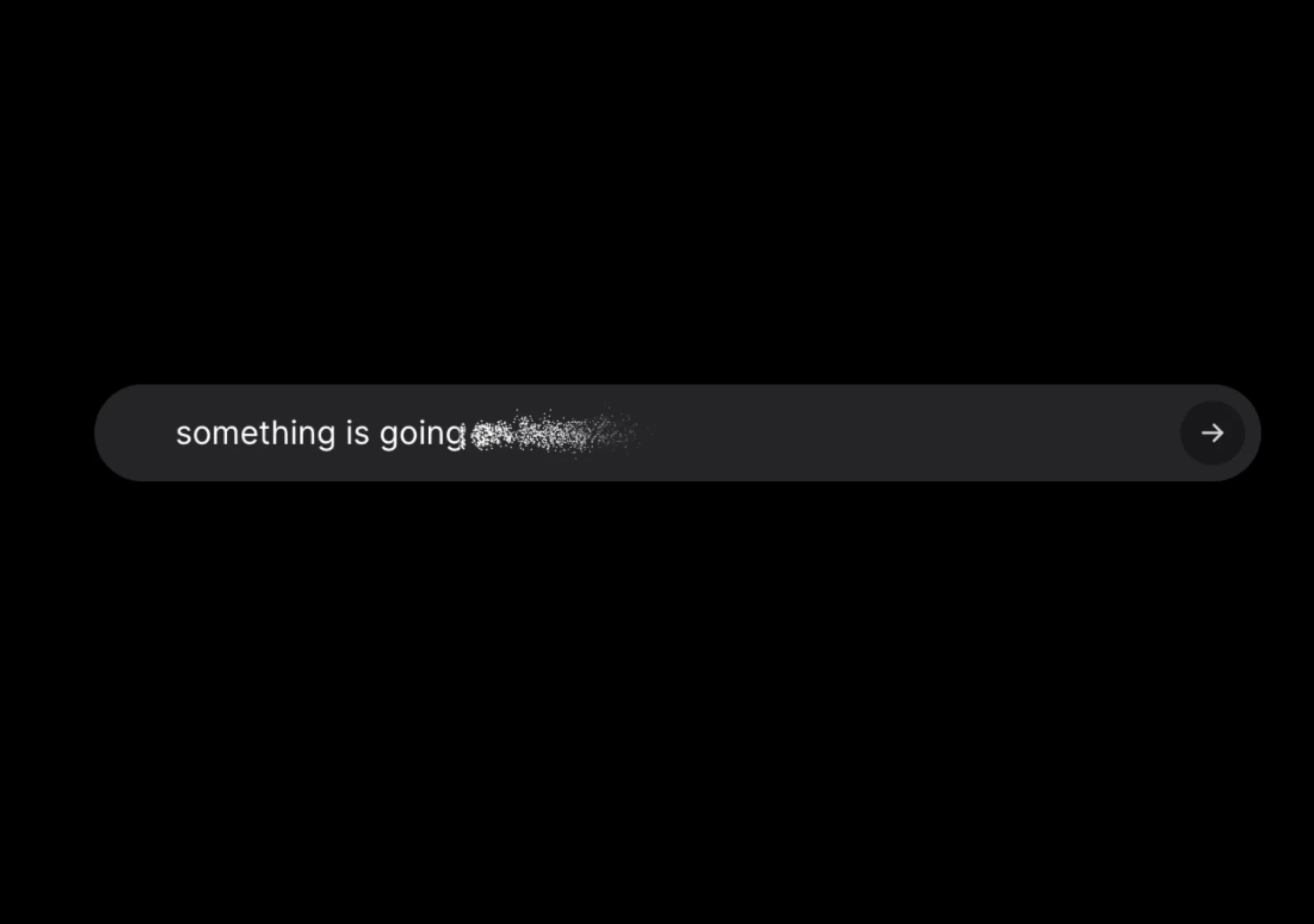
Prompt
// components/ui/placeholders-and-vanish-input.tsx
"use client";

import { AnimatePresence, motion } from "motion/react";
import { useCallback, useEffect, useRef, useState } from "react";
import { cn } from "@/lib/utils";

export function PlaceholdersAndVanishInput({
  placeholders,
  onChange,
  onSubmit,
}: {
  placeholders: string[];
  onChange: (e: React.ChangeEvent<HTMLInputElement>) => void;
  onSubmit: (e: React.FormEvent<HTMLFormElement>) => void;
}) {
  const [currentPlaceholder, setCurrentPlaceholder] = useState(0);

  const intervalRef = useRef<NodeJS.Timeout | null>(null);
  const startAnimation = () => {
    intervalRef.current = setInterval(() => {
      setCurrentPlaceholder((prev) => (prev + 1) % placeholders.length);
    }, 3000);
  };
  const handleVisibilityChange = () => {
    if (document.visibilityState !== "visible" && intervalRef.current) {
      clearInterval(intervalRef.current); // Clear the interval when the tab is not visible
      intervalRef.current = null;
    } else if (document.visibilityState === "visible") {
      startAnimation(); // Restart the interval when the tab becomes visible
    }
  };

  useEffect(() => {
    startAnimation();
    document.addEventListener("visibilitychange", handleVisibilityChange);

    return () => {
      if (intervalRef.current) {
        clearInterval(intervalRef.current);
      }
      document.removeEventListener("visibilitychange", handleVisibilityChange);
    };
  }, [placeholders]);

  const canvasRef = useRef<HTMLCanvasElement>(null);
  const newDataRef = useRef<any[]>([]);
  const inputRef = useRef<HTMLInputElement>(null);
  const [value, setValue] = useState("");
  const [animating, setAnimating] = useState(false);

  const draw = useCallback(() => {
    if (!inputRef.current) return;
    const canvas = canvasRef.current;
    if (!canvas) return;
    const ctx = canvas.getContext("2d");
    if (!ctx) return;

    canvas.width = 800;
    canvas.height = 800;
    ctx.clearRect(0, 0, 800, 800);
    const computedStyles = getComputedStyle(inputRef.current);

    const fontSize = parseFloat(computedStyles.getPropertyValue("font-size"));
    ctx.font = `${fontSize * 2}px ${computedStyles.fontFamily}`;
    ctx.fillStyle = "#FFF";
    ctx.fillText(value, 16, 40);

    const imageData = ctx.getImageData(0, 0, 800, 800);
    const pixelData = imageData.data;
    const newData: any[] = [];

    for (let t = 0; t < 800; t++) {
      let i = 4 * t * 800;
      for (let n = 0; n < 800; n++) {
        let e = i + 4 * n;
        if (
          pixelData[e] !== 0 &&
          pixelData[e + 1] !== 0 &&
          pixelData[e + 2] !== 0
        ) {
          newData.push({
            x: n,
            y: t,
            color: [
              pixelData[e],
              pixelData[e + 1],
              pixelData[e + 2],
              pixelData[e + 3],
            ],
          });
        }
      }
    }

    newDataRef.current = newData.map(({ x, y, color }) => ({
      x,
      y,
      r: 1,
      color: `rgba(${color[0]}, ${color[1]}, ${color[2]}, ${color[3]})`,
    }));
  }, [value]);

  useEffect(() => {
    draw();
  }, [value, draw]);

  const animate = (start: number) => {
    const animateFrame = (pos: number = 0) => {
      requestAnimationFrame(() => {
        const newArr = [];
        for (let i = 0; i < newDataRef.current.length; i++) {
          const current = newDataRef.current[i];
          if (current.x < pos) {
            newArr.push(current);
          } else {
            if (current.r <= 0) {
              current.r = 0;
              continue;
            }
            current.x += Math.random() > 0.5 ? 1 : -1;
            current.y += Math.random() > 0.5 ? 1 : -1;
            current.r -= 0.05 * Math.random();
            newArr.push(current);
          }
        }
        newDataRef.current = newArr;
        const ctx = canvasRef.current?.getContext("2d");
        if (ctx) {
          ctx.clearRect(pos, 0, 800, 800);
          newDataRef.current.forEach((t) => {
            const { x: n, y: i, r: s, color: color } = t;
            if (n > pos) {
              ctx.beginPath();
              ctx.rect(n, i, s, s);
              ctx.fillStyle = color;
              ctx.strokeStyle = color;
              ctx.stroke();
            }
          });
        }
        if (newDataRef.current.length > 0) {
          animateFrame(pos - 8);
        } else {
          setValue("");
          setAnimating(false);
        }
      });
    };
    animateFrame(start);
  };

  const handleKeyDown = (e: React.KeyboardEvent<HTMLInputElement>) => {
    if (e.key === "Enter" && !animating) {
      vanishAndSubmit();
    }
  };

  const vanishAndSubmit = () => {
    setAnimating(true);
    draw();

    const value = inputRef.current?.value || "";
    if (value && inputRef.current) {
      const maxX = newDataRef.current.reduce(
        (prev, current) => (current.x > prev ? current.x : prev),
        0
      );
      animate(maxX);
    }
  };

  const handleSubmit = (e: React.FormEvent<HTMLFormElement>) => {
    e.preventDefault();
    vanishAndSubmit();
    onSubmit && onSubmit(e);
  };
  return (
    <form
      className={cn(
        "w-full relative max-w-xl mx-auto bg-white dark:bg-zinc-800 h-12 rounded-full overflow-hidden shadow-[0px_2px_3px_-1px_rgba(0,0,0,0.1),_0px_1px_0px_0px_rgba(25,28,33,0.02),_0px_0px_0px_1px_rgba(25,28,33,0.08)] transition duration-200",
        value && "bg-gray-50"
      )}
      onSubmit={handleSubmit}
    >
      <canvas
        className={cn(
          "absolute pointer-events-none  text-base transform scale-50 top-[20%] left-2 sm:left-8 origin-top-left filter invert dark:invert-0 pr-20",
          !animating ? "opacity-0" : "opacity-100"
        )}
        ref={canvasRef}
      />
      <input
        onChange={(e) => {
          if (!animating) {
            setValue(e.target.value);
            onChange && onChange(e);
          }
        }}
        onKeyDown={handleKeyDown}
        ref={inputRef}
        value={value}
        type="text"
        className={cn(
          "w-full relative text-sm sm:text-base z-50 border-none dark:text-white bg-transparent text-black h-full rounded-full focus:outline-none focus:ring-0 pl-4 sm:pl-10 pr-20",
          animating && "text-transparent dark:text-transparent"
        )}
      />

      <button
        disabled={!value}
        type="submit"
        className="absolute right-2 top-1/2 z-50 -translate-y-1/2 h-8 w-8 rounded-full disabled:bg-gray-100 bg-black dark:bg-zinc-900 dark:disabled:bg-zinc-800 transition duration-200 flex items-center justify-center"
      >
        <motion.svg
          xmlns="http://www.w3.org/2000/svg"
          width="24"
          height="24"
          viewBox="0 0 24 24"
          fill="none"
          stroke="currentColor"
          strokeWidth="2"
          strokeLinecap="round"
          strokeLinejoin="round"
          className="text-gray-300 h-4 w-4"
        >
          <path stroke="none" d="M0 0h24v24H0z" fill="none" />
          <motion.path
            d="M5 12l14 0"
            initial={{
              strokeDasharray: "50%",
              strokeDashoffset: "50%",
            }}
            animate={{
              strokeDashoffset: value ? 0 : "50%",
            }}
            transition={{
              duration: 0.3,
              ease: "linear",
            }}
          />
          <path d="M13 18l6 -6" />
          <path d="M13 6l6 6" />
        </motion.svg>
      </button>

      <div className="absolute inset-0 flex items-center rounded-full pointer-events-none">
        <AnimatePresence mode="wait">
          {!value && (
            <motion.p
              initial={{
                y: 5,
                opacity: 0,
              }}
              key={`current-placeholder-${currentPlaceholder}`}
              animate={{
                y: 0,
                opacity: 1,
              }}
              exit={{
                y: -15,
                opacity: 0,
              }}
              transition={{
                duration: 0.3,
                ease: "linear",
              }}
              className="dark:text-zinc-500 text-sm sm:text-base font-normal text-neutral-500 pl-4 sm:pl-12 text-left w-[calc(100%-2rem)] truncate"
            >
              {placeholders[currentPlaceholder]}
            </motion.p>
          )}
        </AnimatePresence>
      </div>
    </form>
  );
}Models & stability
Recommended models
Keep exploring

A webpage case by @Oluwaphilemon1 using Claude Fable 5 · Three.js · Blender · GSAP, including the public result, full prompt, and original source.
Prompt
Claude Fable 5 and GPT-5.6 are powerful🥵🥵🥵 Here Is How I built with Claude 👇 Prompt: "Design an agency site where services are presented as supermarket product packaging in 3D" Use Three.js with WebGL to render al
复制这段 TSX 组件源码,交给 Cursor、v0、Claude 等 AI 编程工具,说明这是「3D Animated Pin」的 Aceternity UI 组件实现,即可让它接入你的 React 项目,再按需替换文案、配色与触发参数复用。
Prompt
// components/ui/3d-pin.tsx "use client"; import React, { useState } from "react"; import { motion } from "motion/react"; import { cn } from "@/lib/utils"; export const PinContainer = ({ children, title, href, className, containerClassName…

一个复杂的提示词,用于利用 Three.js 风格优化和逼真光照,在浏览器中生成精细的实时 3D 森林环境。
Prompt
First search for the "/unlazy" skill, read it fully, and use it throughout the entire task. Treat this as a major visual build lasting at least {argument name="minimum duration" d

